Skip to content
View in the app

A better way to browse. Learn more.

LCPDFR.com

A full-screen app on your home screen with push notifications, badges and more.

To install this app on iOS and iPadOS
  1. Tap the Share icon in Safari
  2. Scroll the menu and tap Add to Home Screen.
  3. Tap Add in the top-right corner.
To install this app on Android
  1. Tap the 3-dot menu (⋮) in the top-right corner of the browser.
  2. Tap Add to Home screen or Install app.
  3. Confirm by tapping Install.

mad26

Members
  • Joined

  • Last visited

Files posted by mad26

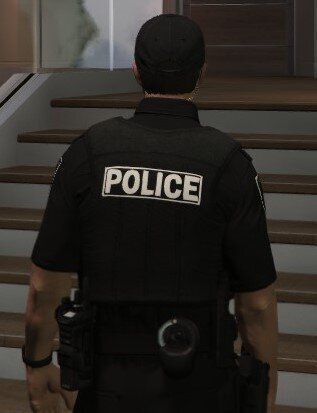
  1. Decided to post these for anyone who didn't like the OG yellow text to match their eup uniforms.

    You need EUP (obviously), OpenIV, and C4M'S Patrolman LBV.
     
    To install, first unzip the downloaded files to your desktop, then in Open IV go to mods\update\x64\dlcpacks\eup\dlc.rpf\x64\eup_componentpeds.rpf\mp_m_freemode_01 and find the two textures with the matching names coordinating to the files on your desktop, then turn on edit mode and open the original file of your choice and replace it with the matching one on your desktop. 
     
    Example: https://gyazo.com/a5fac374ba8926922e96b873676ad387
     
    No, I won't make the text less bold before anyone asks.
    • 184 Downloads
    • 2 Comments
    Updated

Account

Navigation

Search

Search

Configure browser push notifications

Chrome (Android)
  1. Tap the lock icon next to the address bar.
  2. Tap Permissions → Notifications.
  3. Adjust your preference.
Chrome (Desktop)
  1. Click the padlock icon in the address bar.
  2. Select Site settings.
  3. Find Notifications and adjust your preference.