mikegolden
Members
-
Joined
-
Last visited
Files posted by mikegolden
-
This is only an EUP configuration setting. You will need EUP to use this.
This file has two config settings, characters and wardrobe. Just copy and paste the text into the EUP config files.
The character is for the main ped. The wardrobe file may not be correct for everyone, as I also have the EUP Vest & Earpiece mod installed.
I decided to make Joe Exotic from Tiger King, as he is such a hilarious person! Let me know how I did in recreating him.
If you want to share your videos using this character, just let me know and I'll post them here.
Again be sure to install EUP first,
Here is my first Livestream using this character, ps: this stream had a bunch of issues from a recent GTA V update. Everything is running smoothly again.
- 48 Downloads
- 2 Comments
Updated -
This Vest skin is for HANAKO's EUP VEST&EARPIECE BETA. This is a design based on Chicago PD. I replaced the front of the vest patches with the Chicago flag and CPD logos. The back of the vest, I changed the Thin Red Line to Blue! I would love to hear what you think of the design, so please leave a comment! Be sure to also check out my YouTube Channel, mikegolden Games for all of my LSPDFR patrols!
The other mods shown in the screenshots are linked in the ReadMe!
This is HANAKO's EUP VEST&EARPIECE
Here is an LSPDFR Patrol with the vest on.
If you want to have your video of this vest skin posted on here, just let me know.
- 1,861 Downloads
- 14 Comments
Updated -
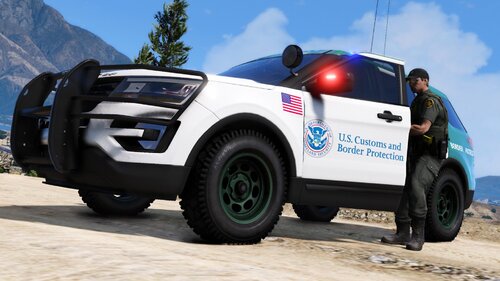
This vehicle livery is for Thehurk's 2016 Ford Police Interceptor Pack w/ HQ Interior - ELS 2.0. This is a design based on the US Customs and Border Protection, otherwise know as Border Patrol. I would love to hear what you think of the design, so please leave a comment! Be sure to also check out my YouTube Channel, mikegolden Games for all of my LSPDFR patrols!
This is Thehurk's 2016 Ford Police Interceptor Pack w/ HQ Interior - ELS 2.0 Download Link below
Here is one of my LSPDFR Border Patrols with this Livery.
Here is a Livestream of mine as well.
If you want to have your video, with this Livery posted on here, just let me know.
- 431 Downloads
- 1 Comments
Updated -
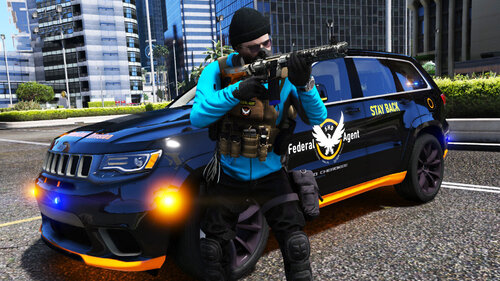
This Livery is for BlueGhost's 2018 Jeep Grand Cherokee TrackHawk. This is a design based off of Tom Clancy's The Division series. With how the world is going right now, I figured it would be great to have a Division livery in GTA V. We have the S.H.D. logos on the sides and roof of the Jeep, with a black paint job. Strategic Homeland Division across the hood of the Jeep, with orange trim on the bottom. We also have a S.H.D login screen on the Toughbook computer. I would love to hear what you think of my design, so please leave a comment! Be sure to also check out my YouTube Channel, mikegolden Games for all of my LSPDFR patrols!
This is BlueGhost's Unmarked Pack, where you can find the Grand Cherokee -
Here is he first Livestream where we take a look at the vehicle in game. If you want to have your video of this livery posted up hear, just let me know! I'm glad to post it.
- 224 Downloads
- 3 Comments
Updated -
This skin is based on the real life California State Park design. I added the extra green to the rear of the vehicle for ascetics. This is my first upload to lcpdfr.com and I plan to upload more. I hope you like this design and please give feedback.
This is only the dds file and is just a livery. You may need to edit the name as this will replace the first livery. Just rename it like this; "exp_sign_1" changed to "exp_sign_2" or even "exp_sign_9" it depends on how many skins you have installed.
You will need to install the original vehicle here:
Here is one of my livestream patrols in this vehicle:
-------INSTALL-------
1.
Open OpenIV
2.
Search for the vehicle that you replaced, I did police3.
Grand Theft Auto V\mods\update\x64\dlcpacks\patchday12ng\dlc.rpf\x64\levels\gta5\vehicles
3.
Edit Mode
4.
Double click on police3.ytd
5.
Import "exp_sign_1"
6.
Save and enjoy
- 228 Downloads
- 3 Comments
Submitted