



Kibowden59
Members
-
Joined
-
Last visited
Everything posted by Kibowden59
-
i dont have any mods its a fresh install
-
Hi, can you remove visualV and see if that fixes it
-
Hi DireNeed, Yeah so what you have done you have removed the openiv plugin have you removed it to your recycling bin have a peak through there if you can reach it back return it to GTA V DIRECTORY and you should be fine. Otherwise with no backups You will have to reinstall.
-
Hi, have you updated your gpu drivers to latest through geforce experiance? Also what mods have you added and what textures to vehicles have you done?
-
Hi, no you cannot as fivem needs online compatability and your mods will regect this. There is ways of having two versions of the game and running fivem through one and lspdfr through the other.
-
Hi, Try again but have no mods when you load in you can do this by removing plugins and changing mods to _mods after doing this try it again. If that works after creating your character close gta v return your plugins and remove the _ in mods to make it work again. LMK if i helped thanks!
-
Hi, My gta v infinite loads but its a fresh install with no mods or nothing can somebody help
-
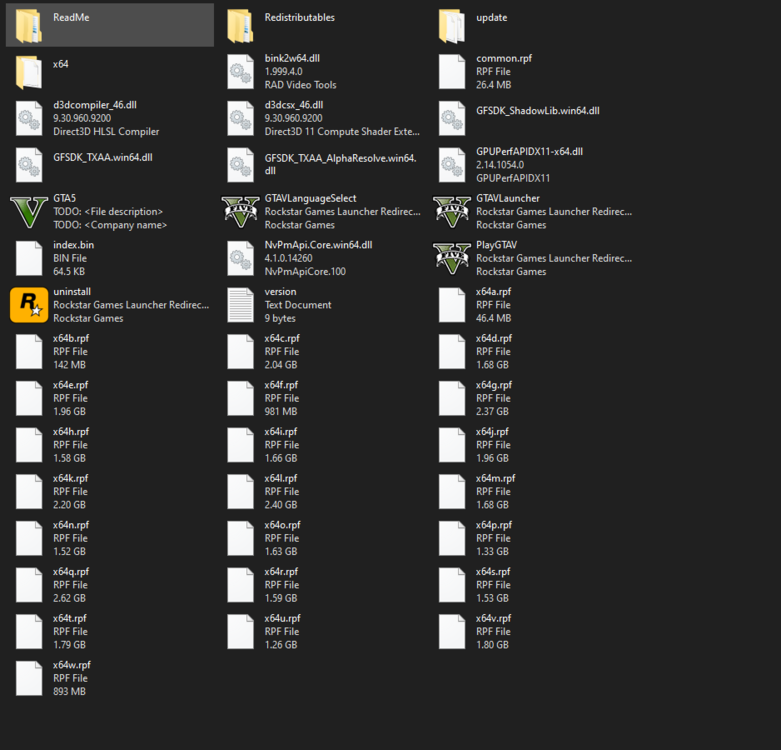
so this is my directory please help. when i reinstalled my mods was still there i deleted them and then checked gta v's integraty and it said it was ready to play and when i loaded in those ads that come up had no pictures next to them it just had capture written on it.
-
i dont have lspdfr setup as it was a fresh install. So i do not have mods folder.
-
ok no worries you said you dont have a mods folder correct?
-
can somebody help me please? i do not understand why gta infinate loads. I reinstalled and dont have lspdfr installed and it still infinte loads does anybody have a fix? Thanks
-
Hi, Koszelus have you done anthing else to your gta directory? As not installing some plugins or exterior mods may make this problem. Do you have scripthookv and scriphookdotnet? Also some plugins such as scenemanager require a modded gameconfig to work.
-
Are you running the game with gta v launcher or ragepluginhook?
-
Because i can nothing to say i cant. Also off topic in thread.
-
Hi, v Hi, Sorry about that that was the only way i knew to get rid of them. Anyway to the point. 1) Reinstall Custompullover and grammar police but make sure you know what your doing and make sure you dont move any files or scripts as it shows its not shown in the directory so it cant read it. 2) Click win + r and type regedit. Allow admin rights. type at the top this directory [HKLM\Software\Microsoft\Fusion!EnableLog]. And set the DWORD value to 1. As not having this set to 1 can cause performace issues in game which can cause render issues which force closes the game to save itself from blowing up pretty much. LMK if this helps 🙂
-
Hi, MoneyGravez i would first suggest to delete the one you have in your gta directory and reinstall it here -https://gta5mod.net/gta-5-mods/tools/community-script-hook-v-net-2-10-9/ I suggest that you only use scripthookvdotnet 3 and try to run it. if that does not work then return and link another rph.log and i can help further
-
Hi, kareem07 I can offer you help but the crash report doesnt tell us much about why. If you go into your GTA V main directory it will be in there it is called ragepluginhook.log. Thanks
-
Hi, Kejrol You DONT have installed the latest version of scripthookdotNET. You need this in order to play you can download it here -https://gta5mod.net/gta-5-mods/tools/community-script-hook-v-net-2-10-9/. Also i suggest you get the latest version of LSPDFR 0.4.9 You can get it from the homepage here - https://www.lcpdfr.com/lspdfr/index/
-
Hi there guncussion666, Can you post your ragepluginhook.log ( in the main game directory) from that i can see what is the problem and how to fix it from either error codes or not installing things right! P:S little tip if you dont know what your doing ask for help on here or watch a video. Also i suggest always making a backup of the folder before attempting to mod incase you make a mistake.
-
even though its been solved remove every plugin and put them in one by one just to spot ouyt the one that makes it crash Yeah it might just be overload on how many your pc can run at one. Can be due to ram speeds or even how much ram yopu have.
-
can i see the LSPDFR folder now as that 1 plugin shouldnt be causing the problem
-
Send a picture of your plugins folder
-
Do as it says in the error if it carries on restart your pc.
-
ok can you go into rph settings and disable plugins loading on startup and see if it wil load in then
-
Hi. What mods have you done to your Install and what are your pc specs?

