DebotVox
Members
-
Joined
-
Last visited
Everything posted by DebotVox
-
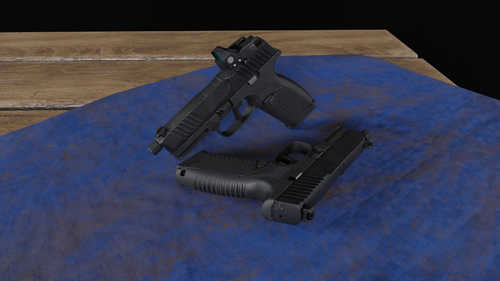 I realised that there isn't a FN 509 mod for those who want to roleplay as LAPD, so this is for all you LSPDFR LAPD enjoyers! Based on the FN 509 series, the MRD-LE sports a polymer, striker-fired 9mm design topped with FN’s Low-Profile Optics Mounting System. It also comes with 3-dot tritium sights co-witness with the Miniature Red Dot, for maximum sighting versatility and a clean sight picture, day or night. Recently, LAPD selected the FN 509 MRD-LE as its issued duty gun. This particular model comes with a threaded barrel for attaching suppressors Features: Add-On/Replace Optimized textures for smooth gameplay (ytd not exceeding 10MB, won't be causing texture loss) Fully animated Working tritium glow sights Custom add-on component SIG Sauer ROMEO1PRO red dot Compatible with vanilla suppressor and flashlight REQUIREMENTS FOR ADD-ON: Gameconfig Weapon Limits Adjuster Packfile Limit Adjuster Heap Adjuster REPLACE INSTALLATION: Replaces combat pistol or heavy pistol Drag and drop the ydrs and ytds to mods/update/x64/dlcpacks/patchday8ng/dlc.rpf/x64/models/cdimages/weapons.rpf Values are provided in each replace installation to fix scoping in first person ADD-ON INSTALLATION: Drag and drop the "fn509" folder to mods\update\x64\dlcpacks Go to mods\update\update.rpf\common\data and edit dlclist.xml, enter a new line and add "<Item>dlcpacks:/fn509/</Item>" Use any trainer of your preference to spawn the gun Spawn weapon name: WEAPON_FN509MRDLE Spawn components name: COMPONENT_AT_PI_MRD COMPONENT_AT_PI_FLSH COMPONENT_AT_PI_SUPP_02 I recommend Zolika1351's Trainer as it can automatically detect add-on items Keep in mind that this is my first add-on mod, so do report all bugs in the comments if found! Credits: Model and textures by rwroclav: https://sketchfab.com/3d-models/fn-509-with-tactical-kit-cc72e04581874a2e930fbec019c82d61
 -
I'm using v1.5.0 too but the game just crashes. Will try to do a clean install of Menyoo to remove my own configs for it.
-
After a bit of trial and error, I found out that it is actually a asi mod conflict with LSPDFR that is causing the crash. Now more trial and error to find out which mod is crashing my game Edit: Found out that Menyoo is causing the crash. IDK why, I've seen many people use Menyoo with LSPDFR and it works fine. Anyways, thanks for the help
-
Game still crashes. Seems like LSPDFR's own problem Here is the new log RagePluginHook.log
-
@DarkVypr Here is the correct log RagePluginHook.log
-
After I enable LSPDFR in RPH and travel to Mission Row PD, my game will freeze and crash when approaching it. Removed all my pluggins and ran vanilla LSPDFR and it still crashes Here is the log file RagePluginHook_08082022_160549.log