
RiCodeXL
Members
-
Joined
-
Last visited
Everything posted by RiCodeXL
-
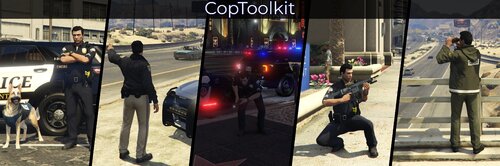 CopToolkitA police roleplay plugin featuring animations, K9 companion, prop scenarios, speedometer, vehicle indicator lights control, and weapon loadouts. FeaturesAnimationsPlayer animations with option to add your own with hotkey support. 20+ animations added by default. K9 UnitK9 companion (`a_c_shepherd`) with Follow/Stay commands, animations (sit/bark/sleep), and ride along in vehicle support. Note ⚠️: The K9 does not currently apprehend or chase suspects. This feature may be added in a future release. Prop ScenariosProp-based scenarios with option to add your own with hotkey support. 20+ scenarios added by default. SpeedometerCustomizable on-screen speedometer with KMH/MPH support, adjustable colors, position, font size, and background opacity. Vehicle LightsToggle left/right indicators and hazard lights while in a vehicle with hotkey support. Weapon LoadoutsAdd your own weapons to the loadout with component customization and tints. Includes Carbine Rifle Mk II, Flare Gun, Flashlight, Nightstick, Pistol Mk II, Pump Shotgun Mk II, and Taser by default. Options to load all weapons at once, remove all weapons, and add maximum ammo to current inventory. RequirementsScriptHookV (tested on v3725.0 / 1013.20) ScriptHookVDotNet3 (tested on ScriptHookVDotNet-v3.7.0-nightly.87) LemonUI.SHVDN3 (v2.2.0.0, included in release) InstallationExtract the scripts folder from the .rar file to your Grand Theft Auto V folder. Your structure should look like this: Grand Theft Auto V/ └── scripts/ ├── LemonUI.SHVDN3.dll ├── CopToolkit.dll └── CopToolkit/ └── CopToolkit.iniConfigurationAll configuration is done through `CopToolkit.ini`. The config file is automatically generated with defaults if missing. Hotkey Format Examples: - Single key: `F1`, `NumPad5`, `G` - With modifier: `CTRL+K`, `ALT+NumPad1`, `SHIFT+F5` - Valid modifiers: `CTRL`, `ALT`, `SHIFT` To customize or disable hotkeys: Use single keys or combinations with `CTRL+` or `ALT+`. Section headers like `[AnimationHotkeys]` should remain but sections can be left empty. Comment out lines (e.g., `; cop_arms_crossed=ALT+NumPad1`) or delete them entirely. To disable features: Remove `[Animation_*]`, `[Prop_*]`, or `[Weapon_*]` definitions to hide them from menus. To reset to defaults: Delete the `CopToolkit.ini` file and restart the game to auto-generate defaults. Adding Custom ContentSee default examples in the config. Animations: https://forge.plebmasters.de/animations | Flags: https://wiki.rage.mp/wiki/Player::taskPlayAnim Prop Scenarios: https://wiki.rage.mp/wiki/Scenarios Weapon Loadouts: Components: https://wiki.rage.mp/wiki/Weapons_Components | Tints: https://wiki.rage.mp/wiki/Weapons_Tints | Weapons: https://wiki.rage.mp/wiki/Weapons Default ControlsMain Menu: Default key is `F3` Animations `ALT+X` - cancel animation/prop scenario `ALT+NumPad1` - arms crossed `ALT+NumPad2` - hands on belt `ALT+NumPad3` - radio check `ALT+NumPad4` - aim rifle Prop Scenarios `ALT+NumPad5` - binoculars `ALT+NumPad6` - investigate `ALT+NumPad7` - drinking coffee `ALT+NumPad8` - security flashlight K9 Commands `CTRL+K` - spawn K9 `CTRL+NumPad1` - follow `CTRL+NumPad2` - stay `CTRL+NumPad3` - enter vehicle (player must be inside vehicle first. K9 enters in this order: rear right, rear left, front right) K9 Animations `CTRL+NumPad4` - sit `CTRL+NumPad5` - bark `CTRL+NumPad6` - sleep Vehicle Lights `CTRL+NumPad7` - left indicator `CTRL+NumPad8` - hazard lights `CTRL+NumPad9` - right indicator TroubleshootingGeneral Issues Plugin crashes: Check for outdated dependencies (`ScriptHookV`, `ScriptHookVDotNet3`, `LemonUI`). If settings become corrupted, delete `CopToolkit.ini` and restart the game to generate a fresh file automatically. Menu won't open: Check key conflicts. Verify `LemonUI.SHVDN3.dll` is placed in the `scripts` folder. Animations & Props Animations/Props stuck: Use the Cancel Animation hotkey (default `ALT+X`) or the cancel option in the Animation/Prop menu. Animations/Props fail to load: Ensure the settings are correct for the animation/scenario. Some mission-specific dictionaries (especially `rcm*`) may fail to load. If an animation doesn't work, try finding an alternative from the `amb@` or `anim@` categories. Animations/Props I've added doesn't show up in menu: Make sure you've entered all information correct, otherwise plugin will not show it. Hotkeys Hotkeys not working: Check for conflicts in `CopToolkit.ini` or with other mods. Ensure no menu is open (e.g., pause menu, phone). K9 K9 won't spawn: Wait 3 seconds between spawn attempts (cooldown). Check for script errors or conflicts with other animal-related mods. K9 won't enter vehicle: Player must be inside vehicle first. K9 will attempt to enter available seats (rear right -> rear left -> front right). Some modded vehicles may not support K9 entry. Speedometer Speedometer not displaying: Check for conflicts with other HUD mods. Vehicle Lights Indicator lights not working: Only tested with standard GTA V vehicles. Weapon Loadouts Weapon not spawning: Ensure weapon hashes and components are spelled correctly. Only tested with standard GTA V weapons. LicenseThis work is licensed under CC BY-NC-SA 4.0 - you are free to share and adapt this work for non-commercial purposes with attribution.