Osler.
Members
-
Joined
-
Last visited
Everything posted by Osler.
-
It turns out that I want to use both modifications, but if I use one it affects the other, because according to what I checked, NPC Style Cover needs the pedpersonality, so if I put the Traffic Fluidity it is deactivated
-
for Ultimatebackup I highly recommend you to use the program called EUP2UB, it is very simple and will save you time, you can find it on his discord page and for lspdfr outfits, use
-
-
use Voice Menu
-
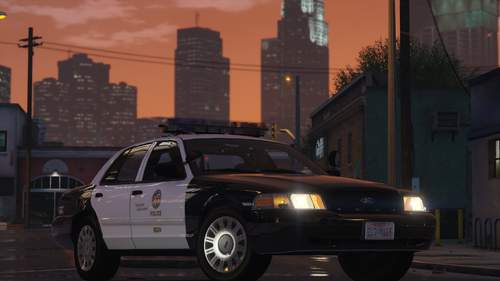 The best! I only changed two slots to "police" and "police4" and it works great, no incompatibility, the best free LAPD pack
- 48 comments
- 11 reviews
-
-

- 1
-
-
very late but well, what you have to do is the following: "Well, what I did was remove the ultimate backup keys since it has been the same but it does not do what is characteristic of grammar police, I only modified the keys to HotkeysModifier=RMenu | PanicKey=NumPad0" and what I did inside the UB .ini was to remove the rest of the backup and just leave it in "localpatrol" so that the other patrols from SAHP, SWAT, etc. do not come" Edit: for more units to come, in case you only want "localpatrol" or "StatePatrol" (I did this so that motorcycles and swat don't come, only what I want) you have to add "LocalPatrol" again, I mean... // The values are any backup types from your xml files including the special units. It's comma delimited without whitespaces. You may put the same unit name multiple times Then you have to put "LocalPatrol,LocalPatrol,LocalPatrol,LocalPatrol" so that as many units as you want arrive
-
-
-
Support, it is something too unreal that as soon as you finish shooting down a suspect the police leave, it is a matter of immersion and roleplay
-
What is the best way to get EUP peds in your ultimatebackup? Say, if I'm patrolling for LSPD in Davis, I don't want the Sheriff to show up, I'm using eup basic configurations
-
Hello, lspdfr keeps giving me a crash, what should it be? I'm sure it must be some plugin that generates the conflict. RagePluginHook.log
-
Is there a way to remove the taser from NPC officers? Seeing the stupidity that has the general AI of GTA V, I want to remove the taser, because it bothers me that the officers use the taser as if it were a toy and taser as soon as the suspect does something and the worst thing that they taser forty thousand times. I use ultimatebackup just in case.
-
 simple but cool
 -
What happens is that this error does not give me a crash, it only generates a RagePluginHook.logbug when I have one of these two mods, and it only happens with LSPDFR here is the log where I do the test, and I send you a sample video of the error
-
RagePluginHook.log
-
Why when using LSPDFR I get bugged with the following mods? Rageuhphoria, realistic weapons gun and immersive combat, when I put the mods in normal mode everything is normal, but when I activate lspdfr I get bugged and I can not draw any weapon
-
This error has appeared today July 29, 2022, normally you open your modded GTA and it keeps loading infinitely, well, to solve this error I had to spend the whole holy day to discover what was happening, and it was simply the mods folder , so to solve it there are two ways: * Rename your "mods" folder to "_mods" if you are on steam (I think so). * If you are on another platform, delete your mods folder and create a completely new one, with your GTA V updated, the problem should be totally solved. This is all because the mods folder you currently have has incompatibilities with the updated GTA V files and patches. Thanks for reading, remember to drink water.
-
-
 WONDERFUL! :DDD