Skip to content
View in the app

A better way to browse. Learn more.

LCPDFR.com

A full-screen app on your home screen with push notifications, badges and more.

To install this app on iOS and iPadOS
  1. Tap the Share icon in Safari
  2. Scroll the menu and tap Add to Home Screen.
  3. Tap Add in the top-right corner.
To install this app on Android
  1. Tap the 3-dot menu (⋮) in the top-right corner of the browser.
  2. Tap Add to Home screen or Install app.
  3. Confirm by tapping Install.
Due to overzealous filtering on Microsoft’s side, some emails to Outlook and Hotmail addresses may not be delivered. If you’re affected, please use a different email address or try again later.

WHOLF

Members
  • Joined

  • Last visited

Files posted by WHOLF

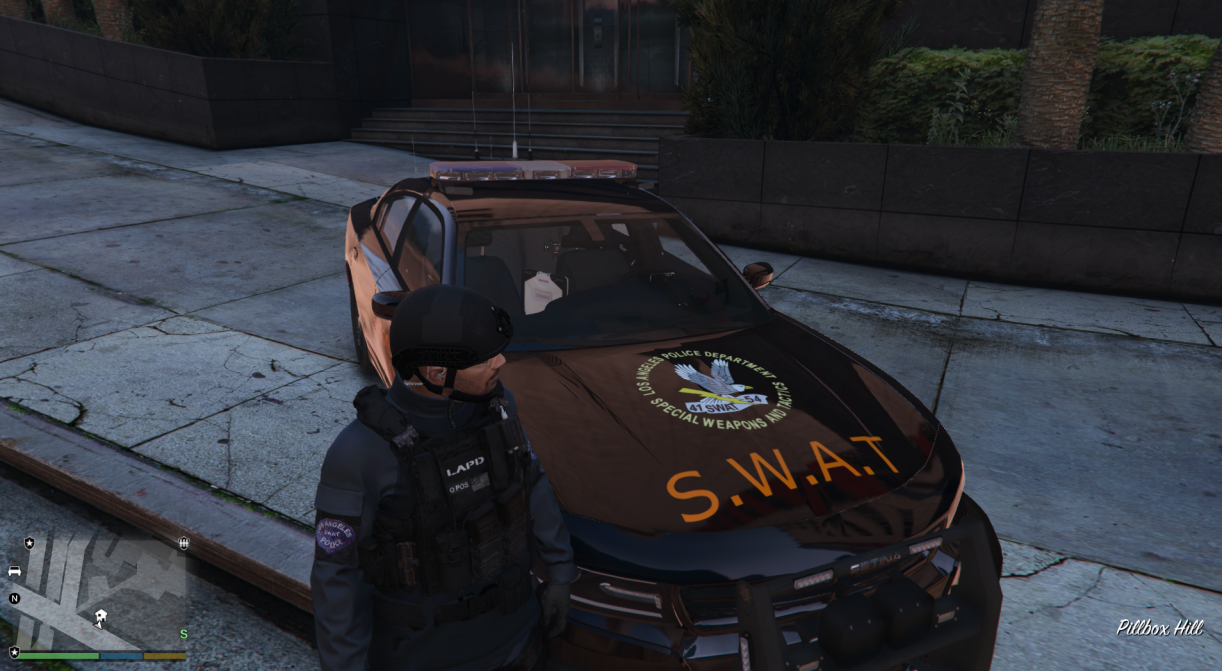
  1. # [LAPD Decals PNG]


    WHY? I couldnt find anything for LAPD so i made this PNG Pack


    ### 📦 What's Included
    Fonts: Custom numbers and lettering sets.
    Stickers: Various decals and warning signs.
    Logos: High-quality emblems, seals, and flags.

    ### ⚠️ Disclaimer
    * Always make a backup of your files before modifying your game.
    * Do not re-upload or claim these files as your own without permission.

    ---
    *Enjoy the mod, and feel free to leave feedback or report any issues!*
    • 71 Downloads
    • 2 Comments
    Updated
  2. !! DO NOT SHARE MY TEXTURE OR EDIT !!
     
    Texture for the 2018 Police Dodge (Police2)
     
    Use OpenIV > GTAV > Mods > Update > x64 > dlcpacks > Your Vehicle Folder > dlc.rpf > x64 > levels > gta5 > vehicles.rpf
     
    [Replace police2.ytd] police2.ytd > Search chargerppv_sign_1 Replace with the File 
     
    For Custom or Questions Discord: Ambie#1734
     
    Enjoy my Texture
    • 70 Downloads
    Updated

Account

Navigation

Search

Search

Configure browser push notifications

Chrome (Android)
  1. Tap the lock icon next to the address bar.
  2. Tap Permissions → Notifications.
  3. Adjust your preference.
Chrome (Desktop)
  1. Click the padlock icon in the address bar.
  2. Select Site settings.
  3. Find Notifications and adjust your preference.