Balou.
Members
-
Joined
-
Last visited
Files posted by Balou.
-
Hey,
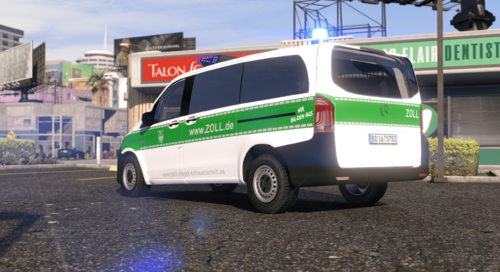
ich veröffentliche heute meinen Skin für den M.B. Vito in der grünen Variante des deutschen Zolls.
Es wird das original Modell des "M.B. Vito Polizei Berlin" von East German Modding für den Skin benötigt.
Discord: https://discord.gg/y95fwe2w9U
Skin: Baløu
Modell: East German Modding
Discord: .balou
Nutzungsbedingungen:
1. Es ist verboten diesen Skin erneut hochzuladen.
2. Wenn der Skin auf einem Server (z.B. FiveM) verwendet werden soll, schreibt mir bitte vorher eine
Privatnachricht auf Discord und fragt mich dort nach einer Erlaubnis.
- 228 Downloads
Updated -
Hey,
ich veröffentliche heute meinen Skin für den Volkswagen T5 LR TDI des deutschen Zolls.
Es wird das original Modell des VW T5 von East German Modding für den Skin benötigt.
Discord: https://discord.gg/VbUz4VTaAp
Skin: Baløu
Discord: .balou
Nutzungsbedingungen:
1. Es ist verboten diesen Skin erneut hochzuladen.
2. Wenn der Skin auf einem Server (z.B. FiveM) verwendet werden soll, schreibt mir bitte vorher eine
Privatnachricht auf Discord und fragt mich dort nach einer Erlaubnis.
Es handelt sich hier um meinen ersten Skin also solltet ihr Fehler feststellen oder Verbesserungsvorschläge haben, schreibt mir gerne
eine Nachricht.
- 146 Downloads
Updated