


RageDemond
Members
-
Joined
-
Last visited
Everything posted by RageDemond
-
From the album: Police Cars
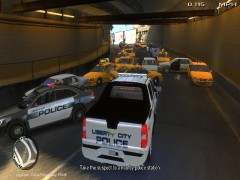
Picture of a pile up that took place when I performed a trafic stop on a yellow taxi cab for going 25MPH under the speed limit. I grabbed on the Dukes-Broker Expressway in Francis International Airport. When I ran his license he had 7 Ciatation, Revoked License, and a Warrant for his arrest. When I approched his car to pull him out before anything he returned fire! Everyone in the area backed up and was crashing into each other and running leaving behind their cars causing more people to pile up causing a big pile up. The Suspect was taken down and arrested. Nobody was hurt. -
From the album: Police Cars
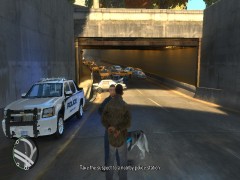
Picture of a pile up that took place when I performed a trafic stop on a yellow taxi cab for going 25MPH under the speed limit. I grabbed on the Dukes-Broker Expressway in Francis International Airport. When I ran his license he had 7 Ciatation, Revoked License, and a Warrant for his arrest. When I approched his car to pull him out before anything he returned fire! Everyone in the area backed up and was crashing into each other and running leaving behind their cars causing more people to pile up causing a big pile up. The Suspect was taken down and arrested. Nobody was hurt. -
From the album: Police Cars
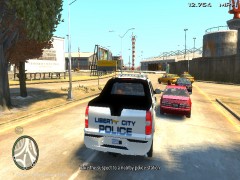
Picture of a pile up that took place when I performed a trafic stop on a yellow taxi cab for going 25MPH under the speed limit. I grabbed on the Dukes-Broker Expressway in Francis International Airport. When I ran his license he had 7 Ciatation, Revoked License, and a Warrant for his arrest. When I approched his car to pull him out before anything he returned fire! Everyone in the area backed up and was crashing into each other and running leaving behind their cars causing more people to pile up causing a big pile up. The Suspect was taken down and arrested. Nobody was hurt. -
From the album: Police Cars
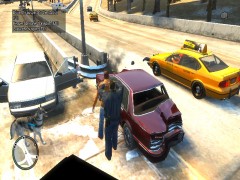
Picture of a pile up that took place when I performed a trafic stop on a yellow taxi cab for going 25MPH under the speed limit. I grabbed on the Dukes-Broker Expressway in Francis International Airport. When I ran his license he had 7 Ciatation, Revoked License, and a Warrant for his arrest. When I approched his car to pull him out before anything he returned fire! Everyone in the area backed up and was crashing into each other and running leaving behind their cars causing more people to pile up causing a big pile up. The Suspect was taken down and arrested. Nobody was hurt. -
From the album: Police Cars
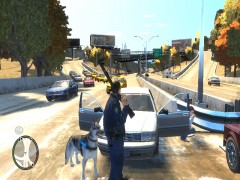
Picture of a pile up that took place when I performed a trafic stop on a yellow taxi cab for going 25MPH under the speed limit. I grabbed on the Dukes-Broker Expressway in Francis International Airport. When I ran his license he had 7 Ciatation, Revoked License, and a Warrant for his arrest. When I approched his car to pull him out before anything he returned fire! Everyone in the area backed up and was crashing into each other and running leaving behind their cars causing more people to pile up causing a big pile up. The Suspect was taken down and arrested. Nobody was hurt. -
From the album: Police Cars
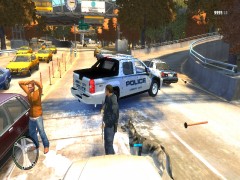
Picture of a pile up that took place when I performed a trafic stop on a yellow taxi cab for going 25MPH under the speed limit. I grabbed on the Dukes-Broker Expressway in Francis International Airport. When I ran his license he had 7 Ciatation, Revoked License, and a Warrant for his arrest. When I approched his car to pull him out before anything he returned fire! Everyone in the area backed up and was crashing into each other and running leaving behind their cars causing more people to pile up causing a big pile up. The Suspect was taken down and arrested. Nobody was hurt. -
From the album: Police Cars
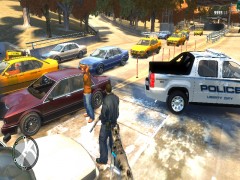
Picture of a pile up that took place when I performed a trafic stop on a yellow taxi cab for going 25MPH under the speed limit. I grabbed on the Dukes-Broker Expressway in Francis International Airport. When I ran his license he had 7 Ciatation, Revoked License, and a Warrant for his arrest. When I approched his car to pull him out before anything he returned fire! Everyone in the area backed up and was crashing into each other and running leaving behind their cars causing more people to pile up causing a big pile up. The Suspect was taken down and arrested. Nobody was hurt. -
From the album: Police Cars
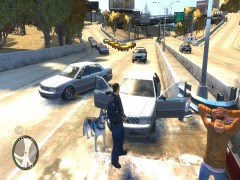
Picture of a pile up that took place when I performed a trafic stop on a yellow taxi cab for going 25MPH under the speed limit. I grabbed on the Dukes-Broker Expressway in Francis International Airport. When I ran his license he had 7 Ciatation, Revoked License, and a Warrant for his arrest. When I approched his car to pull him out before anything he returned fire! Everyone in the area backed up and was crashing into each other and running leaving behind their cars causing more people to pile up causing a big pile up. The Suspect was taken down and arrested. Nobody was hurt. -
From the album: Police Cars
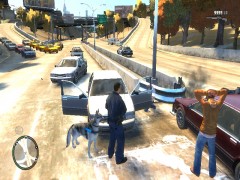
Picture of a pile up that took place when I performed a trafic stop on a yellow taxi cab for going 25MPH under the speed limit. I grabbed on the Dukes-Broker Expressway in Francis International Airport. When I ran his license he had 7 Ciatation, Revoked License, and a Warrant for his arrest. When I approched his car to pull him out before anything he returned fire! Everyone in the area backed up and was crashing into each other and running leaving behind their cars causing more people to pile up causing a big pile up. The Suspect was taken down and arrested. Nobody was hurt. -
From the album: Police Cars
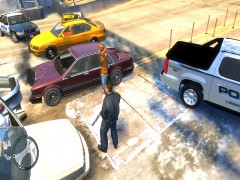
Picture of a pile up that took place when I performed a trafic stop on a yellow taxi cab for going 25MPH under the speed limit. I grabbed on the Dukes-Broker Expressway in Francis International Airport. When I ran his license he had 7 Ciatation, Revoked License, and a Warrant for his arrest. When I approched his car to pull him out before anything he returned fire! Everyone in the area backed up and was crashing into each other and running leaving behind their cars causing more people to pile up causing a big pile up. The Suspect was taken down and arrested. Nobody was hurt. -
Cool I got it to work Thanks.
-
I was just wondering. How do I get ELS to work with other vehicles besides police cars. Is it possible? I have a towtruck that has a light bar on it and is ELS compatible. I didn't really want to have to put it as polpatriot.
-
Ok Found It Thank You. ~Officer911
-
So I was watching a YouTube video and I was wondering if anyone knew what mod this is and where can I download it?
-
Clockwork Mountain. I believe it has low fraps.,
-
From the album: Police Cars
-
-
-
i dont have problems like that
-
if some one can help me find a car pack that is lcpd car back the is els please send me a link
-
if you need help i can help you
-
hey if you want help i have a ts server
-
its supposed to be in C:Program Files (x86)steamsteamappsGrand Theft Auto IV Or the root folder
-
I believe it saves it if you kill a civilian. You can always reset all stats if needed.
-
just go into the options menu in your trainer and on the first menu look for Enable/Disable Keys and just Disable the keys. Then your ELS should work. Hope I helped.



