


Mytical49
Members
-
Joined
-
Last visited
Everything posted by Mytical49
-
Try to remove GrammarPolice
-
That's what I thought, I can't really help you without logs because I don't know enough about it but I recommend you to verify the GTAV files, if possible get a clean GTAV folder (without lspdfr, rage, plugins etc...), reinstall LSPDFR by following the official guide (THE LATEST VERSION OF RAGE IS NOT UPDATED SO DON'T REINSTALL RAGE AFTER INSTALLING LSPDFR), and see if it works.
-
Hi, I'am really not sure but I believe there is a problem with police2 and police. Can you try to remove them from the Mods folder ?
-
Can you look at the RagePluginHook.log file and see if the date of creation is the last time you launched Rage. If it correspond, can you please give it by draging the file
-
Can you launch GTAV without Rage ? The log you provided, if I understand well, show that the world was created, I can try to help you but I'am not sure to have the capacities. Try to go in the rage parameter and set the option for loading plugins to none.
-
The RagePluginHook.log is located in the GTAV root folder
-
Hi, can you explain when the game crash and give us your RagePluginHook.log please
-
Hi, the newest Rage Plugin Hook is located in the lspdfr install, you just need to install LSPDFR normally and then don't try to install another RPH.
-
Hi, can you link the RagePluginHook.log located in the GTAV root folder.
-
Hi, do you have a custom gameconfig like this one ?
-
Thanks !
-
Hi. So I have errors in my callout when using the threading system, when I call my thread it work but then I have an error, so I was wondering if it was just not because it is not possible to run another thread while the callout is processed or if I just made and error. Here is the log file (I used Game.console.write() to see where the error was in the code ) :
-
I mean there is already tutorials on yt and here, but some things aren't explained
-
Thanks for the tip 🙂 Okay, thanks for your help !
-
I think this is a misunderstanding, i didn't mean there is errors in my callout files in VS, there are fine, but in GTA there is sometimes errors in the Rage console (F4) and the native debug tool is not very easy to understand
-
Do you mean the developper mode in RagePluginHook ?
-
Hi, I can a little bit help you if you want (I'am absolutely not a pro but I can give you some advices I think). Give me your discord in DM if you want
-
Thansk ! I think i know why i do that, in fact i have multiple "if" who lead to End(); . I have to clear it
-
Okay, thanks, in the rage console when I have errors it's difficult to know from where it's from with the little information we have, that's why I have to write like "Game. LogTrivial (log1)" between lines so I can see when the callout crashes with the last Game. LogTrivial at what line the callout crashed. I thought someone had built a solution, but apparently not.
-
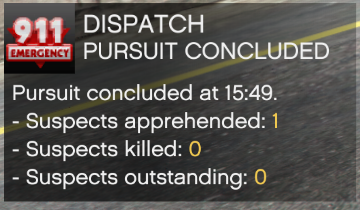
Hi, so in my callout I create a fight and then I create a pursuit to make a suspect trying to escape however during the callout there is multiple time this pop up and I don't know how to "configure" it or to avoid it. Is there a method already existing or how should i do ?
-
I didn't mean a tutorial for creating a callout, I mean usefull tool to debug my callout and deal with errors.
-
Do you know some tools who can help when creating a callout for exemple ?
-
If you have done everything that is asked, ask the creator, in the meantime I advise you to withdraw UnitedCallout
-
Hi, try to disable your anti virus or make an exception for gta, also check the version of gta, LSPDFR, Ragepluginhook and make sure you are not on a pirated version
-
Hi, no problem you are welcome, can you post the Ragepluginhook.log please. Also, Scripthook has no been updated to the latest GTA version

