TSmith Gaming
Members
-
Joined
-
Last visited
Files posted by TSmith Gaming
-
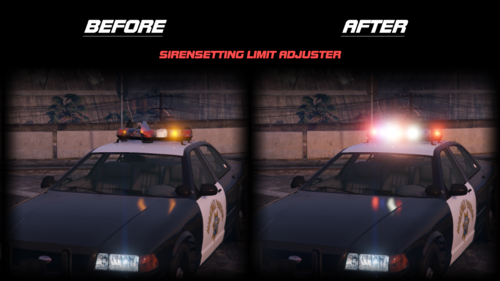
-----HOW TO INSTALL SIRENSETTINGS LIMIT ADJUSTER - FIVEM FIX-----
Open your FiveM application data (Right click the FiveM logo, open file location, open FiveM Application Data) and then open the plugins folder
Drag and drop the SirenSetting_Limit_Adjuster.asi file into your plugins folder
Start FiveM and the lights will work fine for you guys
COMMON ERROR
If you open FiveM and get a popup saying "Error, SirenSetting_Limiter_Adjuster log creation failed. Logging has been disabled. Error: Access is denied."
FIX: Close FiveM. Go to your Grand Theft Auto V directory, Right click it on the side, Properties, Security, edit, and give Users, SYSTEM, Administrators, and Authenticated users "full control" then launch your FiveM and it should work! If it did not work, keep trying!
VIDEO HOW TO INSTALL IT
https://youtu.be/X-prJsZNJj4
----- Posted by @itstheo_official -----
----- DISCLAIMER -----
DM Support is not provided during this post
(README.md File can be found in download!)
Original Post (I Think) Below \/ (Tends to be continuously deleted so I reposted)
- 3,343 Downloads
- 1 Comments
Updated