.png.54ecd2cecbdbad94930ad7746eb96dac.png.e081ea7d323261a5381466b0ae81b9de.png)

q57
Members
-
Joined
-
Last visited
Everything posted by q57
-
did it not crash when you renamed it?
-
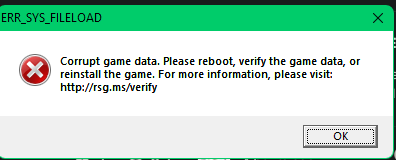
solution for anyone who also has this problem: TAG ERR_SYS_FILELOAD Corrupt game data one or more of your add-on dlcpacks is corrupted and you must try to find out which one and remove it.just update your shiz mani keep getting this message whenever i load up gta 5 with rph PLS HELP crashreport: ive verified and set mods folder to _mods to see if it was in there, its something in the game
 read the steps CAREFULLY. it seems you are rushing through ityouve already downloaded lspdfr so just ignore it. go to step 5ok? thats whats suppose to happen, read the instructions carefullyuh, wrong site? click on the download links itself and read the steps.follow this guide i made like a year ago, it should ready your game for car mods and script packs: do you have an openiv mod file?do you have heapadjuster and is any of your mods outdated?try to just reinstall the actual lspdfr.dll and keys.initry running rph with administrator permissions if that doesnt work make it so rph is excluded from your antivirus if that doesnt work then idk man thats all i can tell youuhhhhhhh please send your rph.log filejeez dont give us info or anything.. ultimatebackup usually causes this bafoonery so try uninstalling it and reloading into the gamewhat kind of mods exactly?it hooks but for like 5 seconds the console doesnt work and after that the game crashes though after this rph works and i can play lspdfr again, weird. sorry for the late responseSo, load gta vanilla completely and then load rph while the game is already loaded? that doesnt seem rightthe game crashes and rph generates this:Crashreport or normal log? actually rph crashed so hard it didnt generate a crash report RagePluginHook.log that log file might not contain the actual crash also for some reason eup menu crashes when i press f11 (my key to open the menu)ah, ok lemme try that ah, ok lemme try that it worked but once i did gotopd command the game itself crashedWhenever i loadplugin lspdfr.dll in rph console lspdfr crashes (i updated it) here is log RagePluginHook.log i have updated rph, lspdfr, and shv