Malhard
Members
-
Joined
-
Last visited
Everything posted by Malhard
-
-
-
-
I have have Ultimate Backup. Ok, my friend. Thanks again.
-
OK, thanks. My question then is more focused on which file is directed to each department (police2, sheriff3, etc).
-
Could someone explain to me the logic of PATCHDAY folders? I would like to know which to install templates for LSPD, LSSD, etc. I'm lost... Sometimes a texture appears in the wrong department.
-
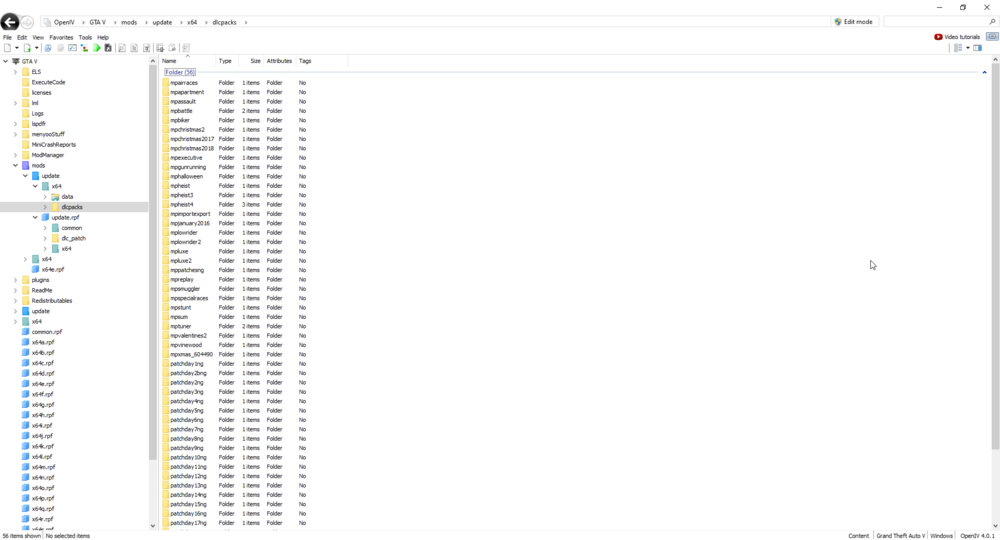
I follow the directions to get to the folder (Grand Theft Auto V\mods\update\x64\dlcpacks\eup), but it is not an eup folder. Can anyone help?
-
I'm trying to install Coastal Callouts but after installing Lenny's Mod Loader and gameconfig using LML I try to log in to see if everything is ok up to this part, but I get the following error: err_mem_embeddedalloc_alloc If I remove the LML files the game goes back to normal. Does anyone know what it can be and how to fix it?
-
I open the game and press alt+tab to start the rage plugin hook, but when it starts it tries to open the rockstar laucher again, which makes the launcher crash and the game starts without the mod. Until yesterday it was normal. Is there any way to prevent the rage plugin from trying to open the rockstar launcher? Thanks. Edit: Is it possible for OpenIV do this? I installed yesterday but hadn't played after installation.
.thumb.jpg.61de846de400ca98f85d205992527de1.jpg)