Skip to content
View in the app

A better way to browse. Learn more.

LCPDFR.com

A full-screen app on your home screen with push notifications, badges and more.

To install this app on iOS and iPadOS
  1. Tap the Share icon in Safari
  2. Scroll the menu and tap Add to Home Screen.
  3. Tap Add in the top-right corner.
To install this app on Android
  1. Tap the 3-dot menu (⋮) in the top-right corner of the browser.
  2. Tap Add to Home screen or Install app.
  3. Confirm by tapping Install.

garlic bread

Members
  • Joined

  • Last visited

Files posted by garlic bread

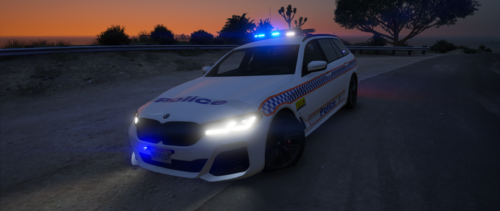
  1. evening lads, got a queensland police general duties bmw wagon for you, fictional, but with the rear inspired by an RPC commodore wagon from back in the day. bit dodgy due to the logo but it works. also changed the lightbar to red and blue for ultimate immersion.
     
    model:
     
     
    • 80 Downloads
    Updated
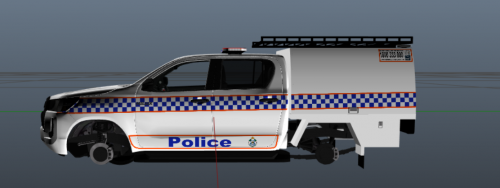
  2. Contains a QPS Roadside Drug Testing Unit livery as Livery #2 and a QPS General Duties livery as Livery #1
     
    Highly recommend using the Forensic Crash Unit livery included with the model as Livery #3, which is how we run this in my sever.
     
    The rear of the RDTU is entirely fictional as I was unable to find any reference images for the rear.
     
    Model:
     
     
    You can find more of my work here:
    https://discord.gg/UJU4uGv4eM
    • 52 Downloads
    Updated

Account

Navigation

Search

Search

Configure browser push notifications

Chrome (Android)
  1. Tap the lock icon next to the address bar.
  2. Tap Permissions → Notifications.
  3. Adjust your preference.
Chrome (Desktop)
  1. Click the padlock icon in the address bar.
  2. Select Site settings.
  3. Find Notifications and adjust your preference.