Skip to content
View in the app

A better way to browse. Learn more.

LCPDFR.com

A full-screen app on your home screen with push notifications, badges and more.

To install this app on iOS and iPadOS
  1. Tap the Share icon in Safari
  2. Scroll the menu and tap Add to Home Screen.
  3. Tap Add in the top-right corner.
To install this app on Android
  1. Tap the 3-dot menu (⋮) in the top-right corner of the browser.
  2. Tap Add to Home screen or Install app.
  3. Confirm by tapping Install.

Harrison.C

Members
  • Joined

  • Last visited

Files posted by Harrison.C

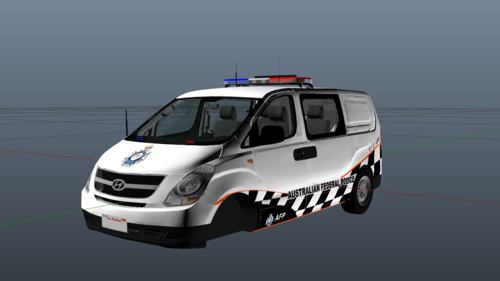
  1. It is not an exact replica of the AFP Iload but it has the fundamentals
     
    • 46 Downloads
    Updated
  2. YTD Skin file for eup vest of AFP
    • 170 Downloads
    • 2 Comments
    Updated
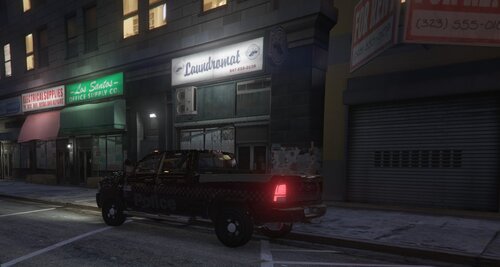
  3. This is a skin file for TrooperGoetz 2017 Ram
    https://www.gta5-mods.com/vehicles/2017-dodge-ram-els
    This is in no way my vehicle model but published by TrooperGoetz and his associates.
     
    A couple years back I saw a NSWPF ghost ram driving in the city, there were no photos of it but this one on google images, the one I saw didn't have a custom tray,

    this vehicle skin is based off of this RAM
     
    DO NOT REPOST
    • 37 Downloads
    • 2 Comments
    Submitted

Account

Navigation

Search

Search

Configure browser push notifications

Chrome (Android)
  1. Tap the lock icon next to the address bar.
  2. Tap Permissions → Notifications.
  3. Adjust your preference.
Chrome (Desktop)
  1. Click the padlock icon in the address bar.
  2. Select Site settings.
  3. Find Notifications and adjust your preference.