
Charlotte.
Members
-
Joined
-
Last visited
Everything posted by Charlotte.
-
Download a custom gameconfig.xml reccomended - https://www.gta5-mods.com/misc/gta-5-gameconfig-300-cars
-
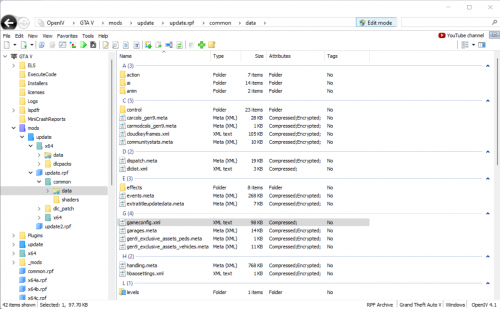
Please install the following: Modified Gameconfig https://bit.ly/3yt6yMy mods > update > update.rpf > common > data Heap Limit Adjuster https://bit.ly/3iqYFBM Place the .asi file into your main GTA V folder. Packfile Limit Adjuster https://bit.ly/3rXa2Vq Place the .asi and .ini files into your main GTA V folder.
-
Please send your RagePluginHook log This is a text file called RagePluginHook. If you can see file extensions, it has a .log one. It is in your main GTA V folder. It is not inside of your logs folder.
-
Please send your RagePluginHook log This is a text file called RagePluginHook. If you can see file extensions, it has a .log one. It is in your main GTA V folder. It is not inside of your logs folder.
-
Please send your RagePluginHook log This is a text file called RagePluginHook. If you can see file extensions, it has a .log one. It is in your main GTA V folder. It is not inside of your logs folder.
-
You need to verify your game files. How to verify game files GTA V Steam Steam Library > Right click GTA V > Properties > Local Files > Verify Integrity GTA V Retail Rockstar Games Launcher > Click GTA V > Click Settings > Verify GTA V Epic Games Go to your Epic Games Library > GTA V > click the three little dots > Verify
-
No problem!
-
Please send your RagePluginHook log This is a text file called RagePluginHook. If you can see file extensions, it has a .log one. It is in your main GTA V folder. It is not inside of your logs folder.
-
It appears that your ambient spawns are causing the crash, go inside of your LSPDFR.ini and change "Main.DisableGameBlipHiding" to true and try it again
-
Please send your RagePluginHook log This is a text file called RagePluginHook. If you can see file extensions, it has a .log one. It is in your main GTA V folder. It is not inside of your logs folder.
-
Personally i wouldn't use that config, i have tested it and it does not work for me, bellow i will attach a game config that works for me but i would recommend waiting till the 31st for it too be updated Game config - https://www.gta5-mods.com/misc/gta-5-gameconfig-300-cars
-
Please provide us with more information. Is the game crashing with rage or just gta5 on its own? When does the game crash?
-
Please create a new topic and i will be happy to help. Please create a new topic and i will be happy to help.
-
You can use the RagePluginHook.ini to change the setting also RagePluginHook.ini is located in your game directory.
-
Please send your RagePluginHook log This is a text file called RagePluginHook. If you can see file extensions, it has a .log one. It is in your main GTA V folder. It is not inside of your logs folder.
-
No worries mate.
-
Delete gta5.exe Then verify your game files.
-
Please send your RagePluginHook log This is a text file called RagePluginHook. If you can see file extensions, it has a .log one. It is in your main GTA V folder. It is not inside of your logs folder.
-
Rename your mods folder to .mods and try it.
-
Please send your RagePluginHook log This is a text file called RagePluginHook. If you can see file extensions, it has a .log one. It is in your main GTA V folder. It is not inside of your logs folder.
-
Hello! It appears that your ambient spawns are causing the crash, go inside of your LSPDFR.ini and change "Main.DisableGameBlipHiding" to true and try it again
-
Since the latest lspdfr update it seems that my Clear The Way V has stopped working, is there any good alternatives?
-
-
 Love these great pack and hope to see more added in the future!
 -