Nightz Development
Members
-
Joined
-
Last visited
-
Currently
Viewing File: Blaine County Traffic Lights & Signs Remastered [Nightz Development]
Files posted by Nightz Development
-
ND_Framework is a complete, character-based roleplay framework for FiveM by Nightz Development. It runs the entire spine of an RP server from one resource: multi-character selection, a full Fleeca-style banking economy, jobs and departments, hospital and death, jail with warrants, an enhanced 911 dispatch, vehicle insurance and DMV, ID cards and badges, and a long list of supporting systems. Every other ND_* resource plugs into this one core, so your whole server shares one economy, one identity, and one dispatch.
Released publicly and free.
Characters & Identity • Multi-character selection and creation (up to 10 per player), per-character spawn and last-location save • ID cards and LEO badges with proximity show/view (/showid, /viewid) • Discord rich presence, character lifecycle logging, optional join whitelist
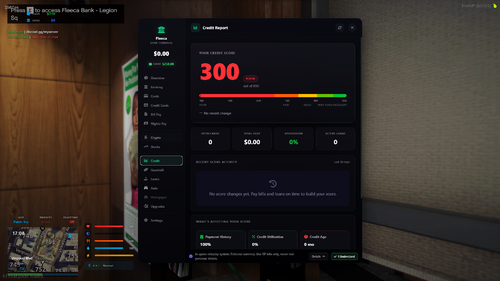
Banking & Economy • Built-in bank + ATM UI, reached with E at bank and ATM locations • Checking and savings accounts with auto-issued debit cards, multi-bank support, welcome bonus • Credit cards with credit scoring, an optional AI underwriter (deterministic built-in fallback), loans and mortgages • Player to player transfers (standard vs instant for a fee, review holds, first-recipient scam warning), fees and limits • Invoicing and billing (fines, subscriptions, payment plans, garnishment) plus Bill Pay quick-pay • Investing: crypto, stocks, and asset markets • Account upgrade tiers with real perks (cashback, overdraft buffer, APY bonuses, payroll) • Paycheck system with per-department salaries and hourly vs performance pay
Jobs, Departments & Tablets • Fully customizable departments, ranks, Discord roles, salaries, power tiers, and spawns • Permissions via Discord roles, ACE, or mixed • Clocking and duty with per-department loadouts • Job Tablet (business management and employee payroll) and a Department command Tablet (roster, rank and salary control, treasury and city budget, requisition, MOTD)
Hospital & Death • EKG death screen, respawn timer and fee, repeat-death abuse protection • EMS hospital tablet, multi-step Surgery (/surgery), Coroner and autopsy (/autopsy) • Downed alerts to EMS, ambulance transport, critical-care play lockout
Jail, Records & Dispatch • Jail with offline countdown, LEO jail tablet, a real-law charge book, records and warrants • Enhanced 911 and dispatch with postal and street, a call board, ShotSpotter gunfire alerts, panic alerts, and citations (/ticket)
Vehicles • Vehicle insurance (tiered presets plus a custom policy builder, credit-scaled premiums, monthly billing, claims) • DMV registration (/dmv): temporary tags on delivery and paid renewals
CAD Integration (CDE CAD, official framework partner) • Syncs civilian characters, pushes 911 calls to the CAD dispatch screen • Opt-in hooks for arrests/jail, DMV registrations, panic, server heartbeat, live-map GPS, and EMS calls • Character creation can collect the extra CAD civilian fields when enabled
Quality of Life & Admin • Dark-glass Admin Console: live dashboard, bans and kicks, warnings/strikes, staff tools (freeze, noclip, spectate), merged banking admin, and a full action audit log • AOP with auto-switcher, peacetime, priority, scoreboard, street labels, weapon saver, world clear, taser cartridges, mute and chat filter • Global UI theme so sibling Nightz UIs recolor from one place, plus an autostart scanner for ND_* resources
Dependencies • Hard dependency: oxmysql (the only requirement) • Optional siblings, auto-detected at runtime: ND_HUDV2, ND_Inventory, ND_Properties, ND_Dealership, ND_Phone, ND_Doorlocks, ND_Tablet, ND_Garage, ND_Fuel and the wider Nightz suite. It runs standalone and lights up extra features when these are present. Which can be bought on our store- 24 Downloads
Updated -
ND_DiscordUnified combines 30+ powerful modules into a single, unified resource. Built for RP servers that demand seamless Discord integration, real-time role syncing, and comprehensive server management.
What's Included
Core Systems
| Module | Description |
|--------|-------------|
| Discord API | Real-time role syncing with intelligent caching & rate limiting |
| Permissions | ACE permissions automatically granted via Discord roles with group inheritance |
| Whitelist | Role-based server access control with priority queue |
| Priority Queue | VIP/Staff queue priority system |
| Moderation | Full kick/ban/warn system with Discord DMs & database integration |
| Admin Roles | Global admin role configuration shared across all modules |
Player Systems
| Module | Description |
|--------|-------------|
| Chat Roles | Custom prefixes & colors by Discord role |
| Tag IDs | 3D overhead name tags with role-based styling |
| Weapon Perms | Restrict weapons by Discord role |
| Vehicle Whitelist | Role-based vehicle restrictions |
| TrustScore | Player trust & reputation scoring system |
| Player Profiles | In-game profile cards with stats, reputation & moderation history |
| Reputation | Community-driven player upvote/downvote system |
| Welcome | Customizable player welcome experience |
Security & Monitoring
| Module | Description |
|--------|-------------|
| Alt Detection | Automatic alt account detection via HWID/Discord/IP |
| IP Reputation | VPN/Proxy/Tor detection & blocking |
| Auto-Moderation | Chat filter, spam detection & caps detection with configurable actions |
| Link Verification | Require Discord account linking before joining |
| Session Tracker | Playtime tracking with leaderboards & player stats |
| Staff Activity | Staff action logging & duty tracking |
Communication & Events
| Module | Description |
|--------|-------------|
| Notifications | Beautiful in-game NUI notifications |
| 911 Emergency | Custom dispatch system with configurable blip duration |
| Report Player | In-game player report system |
| Announcements | Scheduled server announcements via Discord & in-game |
| Advanced Logging | 13+ log categories with Discord webhooks & rate limiting |
Server Management
| Module | Description |
|--------|-------------|
| Restart Scheduler | Automated restart warnings with Discord notifications |
| Maintenance Mode | Maintenance mode with role-based bypass |
| Role Sync | Two-way Discord role synchronization |
| Event Scheduler | In-game event scheduling with RSVP system |
| Custom Commands | Create custom commands with Discord slash command sync |
| Multi-Server | Cross-server player data sync (advanced) |
Rich Integration
| Module | Description |
|--------|-------------|
| Discord Rich Presence | Custom Discord status with live player count & buttons |
| Voice Sync | Discord voice channel sync with in-game proximity |
| Appeals | In-game ban appeal system with Discord integration |
Key Features
- Single Resource — One `ensure`, all features
- 30+ Modules — Every module toggleable independently
- Real-time Sync — Discord roles update instantly in-game
- Smart Caching — Reduces API calls with configurable expiry & deduplication
- Database Integration — MySQL support (oxmysql & mysql-async) for bans, warnings, sessions, reputation & more
- Comprehensive Logging — Joins, deaths, chat, commands, explosions, teleports, noclip, vehicles & more
- Discord DM Notifications — Players receive ban/warn/appeal notifications via Discord
- Webhook Rate Limiting — Built-in queue with backoff to prevent Discord 429 errors
- Auto-Moderation — Chat filtering, spam & caps detection with mute/warn/kick actions
- Modular Config — Per-module config files with validation & secret masking
- Module Guards — Disabled modules have zero performance overhead
- Admin Dashboard — NUI-based admin panel for server management
Support
Need help with setup or configuration?
Join our Discord: https://discord.gg/UpJKHT3hUN
Built by Nightz Development
Version: 0.3.3 | Last Updated: March 16, 2026- 627 Downloads
Updated -
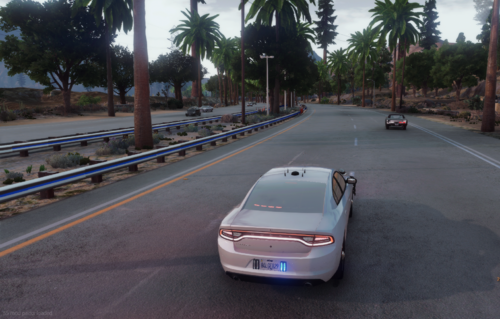
Hey everyone we are excited to release our enhanced version of the popular Calm-AI script for FiveM! This update adds realistic emergency vehicle avoidance behavior to AI-controlled vehicles, making your server's traffic feel more alive and realistic. Also I will try to get Photos but it wont be easy really.
Advanced Emergency Vehicle Detection
- Supports ALL emergency service vehicles (police, fire, medical, military, prison, FIB, security)
- 50+ vehicle models recognized
- Only triggers when lights & sirens are active
Realistic Pull-Over Behavior
- Advance Detection: AI pulls over when emergency vehicles are within 100 meters
- Smart Positioning: Pulls to the correct side based on emergency vehicle position
- Blinker Activation: Turn signals automatically activate when pulling over
- Realistic Timing: 1-2 second delay before resuming normal driving after emergency passes
Special Behaviors
- Jerk AI: 5% of vehicles ignore emergency vehicles entirely (just like real life!)
- Side Awareness: Left emergency vehicle = pull right, Right emergency vehicle = pull left
- Middle Position Handling: Smart splitting when emergency vehicle is directly ahead
Support
For issues, suggestions, or contributions, please contact Nightz Development.
Make your FiveM server's traffic feel more realistic with our enhanced Calm-AI!
- 1,518 Downloads
- 9 Comments
Updated -
Overview:
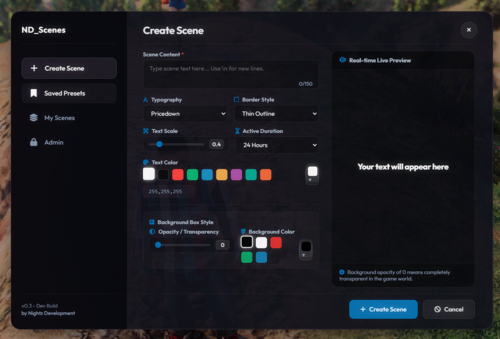
ND_Scenes is a fully reimagined and modernized scene placement script for FiveM. Based on the original DPScenes concept, ND_Scenes brings performance improvements, clean visuals, and a streamlined workflow — designed specifically for police, fire, EMS, and event RP.
Features:
Simple and intuitive command system
Customizable fonts, sizes, colors, glow, and text alignments
Fully editable scenes — no need to retype or delete
ACE/role-based permission support
Optional map markers and persistence toggle
Built-in night mode for low-light readability
No framework dependency — 100% standalone
Framework integration optional (vMenu, QBCore, ESX compatible)
Commands:
/scene - Place a scene text at your location /sceneedit - Edit a nearby scene /sceneremove - Remove your nearby scene Ideal Use Cases:
Police: Evidence tags, roadblocks, traffic notices
Fire/EMS: Medical scenes, staging points
Admin/Staff: Event signs, RP guidance, rule reminders
RP Events: Custom signs for immersive world-building
Requirements:
FiveM server (no external dependencies)
Optional Discord role permissions or ACE setup
Performance:
Highly optimized
Minimal resource usage
No persistent tick usage unless scenes are active
Support:
Active support provided through Discord. All ND scripts are fully maintained and regularly updated.
Credits:
Developed by Nightz Development in collaboration with Windsurf.
Special thanks to the FiveM & RP community for ongoing feedback.
- 432 Downloads
Updated -
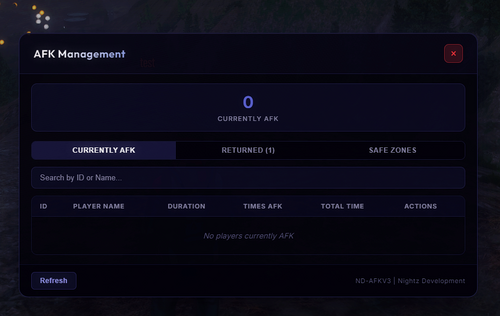
ND-AFKV3 Advanced AFK Detection & Management System
Server-authoritative AFK detection for FiveM with a premium glassmorphism admin
panel, persistent oxmysql tracking, and deep ND_DiscordUnified integration.
Features
- Server-side detection | idle time is tracked on the server via client
heartbeats, so it can't be spoofed client-side.
- Tiered timeouts | per-permission-group warning schedules (e.g. afk.vip
vs default), each with its own messages and a configurable grace period.
- Final action | kick, or teleport the player to an AFK lounge, after a
configurable delay past the last warning.
- Exemptions | driving above a speed threshold, typing, pause menu, open
NUI/inventory, and dead/incapacitated; plus ACE bypass afk.bypass).
- Safe zones | static zones from config and dynamic zones created live from
the admin panel (persisted to the database), with optional in-world markers.
- Admin NUI panel /afkpanel) | Currently AFK / Returned / Safe Zones
tabs, search, and Warn / Exempt / Go To / Kick actions.
- ND Unified Profile | playtime, sessions, warnings, trust score,
reputation, AFK count, total AFK, first join, last seen, Steam/License
badges, and the latest staff note.
- ND Warn | issues warnings straight into the ND_DiscordUnified warning DB.
- Discord logging | via ND_DiscordUnified embeds or a standalone webhook.
- Idle-time HUD and support for native / okokNotify / mythic_notify /
sx-notify / nd_notify notifications.
Requirements
- oxmysql (required)
- ND_DiscordUnified (optional) | enables Discord-role panel access, ND Warn,
and the full ND Unified Profile data. Without it, ACE permissions and local
AFK stats still work fully.
Installation
1. Ensure oxmysql is installed and started first.
2. Import database.sql (tables also auto-create on first start).
3. Drop ND_AFKV3 into your resources and add ensure ND_AFKV3 to server.cfg
(after oxmysql / ND_DiscordUnified).
4. Edit config.lua | timeouts, safe zones, admin ACE/role IDs, Discord webhook.
5. Grant admin access, e.g. add_ace group.admin afk.admin allow.- 6 Downloads
Updated -
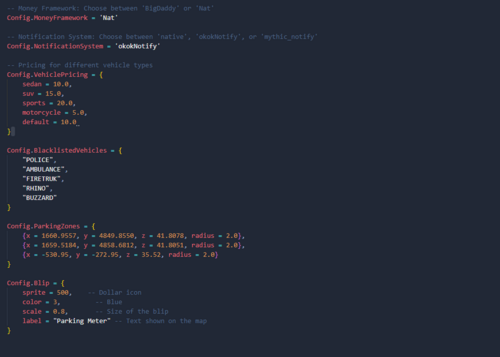
This script idea come from our Grapeseed 3.80 Update that is coming. When it comes to this Script this is User Friendly and has a lot in the config. We may update this in the future but our development team is Focused on other stuff. We have a bunch of new stuff coming soon for 2025 and we are happy to release them to you guys. To get sneak peaks join the Discord
Coming Soon:
More customisation options for the penalty system. Additional notification methods for expired parking alerts. Integration with more third-party resources for advanced parking logic.- 200 Downloads
Updated -
Player Commands
• /bodycam - Toggle bodycam on/off
• /bodycaminactive - Toggle inactive/standby mode (pauses recording but keeps HUD visible)
• /emergency - Activate emergency mode (forces bodycam on during critical situations)
• /trafficstop - Log a traffic stop event
• /code4 - Log scene secured event
• /status [code] - Set officer status (10-8, 10-7, etc.)
• /screenshot - Take manual evidence screenshot
• /bodycampreview - Toggle live feed preview
• /evidence - Open screenshot/evidence gallery
• /dm [id] [message]` - Send direct message to another officer
Supervisor Commands
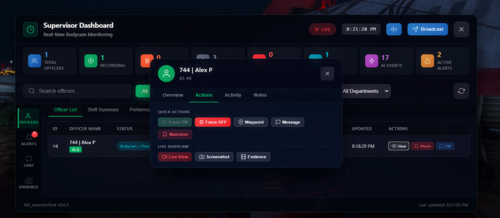
• /axondashboard - Open real-time supervisor dashboard to monitor all officers
• /broadcast [message] - Send broadcast message to all officers
Admin Commands
• /forcebodycam [id] - Force toggle any player's bodycam
• /bodycamstatus [id] - Check any player's bodycam status
Keybinds
• `Tile` (default) - Toggle bodycam on/off
• Panic Button - Configurable emergency key
Features
Bodycam System
• Real-life Axon Body 4 style HUD
• Battery system with drain/charging
• Auto-event detection (weapon drawn, shots fired, vehicle pursuit, foot chase)
• Emergency mode with body lock detection
• Inactive/standby mode
• First-person camera mode (optional)
Fleet 3 Dashcam
• Auto-activates in emergency vehicles
• Speed display (MPH/KMH)
• GPS location tracking
• REC indicator
• Separate serial number
Supervisor Dashboard
• Real-time officer monitoring
• Fleet 3 Active count
• AI event detection
• Alert system with Acknowledge All button
• Officer waypoint/location
• Live bodycam viewing
• Broadcast messaging
• Priority officer flagging
Notification System
• Built-in Axon notifications (no dependency required)
• Configurable per-type toggles
• Support for external systems (ND_Notify, okokNotify, etc.)
Customization
• Full config.lua control
• Discord role integration
• ACE permissions support
• Multiple HUD styles (reallife, background, transparent)
Customizable
• This script is built from the ground up to be fully customizable. You're not stuck with a one-size-fits-all setup. You can tweak it to fit your department or server exactly how you want. It's not your usual Axon script with just some text sitting in the corner; this one gives you way more control, features, and flexibility right out of the box.
Feedback & Support:
Bug Reports: Please report any bugs or issues on our Discord server
Feature Requests: Share your ideas and suggestions with the community
Support: Join our Discord for help with installation and configuration
🔗 Join Our Community: ND Discord Server- 1,198 Downloads
Updated -
IMPORTANT DISCLAIMER
The visual quality and overall appearance of this YMAP may vary depending on individual graphics settings, additional installed modifications, and system hardware.
Performance results and visual fidelity will differ between setups.
This YMAP is designed with high-detail assets intended primarily for high-end gaming PCs capable of rendering large-scale environmental enhancements. While the project has been optimized for general use, users with mid-range hardware may experience lower frame rates or performance fluctuations.
Finally, this is a YMAP-only resource — it does not alter any GTA V textures, road materials, or base game files.
The ND_MapBundle solely adds and adjusts props, objects, and environmental details without modifying texture archives, DLC data, or core map assets.
Dear Sandy Shores Residents
Please note that the current version of Sandy Shores Refresh is not compatible with any Major Location Object (MLO) interiors or other YMAPs that make extensive changes to the Sandy Shores area. Using this modification alongside other large-scale map edits may lead to object conflicts, missing props, or crashes. Compatibility improvements are planned for a future update.
We have Included SandyShoresRemastedV4.1 if you are not able to use Sandy Shores Refresh
OVERVIEW
The ND_MapBundle is a full-scale environment enhancement pack designed for FiveM.
It combines every major Nightz Development map update into a single optimized bundle built for realism, stability, and performance.
This release replaces all previous individual map versions and introduces unified optimization across the entire San Andreas region.
INCLUDED REGIONS
Blaine County Traffic Lights
Grapeseed Updated
Paleto Bay Updated
Route One Updated
Sandy Shores Refresh
Sandy Shores Updated [If cant use Refresh Put this Instead]
South LS Updated Refresh
OPTIONAL ADDONS
Additional map-level enhancements included within the ND_MapBundle for customizable performance and visual scaling.
ExtraTraffic
ExtraGrass
StreetLights
TrafficLights
Patch Files
DEPRECATED MAPS
The following standalone map releases are now considered outdated and will be fully replaced by ND_MapBundle v1.0.0:
ND_GrapeseedUpdated
ND_PaletoBayUpdated
ND_SandyShoresRefresh
ND_RouteOneUpdated
ND_BCTrafficLights
ND_SouthLSRefresh
All future patches, improvements, and performance updates will be released exclusively through the ND_MapBundle.
Older versions/Single Releases will still function in-game; however, they are no longer officially supported or maintained and may experience compatibility issues with future updates.
BETA NOTICE
Some content may include experimental features or pending optimizations.
Please report any bugs or missing props through our Discord.
SUPPORT
Join the Nightz Development Discord for installation help or feedback:
https://discord.gg/87mAUrU3FN
CREDITS
Created by: Nightz Development
TERMS OF USE
- Redistribution or resale is prohibited.
- Modification for private server use is permitted.
- Credit to Nightz Development is required in any public release.
© 2025 Nightz Development
Building immersive Maps since 2020
- 501 Downloads
- 5 Comments
Updated -
ND_DeadlyWeapons v0.1 is a cutting-edge weapon realism and damage enhancement script built for FiveM. Designed to push immersion for law enforcement and roleplay servers, it completely overhauls how weapons behave and how AI responds to them. Whether you’re running singleplayer patrols or hosting a full server, ND_DeadlyWeapons brings your encounters to life with tactical realism and fully customizable settings.
Key Highlights
Immersive Combat Mechanics: Realistic weapon lethality, recoil, and damage multipliers.
AI Behavioral Overhaul: NPC suspects react dynamically to weapon threats, improving realism.
Server-Ready: Lightweight codebase ensures smooth integration into existing servers with minimal resource usage.
Customizable Configuration: Tailor every aspect of weapon damage, zones, and AI reaction to your community’s needs.
ND Ecosystem Integration: Pairs perfectly with ND_AxonBody, ND_DiscordSystem, and other ND scripts for a seamless experience.
⚠️ Important Warnings & Notes
Not a Weapon Model or Texture Pack: ND_DeadlyWeapons does not add new gun models or HD textures. If you already use custom weapon packs, ND_DeadlyWeapons only modifies the behavior, damage, and AI reaction — it will not replace your models or skins.
Performance Impact: Ultra-high damage multipliers, complex AI reaction settings, or large player counts can affect performance. We recommend testing with default configuration before making major changes.
Compatibility: ND_DeadlyWeapons is fully compatible ND_Gore, However, other weapon-handling scripts may conflict with damage multipliers or AI behavior adjustments.
Content Advisory: ND_DeadlyWeapons increases realism in weapon handling and lethality. Server owners should ensure their community rules or age restrictions reflect these changes.
Customization: All damage, lethality zones, and AI reaction settings can be adjusted or toned down in the configuration file to match your server’s style or difficulty.
🔗 Join Our Community: ND Discord Server
- 394 Downloads
Updated -
Sandy Shores Refresh by Nightz Development is the ambitious successor to our previous project,
Sandy Shores Updated (available at https://www.lcpdfr.com/files/file/43226-sandy-shores-updated-nightz-development-read-new-update/).
Blaine County Traffic Lights & Signs Map (available at https://www.lcpdfr.com/downloads/gta5mods/misc/48159-blaine-county-traffic-lights-signs-remastered-nightz-development/). The BCTLS map matches Sandy Shores Refresh in so many ways.
This new YMAP modification represents a significant leap forward, offering a completely overhauled and heavily optimized version of Sandy Shores.
This "Refresh" isn't just an update; it's a complete reimagining, focusing on unprecedented detail, immersive environmental enhancements, and a much more performance-friendly experience compared to its predecessor. While "Sandy Shores Updated" laid the groundwork, "Sandy Shores Refresh" rebuilds upon it with a focus on efficiency and visual fidelity.
Expect to discover:
Extensive Environmental Detailing: Every corner of Sandy Shores has been meticulously re-examined and enhanced. Experience a far more intricate and realistic environment with new props, textures, and nuanced placements that breathe life into the desert landscape.
Optimized Performance: A core focus of "Sandy Shores Refresh" was to drastically improve performance. While any detailed map will have some impact, this version is engineered to be significantly less demanding on your system than our older Sandy Shores project, allowing for a smoother and more enjoyable experience.
Comprehensive Overhaul: This YMAP introduces a multitude of changes, from subtle refinements to major additions across the entire Sandy Shores area. Discover new points of interest, reworked existing locations, and a general elevation of the area's visual appeal.
Immersive Atmosphere: With enhanced detailing and thoughtful additions, "Sandy Shores Refresh" aims to create a deeply immersive atmosphere, making Sandy Shores feel more authentic and engaging than ever before.
Sandy Shores Refresh is designed to be the definitive visual upgrade for Sandy Shores, offering a richly detailed yet highly optimized experience for players.
⚠️ IMPORTANT DISCLAIMER ⚠️
Please note that the visual fidelity and perceived "quality" of this YMAP, as shown in screenshots or videos, may vary significantly based on individual user graphics settings, other installed modifications, and hardware capabilities. This is a heavy performance YMAP designed primarily for users with high-end gaming PCs to fully appreciate its detailed enhancements. While efforts have been made to optimize, users with medium-end PCs may still experience performance impacts. Your mileage may vary.
Furthermore, please be aware that this version of Sandy Shores Refresh is currently NOT compatible with any other Major Location Objects (MLOs) or significant YMAPs that extensively modify the Sandy Shores area. Installing this mod alongside such additions may result in conflicts, visual glitches, or crashes. Full compatibility will be addressed in future updates closer to the final release.
File Contents Include:
This download package is structured to support various installation methods:
Single Player: Contains files specifically prepared for Grand Theft Auto V's single-player mode.
FiveM Server Side: Includes resources and configurations for server-side implementation on FiveM servers, allowing all connected players to experience the refreshed map.
FiveM Client Side: Provides files for client-side installation on FiveM, intended for personal use or specific server setups that require client-side map streaming.
- 1,516 Downloads
- 12 Comments
Updated -
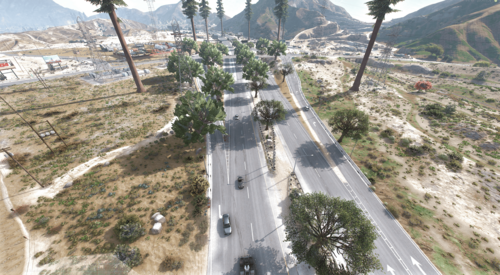
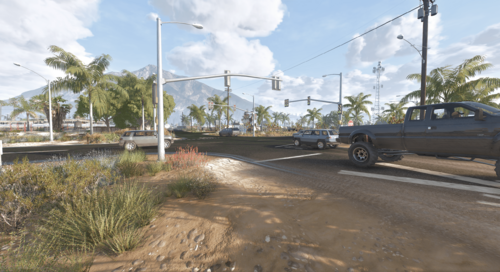
If you ever felt Blaine County looked Empty or Dead and it was not a vibing little Town Well Time to Introduce Blaine County Traffic Lights & Signs Remastered.
Features:
Adds Traffic lights to 21 intersections in Blaine County. [More to Come]
Adding Traffic Signs soon
DISCLAIMER, THE ROUTE ONE UPDATED MAP IS NOT COMPATIBLE JUST YET. WE WILL RELEASE A PATCH SOON.
Join Our Discord For News & Sneaks Peaks that are Coming Soon https://discord.gg/UpJKHT3hUN
Remastered/Patch Fix By
Nightz Development
Original Creator
FAQ
Q: How can I download or purchase additional Nightz Development products?
A: You can join our Discord server to browse and download products. Some items may also be available on LCPDFR.
Q: How can I get in touch with Nightz Development for collaboration or other inquiries?
A: Feel free to reach out through Discord or on LCPDFR. We’re open to collaborations, feedback, and any questions you may have.
Q: How often are maps and products updated?
A: Updates are released based on ongoing development and user feedback. Some updates may coincide with new map releases or enhancements.
Q: What should I do if I encounter an issue with a map, even after reading the provided documentation?
A: Please join our Discord server and open a support ticket. A developer or support team member will assist you as soon as possible.
TOS
[1] You shall not claim any products, scripts, or items created by Nightz Development as your own. Respect the effort and originality put into these creations.
[2] You are not permitted to rip, modify, or alter any of Nightz Development's files without express permission.
[3] These files are approved for use in FiveM servers only. Any other usage must receive explicit consent.
[4] Do not redistribute, resell, or upload these files anywhere else without direct permission from Nightz Development. Unauthorized distribution, whether free or for profit, will result in the removal of these files from your possession and potential further action.
- 7,992 Downloads
- 82 Comments
Updated -
ND_Gore v0.5 is a next-generation gore and injury effects system designed for FiveM, delivering unmatched realism to combat and injury scenarios. Built from the ground up to simulate realistic blood physics, terrain-aware pooling, and weather-driven drying/washing, ND_Gore creates a true-to-life experience for roleplay servers alike.
Key Highlights
Hyper-Realistic Blood Physics: Dynamic splatter, pooling, and environmental interactions.
Complete Customization: Control intensity, lifespan, and behavior of every gore effect.
Optimized for Performance: Lightweight codebase ensures smooth gameplay even on busy servers.
ND Ecosystem Integration: Works seamlessly with ND_DeadlyWeapons, and other ND scripts for a unified realism suite.
Server-Friendly Options: Includes toggles to tone down gore for age-appropriate or themed communities.
⚠️ Important Warnings & Notes
Not a Graphics Mod: ND_Gore does not add new textures or high-definition graphics. If you already use custom blood textures or a graphics pack, ND_Gore will only enhance the amount, behavior, and physics of blood — it will not replace your textures.
Server Performance: Ultra-high gore settings can impact performance on lower-end machines or large servers. We recommend testing with default settings before increasing intensity.
Compatibility: ND_Gore is fully compatible with ND_DeadlyWeapons, and other ND scripts. However, some third-party map mods or extreme visual packs may affect decal placement.
Content Advisory: ND_Gore is designed for 18+ audiences. Servers using ND_Gore should ensure their community guidelines and age requirements reflect the increased realism.
Customization: All blood and gore settings can be adjusted or toned down in the configuration file to suit the needs of PG-friendly or themed communities.
🔗 Join Our Community: ND Discord Server
- 1,148 Downloads
- 4 Comments
Updated -
Overview
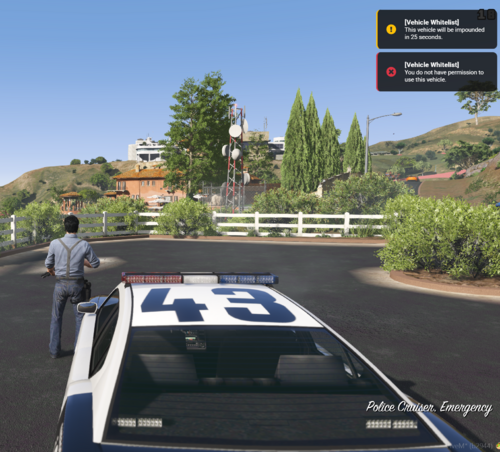
ND_VehicleWhitelist is a comprehensive Discord role-based vehicle permission system for FiveM servers. This script allows server administrators to restrict vehicle usage based on Discord roles, ensuring that only authorized players can use specific vehicles.
Key Features
- Role-Based Vehicle Permissions
- Restrict vehicles to specific Discord roles (police, EMS, tow, admin, etc.)
- Automatic ejection of unauthorized players from restricted vehicles
- Support for Discord role mapping to simplify configuration
- Admin override for full access to all vehicles
Vehicle Handling Options
- Configurable immediate vehicle deletion for unauthorized access
- Delayed vehicle deletion with customizable timer (default: 25 seconds)
- Smart cancellation of deletion timers when authorized players enter vehicles
- Visual effects when vehicles are deleted (smoke grenade effect)
Player Experience Improvements
- Players are moved to the driver's side when ejected from vehicles
- Clear notifications when players are ejected from unauthorized vehicles
- Warning notifications for delayed vehicle deletion
- Success notifications when deletion timers are cancelled
Discord Webhook Integration
- Comprehensive webhook logging for all vehicle permission events
- Detailed player information including identifiers (steam, license, discord)
- User-friendly vehicle names in webhook messages
- Configurable webhook events (ejections, deletions, timer cancellations, admin overrides)
- Test command to verify webhook functionality
Performance Optimizations
- Configurable check intervals for player and world vehicles
- Debug message throttling to reduce console spam
- Vehicle distance checking to ignore distant vehicles
- Role check caching to reduce API calls
Configuration Options
- Separate configuration files for core settings, vehicle lists, and performance options
- Customizable notification messages and types
- Adjustable deletion delay times
- Toggle options for immediate or delayed deletion
- Debug mode for troubleshooting
Commands
- /checkvehicle [model] - Check if you can use a specific vehicle
- /myvehicles - List all vehicles you have access to
- /refreshvehicles - Force update your vehicle permissions
Future Plans
- UI for in-game vehicle management
- Support for temporary vehicle permissions
- Vehicle class-based permissions
- Enhanced logging and analytics
- Expanded vehicle lookup database- 237 Downloads
Updated -
Introducing ND_VehicleSpawner!
Get ready to revolutionize your FiveM server's vehicle spawning experience! We're thrilled to announce **ND_VehicleSpawner**, the ultimate role-based vehicle system meticulously designed for Discord-integrated communities.
What Makes It Special?
Advanced Role-Based Access Control: ND_VehicleSpawner seamlessly integrates with your Discord server roles, allowing you to define granular permissions for who can access which vehicle categories. This means your police department can have their fleet, your fire department their emergency vehicles, and VIPs their luxury cars, all managed effortlessly through Discord.
Beautiful NativeUI Interface: We've crafted a modern and intuitive menu system that's a joy to use. Vehicles are neatly organized by their role-based categories, and the responsive layout ensures optimal positioning and spacing for a smooth user experience.
Smart Vehicle Management: Say goodbye to vehicle clutter! ND_VehicleSpawner includes intelligent features like automatic cleanup of old vehicles when new ones are spawned, a handy spawn history, and even a favorites system so players can quickly access their preferred rides.
Developer-Friendly Tools: For server owners and developers, we've included robust debugging modes, testing utilities, and extensive configuration options. This ensures easy setup, troubleshooting, and customization to fit your server's unique needs.
Easy Setup & Integration:
Setting up ND_VehicleSpawner is a breeze. It's a plug-and-play solution that integrates with essential dependencies like NativeUI, ND_DiscordAPI, and ND_AcePerms. Simple commands like `/vspawn` for users and `/vsadmin` for administrators make it accessible for everyone. Just drop it into your server's resources, configure your Discord role IDs, and you're good to go!
- 376 Downloads
- 2 Comments
Updated -
Paleto Bay Updated by Nightz Development is a comprehensive YMAP modification designed to breathe new life into the Paleto Bay area of the game. This mod goes beyond simple tweaks, introducing a wealth of changes and additional details that significantly enhance the environment and overall player experience.
Expect to discover:
Extensive Detailing: The mod focuses on adding intricate details throughout Paleto Bay, making the area feel more lived-in and realistic.
New Elements & Additions: Beyond existing structures, this YMAP introduces new objects, props, and potentially even small structures to enrich the landscape.
Enhanced Immersion: With a focus on visual improvements and environmental additions, Paleto Bay Updated aims to create a more immersive and engaging experience for players exploring this northern region of the map.
FAQ
Q: How can I download or purchase additional Nightz Development products?
A: You can join our Discord server to browse and download products. Some items may also be available on LCPDFR.
Q: How can I get in touch with Nightz Development for collaboration or other inquiries?
A: Feel free to reach out through Discord or on LCPDFR. We’re open to collaborations, feedback, and any questions you may have.
Q: How often are maps and products updated?
A: Updates are released based on ongoing development and user feedback. Some updates may coincide with new map releases or enhancements.
Q: What should I do if I encounter an issue with a map, even after reading the provided documentation?
A: Please join our Discord server and open a support ticket. A developer or support team member will assist you as soon as possible.
TOS
[1] You shall not claim any products, scripts, or items created by Nightz Development as your own. Respect the effort and originality put into these creations.
[2] You are not permitted to rip, modify, or alter any of Nightz Development's files without express permission.
[3] These files are approved for use in FiveM servers only. Any other usage must receive explicit consent.
[4] Do not redistribute, resell, or upload these files anywhere else without direct permission from Nightz Development. Unauthorized distribution, whether free or for profit, will result in the removal of these files from your possession and potential further action.
- 2,200 Downloads
- 7 Comments
Updated -
Features Overview:
Graveyard Info
/sendtograve <playerID> <time>. /Releasefromgrave <playerID>
Customizable timer – choose how long they stay in the graveyard. Randomized teleport after their time is up to a nearby hospital or outside location.
Ace Perms for Standalone
Config.RequiredRoles
Real-Time NUI Timer
Players will see a cool countdown timer on their screen during their stay in the graveyard. When the timer hits 0, the player will be released and teleport randomly to a hospital.
Detailed Logging & Webhooks
Discord Webhooks with detailed player actions: Example: "Alex P. (ID: 1) sent John D. (ID: 3) to the graveyard for 300 seconds." Example: "Admin Alex P. released John D. from the graveyard." Custom embed colors for sending and releasing actions.
FAQ
Q: How can I download or purchase additional Nightz Development products?
A: You can join our Discord server to browse and download products. Some items may also be available on LCPDFR.
Q: How can I get in touch with Nightz Development for collaboration or other inquiries?
A: Feel free to reach out through Discord or on LCPDFR. We’re open to collaborations, feedback, and any questions you may have.
Q: How often are maps and products updated?
A: Updates are released based on ongoing development and user feedback. Some updates may coincide with new map releases or enhancements.
Q: What should I do if I encounter an issue with a map, even after reading the provided documentation?
A: Please join our Discord server and open a support ticket. A developer or support team member will assist you as soon as possible.
TOS
[1] You shall not claim any products, scripts, or items created by Nightz Development as your own. Respect the effort and originality put into these creations.
[2] You are not permitted to rip, modify, or alter any of Nightz Development's files without express permission.
[3] These files are approved for use in FiveM servers only. Any other usage must receive explicit consent.
[4] Do not redistribute, resell, or upload these files anywhere else without direct permission from Nightz Development. Unauthorized distribution, whether free or for profit, will result in the removal of these files from your possession and potential further action.
- 123 Downloads
Updated -
IMPORTANT: Due to the way this mod works, the original Rockstar Editor video file will NOT be saved to the disk (actually it does, but it will be empty). The complete video will be exported to the folder specified in the .ini file. The default location is your user's Videos folder.
NOTE: For high resolution exports without DSR, use this guide by Kravencedesign
Note that this is not tested with version 0.5.0 of the mod, please confirm it in the comments if you managed to make it work.
NOTE: Currently the mod only works in Windowed and Borderless Window mode. Your Graphics > Render Resolution and Advanced Graphics > Resolution settings MUST be the same value in game settings.
Source code for this mod is available on GitHub.
You can watch a showcase of some of the features here. Extended Video Export
Extended Video Export is an enhancement mod for GTA V, aimed at directors who want better export options from Rockstar editor.
Requirements
ScriptHookV or FiveM Voukoder 13.3. Might work with other versions. Latest version of Microsoft Visual C++ 2015 - 2022 Redistributable
[FiveM] Added Game Build Support
3095
3258
3324
[SP Changes]
https://www.gta5-mods.com/scripts/extended-video-export#description_tab
- 2,778 Downloads
- 3 Comments
Updated -
A Complete workup from the old V1
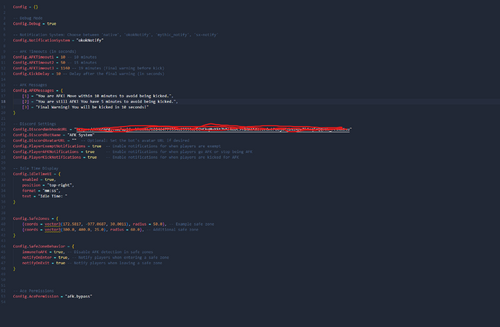
Config = {} -- Debug Mode Config.Debug = false -- Notification System: Choose between 'native', 'okokNotify', 'mythic_notify', 'sx-notify' Config.NotificationSystem = "okokNotify" -- AFK Timeouts (in seconds) Config.AFKTimeout1 = 600 -- 10 minutes Config.AFKTimeout2 = 900 -- 15 minutes Config.AFKTimeout3 = 1120 -- 19 minutes (Final warning before kick) Config.AFKTimeout4 = 1200 -- 20 minutes (Additional warning before kick) Config.KickDelay = 10 -- Delay after the final warning (in seconds) -- AFK Messages Config.AFKMessages = { [1] = "You are AFK! You have been AFK for 10 minutes!", [2] = "You are still AFK! You have been AFK for 15 minutes!", [3] = "Your still AFK! You have been AFK for 18 minutes! Move now or be kicked.", [4] = "Final Warning! You have been AFK for 20 minutes! Kicking after this message" } -- Discord Settings Config.DiscordWebhookURL = "" Config.DiscordBotName = "AFK System" Config.DiscordAvatarURL = "" -- Optional: Set the bot's avatar URL if desired Config.PlayerExemptNotifications = true -- Enable notifications for when players are exempt Config.PlayerAFKNotifications = true -- Enable notifications for when players go AFK or stop being AFK Config.PlayerKickNotifications = true -- Enable notifications for when players are kicked for AFK Config.DiscordDetailedNotifications = true -- Idle Time Display Config.IdleTimeUI = { enabled = true, position = "top-right", format = "mm:ss", text = "Idle Time: " } Config.AFKDetectionSensitivity = 0.5 -- Lower value means more sensitive Config.SafeZones = { {coords = vector3(172.5817, -977.0687, 30.0011), radius = 50.0}, -- Example safe zone {coords = vector3(300.0, 400.0, 25.0), radius = 60.0}, -- Additional safe zone {coords = vector3(500.0, 600.0, 35.0), radius = 70.0}, -- New safe zone } Config.SafeZoneBehavior = { immuneToAFK = true, -- Disable AFK detection in safe zones notifyOnEnter = true, -- Notify players when entering a safe zone notifyOnExit = true -- Notify players when leaving a safe zone } -- Ace Permissions Config.AcePermission = { "afk.bypass" } Config.ExemptFromAFK = { inVehicle = true, -- Exempt players in vehicles inVehicleSpeed = 7.0, -- Minimum speed (in m/s) for exemption to apply (5.0 = ~18 km/h or ~11 mph) typing = true, -- Exempt players typing in chat usingMenu = true, -- Exempt players with menus open Notify = true -- Notify players when they are exempt }- 129 Downloads
Updated -
Nightz Development Advance AFK Script
AFK Checks
Keyboard Movement Check
Mouse Movement Check
Camera Rotation Check
UI Interaction Check
Idle Time Check
Chat Interaction Check
UI
Change the Theme
Sound Alerts **Coming Soon
Messages
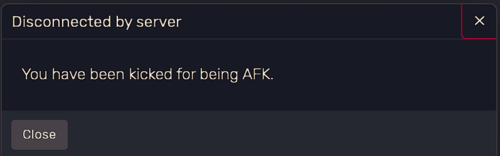
Config.AFKMessages = { [1] = "You are AFK! Move within 5 minutes to avoid being kicked.", [2] = "You are still AFK!. You have 10 minutes to avoid being kicked.", [3] = "Final Warning! You will be kicked in 10 seconds!"
Discord
Added Webhooks
Change Your DiscordBotName
Change Your DiscordAvatarURL
AFK Timeout Settings
AFKTimeout1 = 300 -- 5 minutes AFKTimeout2 = 600 -- 10 minutes AFKTimeout3 = 950 -- 11 minutes (Final warning before kick) KickDelay = 10 -- Delay after the final warning (in seconds)
Safe Zones
Sends a Notifcation When Enter a Zone
{coords = vector3(200.0, 200.0, 20.0), radius = 50.0}, -- Example Safe Zone 1 {coords = vector3(-500.0, -300.0, 30.0), radius = 70.0}, -- Example Safe Zone 2 {coords = vector3(181.2449, -968.7045, 29.5793), radius = 50.0} -- Example Safe Zone 3 FAQ
Q: How can I download or purchase additional Nightz Development products?
A: You can join our Discord server to browse and download products. Some items may also be available on LCPDFR.
Q: How can I get in touch with Nightz Development for collaboration or other inquiries?
A: Feel free to reach out through Discord or on LCPDFR. We’re open to collaborations, feedback, and any questions you may have.
Q: How often are maps and products updated?
A: Updates are released based on ongoing development and user feedback. Some updates may coincide with new map releases or enhancements.
Q: What should I do if I encounter an issue with a map, even after reading the provided documentation?
A: Please join our Discord server and open a support ticket. A developer or support team member will assist you as soon as possible.
TOS
[1] You shall not claim any products, scripts, or items created by Nightz Development as your own. Respect the effort and originality put into these creations.
[2] You are not permitted to rip, modify, or alter any of Nightz Development's files without express permission.
[3] These files are approved for use in FiveM servers only. Any other usage must receive explicit consent.
[4] Do not redistribute, resell, or upload these files anywhere else without direct permission from Nightz Development. Unauthorized distribution, whether free or for profit, will result in the removal of these files from your possession and potential further action.
- 246 Downloads
- 4 Comments
Updated -
Coming Soon
Story Mode & Client Sided
Traffic Signs/Stop Signs/Yield Signs & Much More
FAQ
Q: How can I download or purchase additional Nightz Development products?
A: You can join our Discord server to browse and download products. Some items may also be available on LCPDFR.
Q: How can I get in touch with Nightz Development for collaboration or other inquiries?
A: Feel free to reach out through Discord or on LCPDFR. We’re open to collaborations, feedback, and any questions you may have.
Q: How often are maps and products updated?
A: Updates are released based on ongoing development and user feedback. Some updates may coincide with new map releases or enhancements.
Q: What should I do if I encounter an issue with a map, even after reading the provided documentation?
A: Please join our Discord server and open a support ticket. A developer or support team member will assist you as soon as possible.
TOS
[1] You shall not claim any products, scripts, or items created by Nightz Development as your own. Respect the effort and originality put into these creations.
[2] You are not permitted to rip, modify, or alter any of Nightz Development's files without express permission.
[3] These files are approved for use in FiveM servers only. Any other usage must receive explicit consent.
[4] Do not redistribute, resell, or upload these files anywhere else without direct permission from Nightz Development. Unauthorized distribution, whether free or for profit, will result in the removal of these files from your possession and potential further action.
- 1,516 Downloads
- 3 Comments
Updated -
FAQ
Q: How can I download or purchase additional Nightz Development products?
A: You can join our Discord server to browse and download products. Some items may also be available on LCPDFR.
Q: How can I get in touch with Nightz Development for collaboration or other inquiries?
A: Feel free to reach out through Discord or on LCPDFR. We’re open to collaborations, feedback, and any questions you may have.
Q: How often are maps and products updated?
A: Updates are released based on ongoing development and user feedback. Some updates may coincide with new map releases or enhancements.
Q: What should I do if I encounter an issue with a map, even after reading the provided documentation?
A: Please join our Discord server and open a support ticket. A developer or support team member will assist you as soon as possible.
TOS
[1] You shall not claim any products, scripts, or items created by Nightz Development as your own. Respect the effort and originality put into these creations.
[2] You are not permitted to rip, modify, or alter any of Nightz Development's files without express permission.
[3] These files are approved for use in FiveM servers only. Any other usage must receive explicit consent.
[4] Do not redistribute, resell, or upload these files anywhere else without direct permission from Nightz Development. Unauthorized distribution, whether free or for profit, will result in the removal of these files from your possession and potential further action.
- 2,491 Downloads
- 12 Comments
Updated -
DISCLAIMER THE POLICE STATION, SANDY SHORES MED ARE NOT PART OF THIS MAP. TO GET THOSE MAPS GO HERE https://gn.studio/
FAQ
Q: How can I download or purchase additional Nightz Development products?
A: You can join our Discord server to browse and download products. Some items may also be available on LCPDFR.
Q: How can I get in touch with Nightz Development for collaboration or other inquiries?
A: Feel free to reach out through Discord or on LCPDFR. We’re open to collaborations, feedback, and any questions you may have.
Q: How often are maps and products updated?
A: Updates are released based on ongoing development and user feedback. Some updates may coincide with new map releases or enhancements.
Q: What should I do if I encounter an issue with a map, even after reading the provided documentation?
A: Please join our Discord server and open a support ticket. A developer or support team member will assist you as soon as possible.
TOS
[1] You shall not claim any products, scripts, or items created by Nightz Development as your own. Respect the effort and originality put into these creations.
[2] You are not permitted to rip, modify, or alter any of Nightz Development's files without express permission.
[3] These files are approved for use in FiveM servers only. Any other usage must receive explicit consent.
[4] Do not redistribute, resell, or upload these files anywhere else without direct permission from Nightz Development. Unauthorized distribution, whether free or for profit, will result in the removal of these files from your possession and potential further action.
- 3,602 Downloads
- 20 Comments
Updated -
FAQ
Q: How can I download or purchase additional Nightz Development products?
A: You can join our Discord server to browse and download products. Some items may also be available on LCPDFR.
Q: How can I get in touch with Nightz Development for collaboration or other inquiries?
A: Feel free to reach out through Discord or on LCPDFR. We’re open to collaborations, feedback, and any questions you may have.
Q: How often are maps and products updated?
A: Updates are released based on ongoing development and user feedback. Some updates may coincide with new map releases or enhancements.
Q: What should I do if I encounter an issue with a map, even after reading the provided documentation?
A: Please join our Discord server and open a support ticket. A developer or support team member will assist you as soon as possible.
TOS
[1] You shall not claim any products, scripts, or items created by Nightz Development as your own. Respect the effort and originality put into these creations.
[2] You are not permitted to rip, modify, or alter any of Nightz Development's files without express permission.
[3] These files are approved for use in FiveM servers only. Any other usage must receive explicit consent.
[4] Do not redistribute, resell, or upload these files anywhere else without direct permission from Nightz Development. Unauthorized distribution, whether free or for profit, will result in the removal of these files from your possession and potential further action.
- 2,981 Downloads
- 30 Comments
Updated -
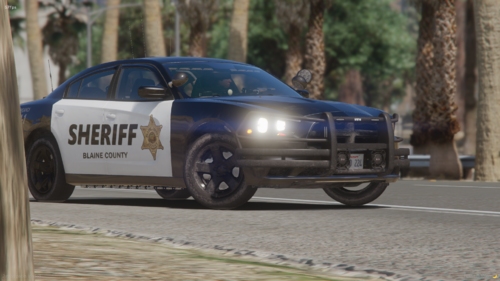
Nightz Development First ever LEO Livery Pack. We have plans to release more Livery's for this pack to include more support for different Vehicle's like Redneck, Redsaint, ETC
Vehicle List
2011 Ford Crown Victoria (11vic.png)
2013 Ford Explorer (13explorer.png)
2014 Dodge Charger (14charger.png)
2015 Ford Expedition (15Expedition.png)
2016 Ford Explorer (16explorer.png)
2018 Dodge Charger (18charger.png)
2018 Ford F-150 (18f150.png)
2018 Ford Taurus (18taurus.png)
2019 Chevrolet Tahoe (19tahoe.png)
2020 Ford Explorer (2020explorer.png)
2021 Chevrolet Tahoe (21Tahoe.png)
2024 Ford Mustang (24mustang.png)
Required Pack
https://ripplesvehicledev.com/products/mpower-pack
FAQ
Q: How can I download or purchase additional Nightz Development products?
A: You can join our Discord server to browse and download products. Some items may also be available on LCPDFR.
Q: How can I get in touch with Nightz Development for collaboration or other inquiries?
A: Feel free to reach out through Discord or on LCPDFR. We’re open to collaborations, feedback, and any questions you may have.
Q: How often are maps and products updated?
A: Updates are released based on ongoing development and user feedback. Some updates may coincide with new map releases or enhancements.
Q: What should I do if I encounter an issue with a map, even after reading the provided documentation?
A: Please join our Discord server and open a support ticket. A developer or support team member will assist you as soon as possible.
TOS
[1] You shall not claim any products, scripts, or items created by Nightz Development as your own. Respect the effort and originality put into these creations.
[2] You are not permitted to rip, modify, or alter any of Nightz Development's files without express permission.
[3] These files are approved for use in FiveM servers only. Any other usage must receive explicit consent.
[4] Do not redistribute, resell, or upload these files anywhere else without direct permission from Nightz Development. Unauthorized distribution, whether free or for profit, will result in the removal of these files from your possession and potential further action.
- 197 Downloads
- 2 Comments
Updated -
FAQ
[Q] How can I download or purchase additional Nightz products?
(A) Join the Discord or find it on LCPDFR: https://discord.gg/87mAUrU3FN
[Q] How can I get in touch with Nightz for a collaboration or anything else?
(A) Send me a message on Discord or here.
[Q] How frequently are these maps updated
(A) Depending on the creation or updating of other maps
TOS
[1] You will Not claim my Items, I Make and work hard on as your own.
[2] You Will Not RIP or Edit my Files.
[3] It is permissible to utilize in FiveM servers.
[4] Unless you get in touch with me, you will not distribute these files for sale or download anyplace else. If you distribute these materials for free or in any other way violate my terms of service, I will take them down.
- 683 Downloads
- 4 Comments
Updated






.thumb.png.357e181d277b211b0cb22f8acbe294de.png)




.thumb.png.5dc63bb71c4b3eb3c8f5dda1569962d8.png)