Skip to content
View in the app

A better way to browse. Learn more.

LCPDFR.com

A full-screen app on your home screen with push notifications, badges and more.

To install this app on iOS and iPadOS
  1. Tap the Share icon in Safari
  2. Scroll the menu and tap Add to Home Screen.
  3. Tap Add in the top-right corner.
To install this app on Android
  1. Tap the 3-dot menu (⋮) in the top-right corner of the browser.
  2. Tap Add to Home screen or Install app.
  3. Confirm by tapping Install.

evanns

Members
  • Joined

  • Last visited

Files posted by evanns

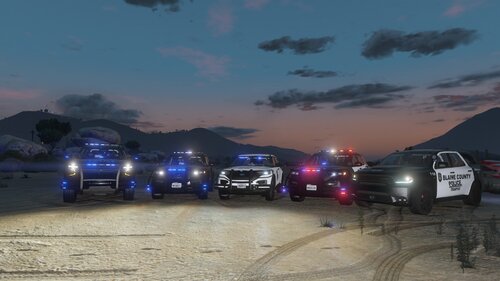
  1. This is a vehicle pack I made after making my BCPD eup pack. Thought I would share it with the LCPDFR.com community.
     
    Vehicles packs used: 
     
    (only used this pack for the durango)
    • 83 Downloads
    Updated
  2. Simple 2 car pack, hope you enjoy.
    BOTH MODELS (16 EXPLORER & 19 TAHOE) COME FROM THIS PACK. YOU CAN CHOOSE EITHER SLICKTOP OR ONE WITH THE LIGHTBAR. @Ripple thank you for the models.
     
    • 80 Downloads
    Updated
  3. This is a siren my girlfriend and I made using her "siren noises". It is just for laughs no need to hate:)
    VIDEO PREVIEW: 
     
    • 739 Downloads
    • 24 Comments
    Updated

Account

Navigation

Search

Search

Configure browser push notifications

Chrome (Android)
  1. Tap the lock icon next to the address bar.
  2. Tap Permissions → Notifications.
  3. Adjust your preference.
Chrome (Desktop)
  1. Click the padlock icon in the address bar.
  2. Select Site settings.
  3. Find Notifications and adjust your preference.