roboteQQ
Members
-
Joined
-
Last visited
Files posted by roboteQQ
-
PL
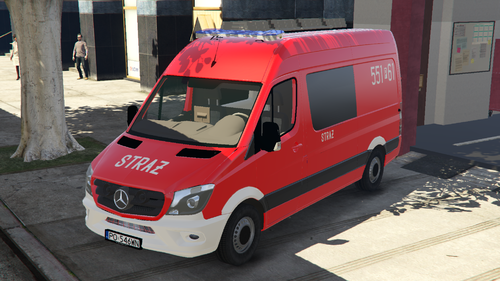
Wymagane pliki/programy:
-oryginalny pojazd https://pl.gta5-mods.com/vehicles/mercedes-benz-sprinter-facelift-brandweer-els#description_tab
-openIV https://openiv.com/
-folder mods
-ELS: https://www.lcpdfr.com/downloads/gta5mods/scripts/13865-emergency-lighting-system/
Jak zainstalować:
1. wrzuć folder ,,firetruk11" do mods>update>x64>dlcpacks za pomocą OpenIV
2. dodaj linijkę <item>dlcpacks:/firetruk11/</item> w dlclist.xml (mods>update>update.rpf>common>data)
3. zmień nazwę plików speedo.yft i speedo_hi.yft z oryginalnego pojazdu, na firetruk11.yft i firetruk11_hi.yft
4. wrzuć oba te pliki do mods>update>x64>dlcpacks>firetruk11>dlc.rpf>x64>vehicles.rpf
5. żeby oświetlenie ELS działało, nazwij plik do ELS
,,firetruk11" i wrzuć do lokalizacji: GTAV>ELS>pack_default
Możliwe błędy: bug tekstury na czarnym pasku
Miłej gry!
ENG
Requirements:
-original vehicle https://pl.gta5-mods.com/vehicles/mercedes-benz-sprinter-facelift-brandweer-els#description_tab
-openIV https://openiv.com/
-mods folder
-ELS: https://www.lcpdfr.com/downloads/gta5mods/scripts/13865-emergency-lighting-system/
How to install:
1. drag and drop the ,,firetruk11" folder to mods>update>x64>dlcpacks using openIV
2. add <item>dlcpacks:/firetruk11/</item> line to dlclist.xml (mods>update>update.rpf>common>data)
3. change the name of speedo.yft and speedo_hi.yft from the original vehicle to the firetruk11.yft
and firetruk11_hi.yft
4. add this files to mods>update>x64>dlcpacks>firetruk11>dlc.rpf>x64>vehicles.rpf
5. to keep the ELS working rename ELS file to ,,firetruk11"
and drag and drop to to the location: GTAV>ELS>pack_default
Possible bugs: glitched texture on the black strip
Have a nice game!
- 332 Downloads
Submitted -
PL
Wymagane pliki/programy:
-openIV https://openiv.com/
-folder mods
Jak zainstalować:
1. wrzuć folder ,,trailer" do mods>update>x64>dlcpacks za pomocą OpenIV
2. dodaj linijkę <item>dlcpacks:/trailer/</item> w dlclist.xml (mods>update>update.rpf>common>data)
Miłej gry!
Możliwe błędy: nie znalazłem żadnych
ENG
Requirements:
-openIV https://openiv.com/
-mods folder
How to install:
1. drag and drop the ,,trailer" folder to mods>update>x64>dlcpacks using openIV
2. add <item>dlcpacks:/trailer/</item> line to dlclist.xml (mods>update>update.rpf>common>data)
Possible bugs: I didn't find anything
Have a nice game!
- 54 Downloads
Submitted -
POLISH
Wymagane pliki/programy:
-openIV https://openiv.com/
-folder mods
Jak zainstalować:
wrzuć pliki prop_cs_ld_police2.ytd i prop_cs_ld_police2+hi.ytd do mods>x64c.rpf>levels>gta5>props>lev_des>v_minigame.rpf
W razie problemów, proszę pisać na serwerze discord: https://discord.gg/kYnKgf4na2 i oznaczyć mnie @wąsacz
Miłej gry!
ENGLISH
Requirements:
-openIV https://openiv.com/
-mods folder
How to install:
go to mods>x64c.rpf>levels>gta5>props>lev_des>v_minigame.rpf
and replace "prop_cs_ld_police2.ytd" and "prop_cs_ld_police2+hi.ytd"
In case of problems, please write in the discord server: https://discord.gg/kYnKgf4na2 and ping me @wąsacz
Have a nice game!
CREDITS
retexture by Roboteqq and Bartoil
- 1,315 Downloads
- 1 Comments
Submitted -
POLISH
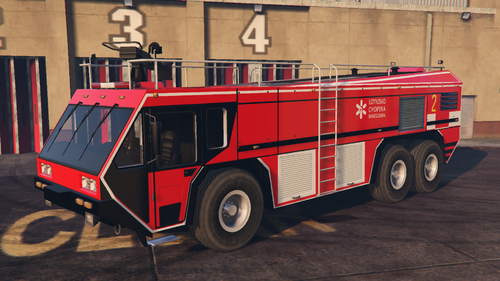
Wymagane pliki/programy:
-oryginalny pojazd https://www.gta5-mods.com/vehicles/hydramax-aerv-template#description_tab
-openIV https://openiv.com/
-folder mods
-ELS: https://www.lcpdfr.com/downloads/gta5mods/scripts/13865-emergency-lighting-system/
Jak zainstalować:
1. wrzuć folder ,,hydramax" do mods>update>x64>dlcpacks za pomocą OpenIV
2. dodaj linijkę <item>dlcpacks:/hydramax/</item> w dlclist.xml (mods>update>update.rpf>common>data)
3. zmień nazwę plików firetruk.yft i firetruk_hi.yft z oryginalnego pojazdu, na hydramax.yft i hydramax_hi.yft
4. wrzuć oba te pliki do mods>update>x64>dlcpacks>hydramax>dlc.rpf>x64>vehicles.rpf
5. żeby oświetlenie ELS działało, nazwij plik do ELS
,,hydramax" i wrzuć do lokalizacji:
ELS: GTAV>ELS>pack_default
ENGLISH
Requirements:
-original vehicle https://www.gta5-mods.com/vehicles/hydramax-aerv-template#description_tab
-openIV https://openiv.com/
-mods folder
-ELS: https://www.lcpdfr.com/downloads/gta5mods/scripts/13865-emergency-lighting-system/
How to install:
1. drag and drop the ,,hydramax" folder to mods>update>x64>dlcpacks using openIV
2. add <item>dlcpacks:/hydramax/</item> line to dlclist.xml (mods>update>update.rpf>common>data)
3. change the name of firetruk.yft and firetruk_hi.yft from the original vehicle to the hydramax.yft
and hydramax_hi.yft
4. add this files to mods>update>x64>dlcpacks>hydramax>dlc.rpf>x64>vehicles.rpf
5. to keep the ELS lighting working rename ELS file to ,,hydramax"
and drag and drop to to the location below:
ELS: GTAV>ELS>pack_default
- 117 Downloads
Submitted -
POLISH
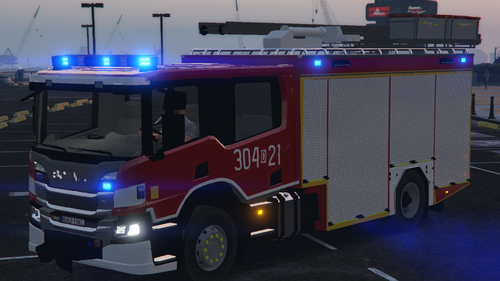
Wymagane pliki/programy:
-oryginalny pojazd https://www.gta5-mods.com/vehicles/generic-uk-rescue-engine
-openIV https://openiv.com/
-folder mods
-ELS: https://www.lcpdfr.com/downloads/gta5mods/scripts/13865-emergency-lighting-system/
Jak zainstalować:
1. wrzuć folder ,,scania" do mods>update>x64>dlcpacks za pomocą OpenIV
2. dodaj linijkę <item>dlcpacks:/scania/</item> w dlclist.xml (mods>update>update.rpf>common>data)
3. zmień nazwę plików firetruk.yft i firetruk_hi.yft z oryginalnego pojazdu, na scania.yft i scania_hi.yft
4. wrzuć oba te pliki do mods>update>x64>dlcpacks>scania>dlc.rpf>x64>vehicles.rpf
5. żeby oświetlenie ELS działało, nazwij pliki do ELS ,,scania" i wrzuć do lokalizacji GTAV>ELS>pack_default
Możliwe błędy: handling, który powoduje, że auto się ślizga, spróbuję to naprawić w następnej aktualizacji
ENGLISH
Requirements:
-original vehicle https://www.gta5-mods.com/vehicles/generic-uk-rescue-engine
-openIV https://openiv.com/
-mods folder
-ELS: https://www.lcpdfr.com/downloads/gta5mods/scripts/13865-emergency-lighting-system/
How to install:
1. drag and drop the ,,scania" folder to mods>update>x64>dlcpacks using openIV
2. add <item>dlcpacks:/scania/</item> line to dlclist.xml (mods>update>update.rpf>common>data)
3. change the name of firetruk.yft and firetruk_hi.yft from the original vehicle to the scania.yft
and scania_hi.yft
4. add this files to mods>update>x64>dlcpacks>scania>dlc.rpf>x64>vehicles.rpf
5. to keep the ELS lighting working rename ELS files to ,,scania"
and drag and drop to to the locations below:
ELS: GTAV>ELS>pack_default
Possible bugs: some slidy handling, I'll try to fix it in the next update
- 1,076 Downloads
- 1 Comments
Submitted