Doggy12
Members
-
Joined
-
Last visited
Files posted by Doggy12
-
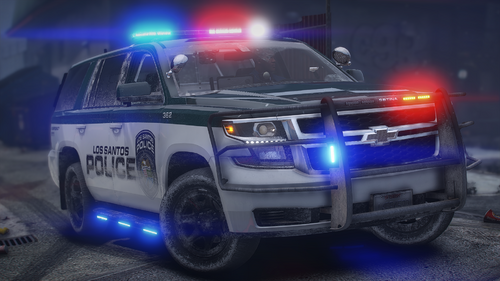
Hello, I present to you my second ever released pack, which I believe turned out nicely. This pack contains 9 vehicles as of now. NOTICE: The templates do NOT look pretty, mainly because I'm lazy and don't want to trace out the exact pillar of the vehicle, or the roof/hood, etc. However, it looks good in game. Also, if enough people request, I may make a 2020 FPIU to support Kanes model, as I believe that's the most used one, could be wrong
Vehicles Used:
2026 Tahoe: NY Modz
2025 FPIU (Not pictured): NY Modz
2021 Durango: GM
2022 Mustang Mach E: Unsure of who's base model.
2020 FPIU: NY Modz
2018 Tahoe: GM
2018 Charger: GM
2016 FPIU: GM
2011 CVPI: Underwood
I will link the pack I used below.
If you see any issues with the liveries, please let me know. I am completing and posting this at 2am, so if there's something I missed when testing it in game and grabbing photos, I do apologize.
You may use these on whatever vehicle they work on, however you can NOT claim these as your own.
The 2025 FPIU is Sheriff2, I used Red/Blue ELS, you can use whatever.
- 233 Downloads
- 3 Comments
Updated