DankAwesomeSauc
Members
-
Joined
-
Last visited
Files posted by DankAwesomeSauc
-
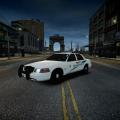
This is the Martin County Sheriff's Office skin that was made by yours truly!
This is the first proper skin I've actually made a proper go at making and I've very pleased with the outcome!
I spotted the skin of Martin County while I was watching COPS when I was off sick (upper trachea infection, ear infection, sinus infection, etc.) and thought it looked pretty neat!
----------------------------------------------------------
NOTEWORTHY POINTS
----------------------------------------------------------
The only thing particularly noteworthy is the "SHERIFF" on the rear of the CVPI. In the screenshot, the text slightly overlaps the Ford logo, but this should hopefully have been fixed.
The texture should work with any type Crown Victoria Model. Any issues, please contact me!
Please do not redistribute to any other website without my permission.
----------------------------------------------------------
DIRECTIONS OF INSTALLATION
----------------------------------------------------------
I am using SparkIV to install the skin, so please do not ask me how to install using OpenIV or anything similar.
1. Open the .rar file
2. Extract the "Martin County CVPI" to a location of your choosing.
3. Open SparkIV and go to "GTAIV" --> "pc" --> "models" --> "cdimages" --> "vehicles.img"
4. Go to the .wtd file where you have your CVPI installed, for example "police", "police2", "fbi", etc. and press "Edit"
5. Look along the sidebar on the left and search for a texture similarly named to "police_sign_1" or similar; it should have "sign" in it hopefully (if my knowledge is correct)
6. Go to Import Texture and search for where you extracted the folder.
7. Look for the "martincountycvpi" .png file and open. It should now replace the police sign you replaced.
8. Save and Close.
9. Save and Rebuild.
Any issues, please feel free to contact me; I'll be more than happy to help!
Steam: 123aidso123
GfWL: Awesome5auce124
And of course the LCPD:FR forums
- 94 Downloads
- 7 Comments
Submitted