


Reenokop
Members
-
Joined
-
Last visited
Everything posted by Reenokop
-
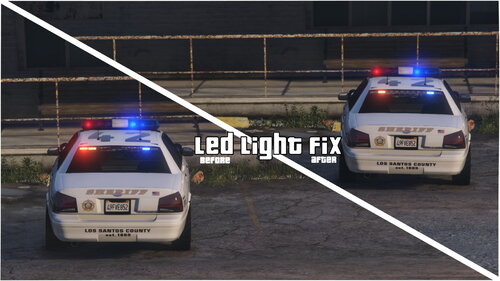 Not sure if it was intentional or not but one of the red LED lights (siren11) will skip two flashes and stay on (look at the images for a better understanding of the issue). -Features: Fixes the siren11 for siren setting IDs "1" and "13". Includes a file that mod creator can use their own mods (read the 'readme!' for more information). -Installation: 1. Go to "mods/update/update.rpf/x64/data" using OpenIV. 2. Make a backup of the 'carcols' file. 3. Replace the 'carcols' file with the one in the folder "default". -Important: Do not reupload!
- 1 comment
- 1 review
-
-

- 1
-
-
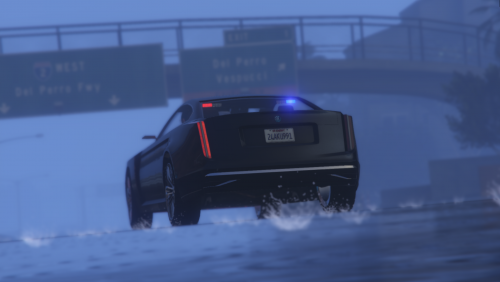 "Word has gone out that the police needed newer and faster cars but there were no American options. One cop however saw the Revolter and thought that it looks like an Albany and has probably been sued by them for copying anyway." The mod works fine but I'm not responsible for any crashes and corruptions! Also please don't reupload it anywhere! It should only be on gta5-mods and lspdfr. Credits: Rockstar Games- Original Revolter Model, it's files and textures Vx5 Voltage- Police lights and carcols Installation: Requirements- OpenIV with "mods" folder (and a custom gameconfig if the game crashes) 1 put the "policerevolter" folder in mods/update/x64/dlcpacks 2 go to mods/update/update.rpf/common/data 3 find "dlclist.xml" ,right click on it and press edit 4 under "<paths>" (in a list of similar entries) add "<Item>dlcpacks:/policerevolter/</Item>" You can edit parts of the mods at your own risk for personal use only Enjoy!
- 4 comments
- 1 review

