
Donkey Doug
Members
-
Joined
-
Last visited
Files posted by Donkey Doug
-
[Description]
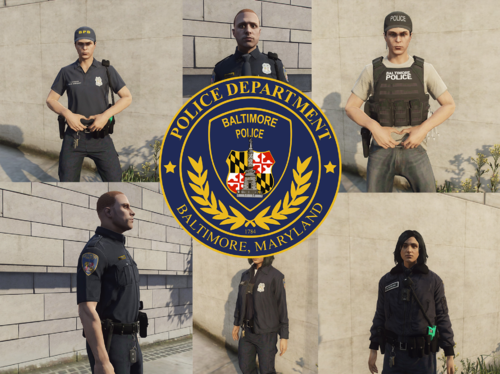
This is a EUP Pack for the Baltimore Police Departement, as far as im sure nobody else has ever created anything like this for lspdfr and I thought it'd
be cool to. This is one of my first EUP texture packs, so there might be a couple things that might not be perfect. I dont live in Baltimore so it was
hard for me to do alot of research, since theres also not much on the BPD out there. There are a couple things that I couldnt make, like the hat and the
collar pins, but other than that everything down to the pants are somewhat accurate. I made this pack on EUP 9.5, but it should work with the most recent
public release(9.3). I couldnt make the polo shirt textures for the female since it was alot more complicated, but i'll try to in the future. The SUP
folder is just for the male polo shirt, so that you can have extra textures without replacing any other textures.
[Installation]
To install this pack your going to need:
-Latest EUP Menu
-Latest EUP L&O
-Latest EUP S&R
-OpenIV
Using OpenIV, head over to mods\update\x64\dlcpacks\eup\dlc.rpf\x64
Go into "eup_componentpeds.rpf" and drag and drop all the folders in.
Then go back out to "eup_componentpeds_p.rpf" and drag and drop both folders in.
Then go back out again all the way to the sup folder in the dlcpacks in OpenIV, drag and drop the folders from the winrar archine from sup_componentpeds
Now that last step is to install the wardrobe.ini (what will have all the uniform presets)
Go to Grand theft Auto V/plugins/EUP and then drag and drop the wardrobe.ini file into the folder
[Changelog]
1.0
[List of all Included Uniforms]
Male
-Male Class A
-Male Class B
-Male Class C
-Male Windbreaker
-Male Wintercoat
-Male Pants
-Male Cargo Pants
-Male Class B Turtleneck
-Male Polo (Officer Sergeant and Detective variant)
Female
-Female Class A
-Female Class B
-Female Class C
-Female Windbreaker
-Female Wintercoat
-Female Pants
-Female Cargo Pants
-Female Class B Turtleneck
Accesories
-BPD Baseball Cap
-BPD Officer Badge
-BPD Office 2 Badge
-BPD Detective Bade
-BPD Sergeant Badge
-BPD Tactical/K-9 Vest
-BPD Patrol Vest
- 899 Downloads
- 1 Comments
Updated -
[Description]
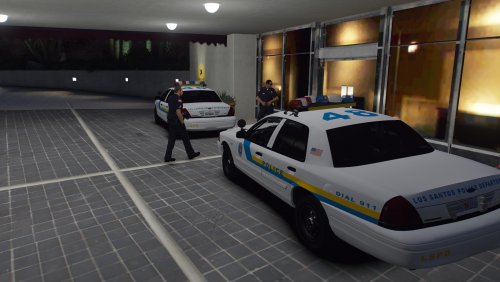
A generic ELS Ford Crown Victoria police interceptor, it has a Fedsig Vision SL lightbar with whelen avngers in the back. There's 3 different generic police liveries that comes with it, feel free to make liveries for it, just dont claim it as your own vehicle. This is my first time making a police car model, so if there's any bugs or anything please let me know.
[Requirements]
To install the vehicle correctly, you'll need:
GTA 5
ELS (needed for lights to work properly)
Gameconfig (For game to not crash on startup)
OpenIV
[Installation]
First, you should make a backup of your game, or atleast dlclist.xml, and makesure to do everything in your mods folder. Also you need to have Open IV to install this.
1: Navigate to :Grand Theft Auto V\mods\update\x64\dlcpacks
2: Drag and drop the "2010cvpi" folder into the dlcpacks folder
3: Using OpenIV navigate to :Grand Theft Auto V\mods\update\update.rpf\common\data, right click and hit edit on dlclist.xml, scroll to the bottom and hit enter on the last line, then paste this <Item>dlcpacks:/2010cvpi/</Item> into it, hit save and exit.
4. If you have ELS installed, go to :Grand Theft Auto V\ELS\pack_default\ and drag and drop 2010cvpi.xml into the folder
5. Close OpenIV and have fun!
- 797 Downloads
Updated -
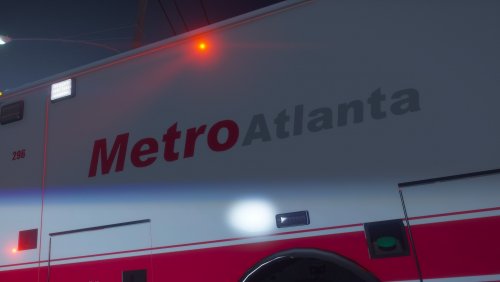
This is a Metro Atlanta livery for Medic4253's Ford E450.
Installation
To install this you first need Medic4253's E450 Ambulance, then you'll have to edit the .ytd of the vehicle model(with openiv) and replace e450_sign with my livery, hit save and start up the game.
- 176 Downloads
Updated -
[Description]
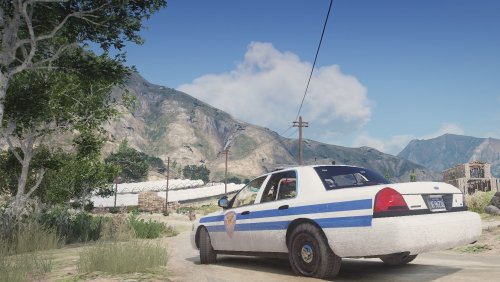
Hey Yall, here is a Linden County Sheriff's livery from the Walking Dead, this is one of my first liveries so there may be some updates later on. From what I've seen, everything is accurate except the pushbar, and a couple of the lights in the front. The Livery replaces the first sign of the vehicle(vicz_sign_1). I also made this in Photoshop with Bxbugs123's 2011 CVPI Template.
Installation Guide is in the readme
- 96 Downloads
Updated