


.png.12d9493c2df8932f0b5fd6c3c481db3b.png)
James Logan
Members
-
Joined
-
Last visited
Files posted by James Logan
-
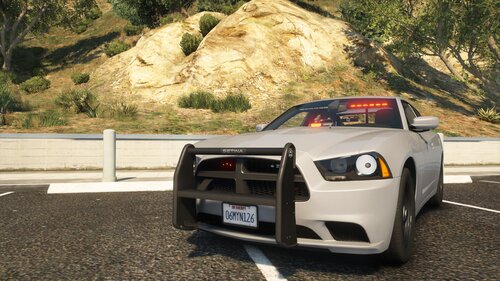
This modification includes an ELS Unmarked Pack, which is still in progress. I do it with love.
I am looking forward to constructive criticism in the comments, or on my Discord!
Join my Discord
Requirements:
Heap Limit Adjuster
Packfile Limit Adjuster
Gameconfig
Install:
1. Navigate to [...]Grand Theft Auto V\mods\update\x64\dlcpacks
2. Enable Edit Mode
3. Drag and drop the "JamesLogan" folder inside it
4. Go to [...]Grand Theft Auto V\mods\update\update.rpf\common\data
5. Locate your dlclist.xml, then right click and click "Edit"
6. Write under the latest entry the following line:
<Item>dlcpacks:/JamesLogan/</Item>
7. Press Save
8. Drag and drop the VCF files to [...]Grand Theft Auto V\ELS\pack_default
9. Finished
Spawn-names
Changelogs
Terms of use
1. You´re not allowed to re-upload the files on other websites.
2. Also, you´re not allowed to edit and upload my edited files.
3. You´re allowed to use this vehicle in FiveM. I prefer to be informed about it.
4. !Riping is not allowed!
Work in Progress!
- 5,652 Downloads
- 26 Comments
Updated -
This modification includes a Unmarked Dodge Chareger from 2016, which can not be detected as a police car, if the siren is off. I
I am looking forward to constructive criticism in the comments, or on my Discord!
Thank you for more than 2000 downloads! I love you guys!!
Join my Discord
Install:
1. Move "JamesLogan" into your FiveM Server Ressource Folder.
2. Write "start JamesLogan" into your server.cfg
3. Spawn unmarkedjl . Have fun!
Terms of use
1. You´re not allowed to re-upload the files on other websites.
2. Also, you´re not allowed to edit and upload my edited files.
3. You´re allowed to use this vehicle in FiveM
4. !Riping is not allowed!
- 4,916 Downloads
- 4 Comments
Updated -
DE
Aufgrund der hohen Nachfrage nach einer Config, welche nach der Installation von German EUP von AgentDZN in LSPDFR keine Verstärkung mit Zolluniform spawnt, sondern mit Kleidung entsprechender Bundesländer, habe ich mich dazu entschlossen diese zu erstellen.
Komm auf meinen Discord
Voraussetzungen
German EUP by AgentDZN
Polizei NRW Weste (Sofern Bundesland NRW ausgewählt)
Ultimate Backup
Installation
1. Öffne den Download
2. Wähle ein Bundesland aus
3. Schiebe die Ordner "Plugins" und "LSPDFR" in dein GTA5 Hauptverzeichnis und ersetze die vorhandenen Dateien
Changelog Version 1.0
- Nordrhein-Westfälische Config hinzugefügt
- Berliner Config hinzugefügt
- Hamburger Config hinzugefügt
- Verstärkung trägt als Langwaffe nur noch eine SMG
- State Patrol trägt Warnwesten (in jeder Config)
- Am Flughafen tragen Kollegen hauptsächlich Bundespolizeiuniform, jedoch auch Zoll und Landespolizeikleidung (in jeder Config)
- In Ganggebieten tragen die Beamten Schusssichere Westen (in jeder Config)
- Supervisor trägt Langärmlige Kleidung (in jeder Config)
Changelog Version 1.1
- Bugfix: Bundespolizei trägt nun Bundespolizeimütze
Changelog Version 2.0
- Bayrische Config hinzugefügt
- Rheinland-Pfälzische Config hinzugefügt
- Hessische Config hinzugefügt
Changelog Version 3.0
- Bremer Config Config hinzugefügt
- Schleswig-Holsteiner Config hinzugefügt
- Niedersächsische Config hinzugefügt
- Mecklenburg-Vorpommerner Config hinzugefügt
Weitere Bundesländer folgen!
Anmerkung
Es ist zu erwähnen, dass ich die für Euch zur Verfügung gestellten lediglich so bearbeitet habe, dass diese die entsprechenden Nummern der Kleidungsstücke beinhaltet. Der Ersteller der Ultimate Backup Config ist BejoIjo. Die Ersteller der Outift.xml ist das gesamte LSPDFR Team.
Aufgrund der vielen Updates von Bejoljo kann es dazu kommen, dass die BackUp Dateien alten Standard mit sich bringen.
Ich freue mich über jede konstruktive Bewertung!
Bei Fragen o.ä. kannst du gern auf meinen Discord kommen!
Nutzungsbedingungen
1. Das Hochladen auf anderen Webseiten ist nicht gestattet.
2. Auch das Bearbeiten und erneute hochladen meiner bearbeiteten Dateien ist untersagt.
Terms of use
1. You´re not allowed to re-upload the files on other websites.
2. Also, you´re not allowed to edit and upload my edited files.
- 8,025 Downloads
- 10 Comments
Updated -
This modification includes a LSPD high-vis vest for Supervisors.
Join my Discord
Requirements
EUP Law and Order 8.1
EUP Menu
Installation
1. Open download file
2. Replace folder in (mods)/update/x64/dlcpacks/eup/dlc.rpf/x64/eup_componentpeds.rpf
3. [Ingame] Choose bulletproof vest/armor: "14"; Texture: "5"
Changelog Version 1
- Added LSPD Supervisor Uniform
Terms of use
1. You´re not allowed to re-upload the files on other websites.
2. Also, you´re not allowed to edit and upload my edited files.
- 1,489 Downloads
- 1 Comments
Submitted
.thumb.png.e4ff60d081e93b1cab260769d7672290.png)


