JanX001
Members
-
Joined
-
Last visited
Everything posted by JanX001
-
Hi I recently added a lambo police car (add on) version into the game. When i press x the police computer opens up / lights and sirens work so the game registers it being a cop car, however I cannot select to stop any cars. Have i missed a step whereby i need to tell lspdfr's config the name of the car file so it registers the car being a cop car so i can stop and search cars. Or if thats not the case pls help 🙂 thx
-
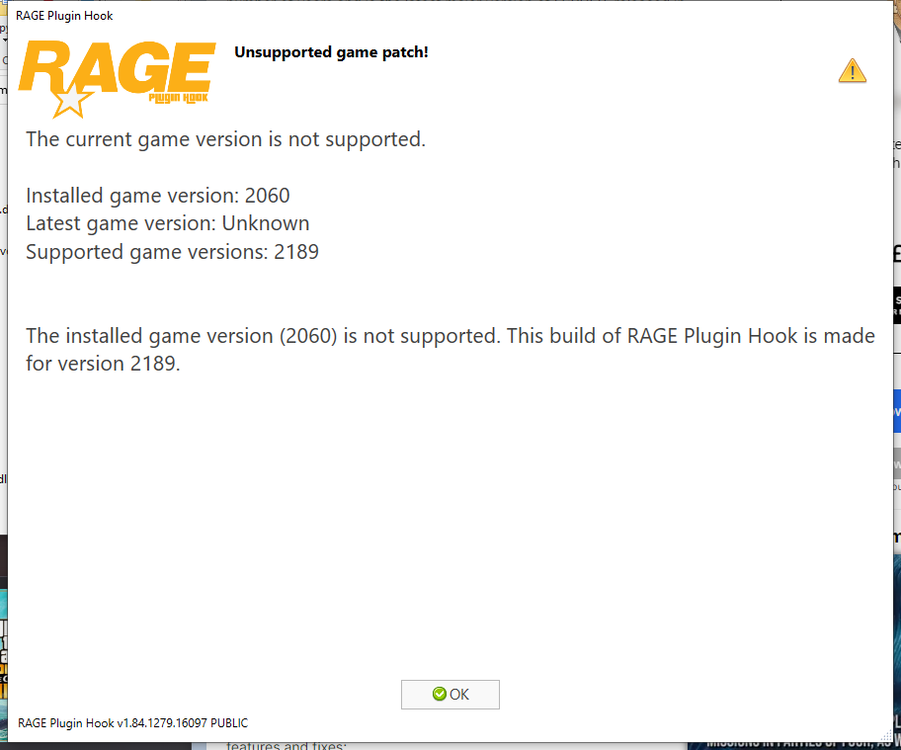
Hi, I recently updated my gta version and ofc i couldnt play until rph, scripthook v and lspdfr came out with an update. Today they all updated and i downloaded all the files and put them into action. When i launch my RPH, my gta is the right version however rph says it doesnt support it even though it is the latest download and only refers to supporting a gta version much further forward than any game version available. Can anyone help? Thanks