



Delgad114
Members
-
Joined
-
Last visited
Everything posted by Delgad114
-
 Hopefully they will be out or at least staring Production some time before September. Just trying to hunt down a few more parts which I may just end up paying someone to make the parts for me. I do but not open to join yet, I'm getting it organized etc and want to have a whole bunch of parts and HQ Dev Base models of cars for commissions available before I release it but I will soon.
 -
I took it down because it used a lot of older parts which were not that great, On top of that it wasn't really up to par with my recent releases which is why most of my cars I also took down. I bought a ton of new parts so it will be back eventually just with all high quality parts and a exact replica as I have come across one of the cars irl and took tons of interior and exterior videos and pictures etc.
-
 No, Everything is installed fine I forgot to set up the light to shine obviously forward it will be fixed in the next update.
 -
unfortunately to my knowledge, you can't obtain it. I had it built by someone a while ago. I'm right now going through the process with Cartress to purchase the Base 2020 & 2016 FPIU Base to remake it now that most of the parts that I wanted on the original are now available to purchase.
-
Its already there you might have the livery equipped just change it to the clear livery and you can adjust the color to your liking using primary and secondary (using a a trainer or menyoo)
-
It's a common glitch with ELS vehicles just equip extra 10 then repair/fix the car using Menyoo or Trainer.
-
Whoops accidently grabbed the wrong one they are both right next to each other lol, Thanks for notifying me. Everything can be configured via ELS except the front visor lights and the wig wags since they are Non ELS. If you want to change them you would have to edit the carcols, To make it easier I would recommend either buying sirentool or if you have a basic understanding how to do it you can edit them in game using the livelights plugin.
-
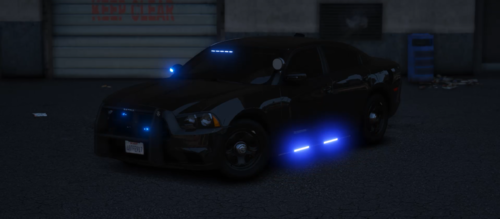
Meet my {ELS Hybrid} (Add-On) 2018 Dodge Charger Slicktop/Undercover! This time around I went with a one-brand build regarding lights, so it’s a full Federal Signal light build. The front features in the grill and lower bumper the Federal Signal Micropulse Ultra; the visors are the Federal Signal Spectralux ILS. The DRLs on the charger do wigwag (if hit by something, they will break, and just the normal DRL will run until also destroyed). There is an optional Setina PB300 (can be equipped via extra 10). No spotlight this time around to keep the sleek look on the sides of the charger featuring near the wheel wells more Micropulse ultras; Typical with my UC/ST build's the under carriage has side runners. On the rear of the vehicle, Near the License plate we have two Federal Signal Micropulse Ultras (12 LED), and the rear visor deck is the Federal Signal CN Signal Master. In the interior, we have the normal Havis center console with HAVIS Cad system, Q2 Radio Federal Signal Smart Controller with the Panasonic Dash mounted dashcam, a Garmin GPS mounted overhead, and a Wraith Radar system. The dome light on the car is functioning. This time we have a Setina Half partition due to these chargers being small; the half partition allows the driver seat to be adjustable like it didn’t have the partition. The right side of the vehicle is for transport, and the left can be used for extra storage, simulated with a set of cones on the seats. In the trunk, we have some police gear and cones. That’s about it for the charger; hopefully, you all enjoy it. This is an ELS hybrid, meaning it uses both ELS and Non-ELS; This Charger has less than 20 sirens, Meaning Sirenlimit adjuster is not needed since it’s not 32 sirens but I still recommend it. If you would like Sirenlimit Adjuster Download it here, Feel Free to Pick Up My Other Charger! Little Spec Sheet If You Want To See What Has Been Added.
-
 Are you sure you installed the ELS properly?
 -
I'll have a look is it the Add on or Replace
-
When you get it on/off repair the vehicle
-
Meet my {ELS} (Add-On/Replace) 2014 Dodge Charger PPV!! This Vehicle Features The STL Raptor Visor kit thats become a standard with my undercover fleet, Whelen Ions around various spots of the vehicle auxilary reverse lights (reverse lights have also been installed on the whelen ions by the plate) Havis CAD & Center Console Motorola Q2 Radio, 4200 Mini Siren Control Box, Sound Off Domelight and a Panasonic Dash Cam, Setina Partitions with a Remington 870 and M4 Rifle the Transport area has the standard Setina Window Guards and the door handles removed the Trunk is filled with tons of equipment. a little LTE antenna puck on the roof to keep the sleek design of the charger. The Setina Pushbar that has been seen on is a toggle option so if you want to remove it or add it back on just equip or unequip Extra 10. (Pushbar off seen in the last picture) The charger also has reflective decals (when changing liveries make sure to also replace "reflective" with the livery) It also serves compatibility with Alexguirre's "Spotlight 1.4" Plugin.
-
 Can confirm they work if you want to further confirm check the credits of the cars and if the FPIU came from Kane104 this will work.
 -
.png.aff40230aca6e9d204d64745de3f23b2.png) The black units are ghost
The black units are ghost -
.png.68efd3695ea056aa37d943c64d93426c.png)
From the album: 2023 Ford F-150 Lightning Teser
-
.png.e4625a9ed1942ecf84786bd62316144a.png)
From the album: 2023 Ford F-150 Lightning Teser
-
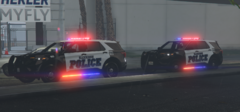
From the album: {ELS} 2023 FPIU (Teaser)
-
-
-
.thumb.jpg.ef36267e8764c66d0402d0b302e4d0f8.jpg) I agree with this 100% at the end of the day their the same Police Officers the only difference is their cars have a new look still the same lighting set up and Siren
I agree with this 100% at the end of the day their the same Police Officers the only difference is their cars have a new look still the same lighting set up and Siren -
Well its a very strange move but the NYPD has done it all police cars they get from 2023 and on are going to be outfitted with this new livery some people like it some people don't but no much we can do about it this livery is a interactive livery as the NYPD added a QR code that takes you to the NYPD page so I have put that next to the rear glass windows and they really do take you to the NYPD website for more info of this livery take a look at the first trailer I made for a livery ENJOY! Credits go to C13 For the FPIU used here from "[32 sirens][DLC][ELS HYBRID] Shawnee Kansas Police Mega Pack 1.0.0" Known Bugs Im not sure if its only in my game but for some reason the Unit number is on top twice even tho clearly in the livery it shows its only their once not sure what thats about
-
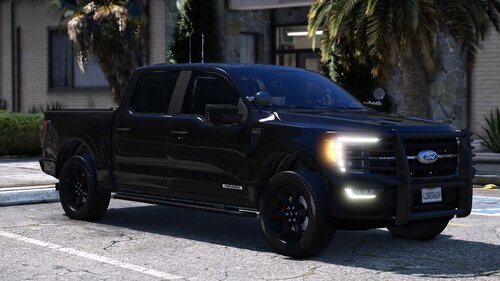 Absolutely beautiful I have been waiting for someone to take the chrome s*** off the F-150 and make a black out package although it would be nice to get that little chrome bar in the grill painted black but hey not a biggie considering how great the lights look and the rest of the Truck
 -
.png.7bf1685529445f0bf76f2ffc37552643.png)
From the album: 2023 FPIU Holiday Special HPD
-
.png.1c8e0809b4923949463801c4dc634424.png)
-
.png.bd9abcc3b4958f45520ae174daf01dfa.png)



.png.aff40230aca6e9d204d64745de3f23b2.png)
.png.68efd3695ea056aa37d943c64d93426c.png)
.png.e4625a9ed1942ecf84786bd62316144a.png)
.thumb.jpg.ef36267e8764c66d0402d0b302e4d0f8.jpg)
.png.7bf1685529445f0bf76f2ffc37552643.png)
.png.1c8e0809b4923949463801c4dc634424.png)
.png.bd9abcc3b4958f45520ae174daf01dfa.png)