


ChipTsuki
Members
-
Joined
-
Last visited
Everything posted by ChipTsuki
-
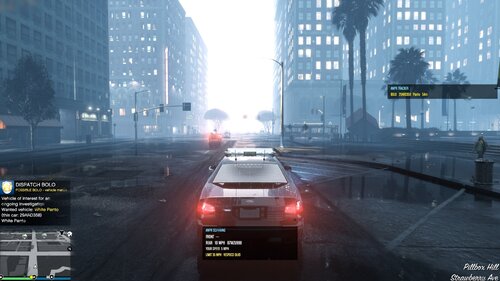 PatrolANPR - ANPR + Speed Radar for LSPDFR (GTA V Enhanced) Version 2.1 - by ChipTsuki DESCRIPTION PatrolANPR turns your patrol car into a modern traffic unit: an automatic plate reader (ANPR / ALPR) and a front + rear speed radar, built for LSPDFR on GTA V Enhanced. Plate data comes from CommonDataFramework - the same database Policing Redefined uses - so when the ANPR flags a car, Policing Redefined shows the same result when you stop it. Everything on screen is drawn with GTA's own UI (notifications, text and boxes), so it stays visible with HDR, ReShade/NVE, RivaTuner and DLSS Frame Generation, where overlays drawn by RAGE Plugin Hook can be invisible. FEATURES ANPR (plate reader) - Reads plates of cars around you automatically (20 m, only cars with a driver - no alerts for parked cars). - Flags: STOLEN VEHICLE, OWNER WANTED, BOLO, OWNER LICENCE SUSPENDED (expired licences, registration and insurance can be enabled in the ini). - Alert = GTA notification (plate, colour, model, owner) + beep + map dot (red = stolen / wanted, yellow = BOLO, orange = licence). - Realistic pace: at most one ANPR alert every 2.5 minutes (configurable); each plate is re-checked only every 10 minutes. - ANPR TRACKER list on the right: last 5 flagged cars with live distance. Dispatch BOLOs (simulated) - Occasionally dispatch issues a BOLO for a car you pass: exact plate, partial plate or model + colour, with a reason (hit and run, robbery...). - The BOLO is written into the car's CommonDataFramework record for 20 minutes, then removed. Speed radar - Small radar box (bottom centre): FRONT and REAR target speed + plate, YOUR SPEED and the speed LIMIT of the road with its street name. - A target turns red with "(+XX)" when it is 5+ over the limit of ITS road. - Big speeders (15+ over): the reading AUTO-LOCKS for 10 s (like a real radar), an entry goes into the SPEED LOG list (kept 2 minutes), plus a SPEEDING notification and a yellow map dot. - Measures only moving cars on your level with a clear line of sight: ignores cars behind walls, median barriers and buildings, on overpasses or on roads under bridges. - Speed limits are estimated from the street name (see Known issues) and can be overridden per street in the ini. Patrol behaviour - One key: F6 switches ANPR + speed radar on / off. - Every time you get into a police vehicle the radar starts OFF and a message reminds you to press F6. - Emergency lights / siren on: the radar switches off and stays off until you press F6 again. - ANPR pauses automatically during pursuits and traffic stops. REQUIREMENTS - GTA V Enhanced (tested on 1.0.1158.16) - RAGE Plugin Hook for Enhanced (tested on 1.132) - LSPDFR 0.4.9 for Enhanced - CommonDataFramework (tested on 1.0.0.10) - REQUIRED for ANPR (without it the speed radar still works, ANPR stays off) - Recommended: Policing Redefined (uses the same CDF data) Legacy (non-Enhanced) GTA V: not tested. INSTALLATION 1. Install the requirements above. 2. Copy the "plugins" folder from the download into your main GTA V folder, so you get: GTA V\plugins\LSPDFR\PatrolANPR.dll GTA V\plugins\LSPDFR\PatrolANPR.ini 3. Start LSPDFR as usual - the plugin loads with your other LSPDFR plugins. A few seconds after going on duty you get a "PatrolANPR - Loaded" notification. 4. Get into a police vehicle and press F6. Uninstall: delete PatrolANPR.dll and PatrolANPR.ini. CONTROLS F6 - switch ANPR + speed radar on / off (changeable: ToggleKey in the ini). That is the only key. CONFIGURATION (PatrolANPR.ini) Every option is explained inside the ini. Main sections: - [General]: toggle key, radar off when entering a vehicle, emergency lights behaviour, pause in pursuits / traffic stops, line-of-sight and height checks. - [ANPR]: range, which flags alert, licence options, parked cars, re-check time, map dots, alert pause, sound. - [SpeedRadar]: range, road speed limits, tolerance, big-speeder threshold, auto-lock, units, position and size of the box. - [Tracker]: ANPR TRACKER and SPEED LOG lists (show/hide, position, how long entries stay). - [DynamicBOLO]: on/off, chance, type of match, frequency, lifetime, reasons. - [SpeedLimits]: per-street overrides, e.g. Vespucci Blvd = 40 KNOWN ISSUES / LIMITATIONS - GTA has no real speed limits. Limits are estimated from the street name: freeways 65 mph, highways / routes 55, tunnels 45, countryside 45, city streets 35. Use [SpeedLimits] to correct single streets. - ANPR flags are as frequent as CommonDataFramework makes them; the alert pause (2.5 min) keeps it realistic. - "Owner wanted" / "licence suspended" refer to the REGISTERED OWNER, not necessarily the driver - check the driver when you stop the car. - The radar only sees what GTA has spawned around you (max 16 nearby vehicles, speed radar 60 m). - The line-of-sight check uses the game's collision: very thin objects (poles, fences) may not block a reading. - Whether Policing Redefined displays the dispatch BOLO in its menus has not been confirmed (the BOLO is written into the CDF record). - The optional dispatch voice (DispatchAudio, off by default) uses generic LSPDFR scanner lines that do not always fit the hit. - Tested on one setup (GTA V Enhanced + NVE + ReShade/RenoDX HDR + Policing Redefined). Please report problems on other setups. REPORTING BUGS Please post in the comments with your RagePluginHook.log (main GTA V folder) and a short description of what happened. All plugin lines start with [PatrolANPR]. CHANGELOG 2.1 - "PatrolANPR - Loaded" message now waits until the going-on-duty screen fade is over (it was not visible before). 2.0 - Each car is judged by the speed limit of its own road (fixes wrong readings near overpasses / crossing roads). Speed radar ignores cars more than 2.5 m above / below you. Licence alerts: suspended only (configurable). "(+XX)" over-limit display. 1.9 - Separate SPEED LOG list, AUTO-LOCK of big speeders. 1.8 - Radar starts off when entering a police vehicle + F6 reminder; simpler radar box; calmer defaults. 1.7 - ANPR TRACKER list, dynamic dispatch BOLOs. 1.6 - Speeder alerts, optional dispatch voice, GPS route option. 1.5 - Emergency lights switch the radar off until F6. 1.4 - Road speed limit, only occupied vehicles, moving targets only. 1.3 - Line-of-sight and bridge / height checks. 1.2 - Alert pause, serious flags only by default. 1.1 - Fixed vehicle detection on GTA V Enhanced. 1.0 - First version. CREDITS - LSPDFR team - LSPD First Response - RAGE Plugin Hook team - CommonDataFramework authors - vehicle / ped database - Policing Redefined authors (compatible data) AI disclosure: the plugin's code and this description were created with the help of an AI assistant (Claude by Anthropic). Every feature listed above was tested in game by the author. PERMISSIONS - Do not re-upload this mod, in whole or in part, to any other website or Discord server. The only official download is on LCPDFR.com. - You may modify it for your own personal use. - Do not release modified versions without my permission. - You may feature it in videos and streams - a link to the LCPDFR.com page is appreciated. - Please report bugs on the LCPDFR.com page with your RagePluginHook.log.
