Creators: Due to background reprocessing of files, approvals and file security checks may be delayed. Thanks for your patience.

Nemes 365
Members
-
Joined
-
Last visited
Files posted by Nemes 365
-
[Author: Nemes]
[Version: 2.0.0]
[Release date: 21.1.2021]
[Lightning format: Non-ELS]
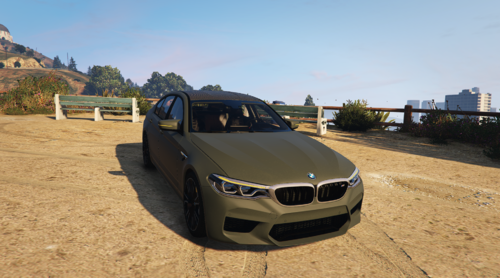
[Vehicle: BMW M5 2018]
[Discord: nemes_178]
Notes:
- Vehicle is privided in ADD-on only format
- This car is provided in NON-ELS version only
- You dont have to ask for permission to use this on a FiveM/FivePD server
- Templates are included
- This vehicle is my first ever release
- installation instructions included
- Vehicle spawn name is: bmwm5
- We expect u know how to read and know how to use common sense
If there are any issues with this car or questions/concenrs please feel free to let me know in the comments or DM me on the discord! (nemes_178)
(note: I will reply faster on discord then in comments.)
If u need help installing this car let me know and i will be heppy to assist!
Car comes in with 3 different lighting styles:
- All lights blue (BMW M5 2018 [BLUE-BLUE])
- Red and blue lights (BMW M5 2018 [RED-BLUE])
- All lights red (BMW M5 2018 [RED-RED])
Installation instructions:
NOTE: For vehicle to work properly u will have to install lux_vehiclecontrol!
- FiveM:
1. When u have opened file called "BMW M5 2018 2.0.0" u will need to choose between different lightning styles (between line 25 and 28 u have explained what i mean)
2. When u have chosen and opened the lightning style folder that u want u open folder named "FiveM Ready"
3. Now u will see folder named "bmwm5" and u copy it into your FiveM server resource folder
4. U have to add following line in your server.cfg: "start bmwm5"
- GTA V (in mods folder):
1. To install this vehicle into your game u will have to use OpenIV (https://openiv.com/)
2. When u have opened file called "BMW M5 2018 2.0.0" u will need to choose between different lightning styles (between line 25 and 28 u have explained what i mean)
3. When u have chosen and opened the lightning style folder that u want u open folder named "GTA V"
5. (DONT FORGET TO ENABLE "EDIT MODE") In OpenIV u will go under "GTA V > mods > update > x64 > dlcpacks" and u will have to drag and drop the folder named "bmwm5" into folder that u just opened (dlcpacks)
6. Now u will have to go into path "GTA V > mods > update > update.rpf > common > data" there u will find file named "dlclist.xml"
7. U right click on the file named "dlclist.xml" and press "Edit" and the file "dlclist.xml" will open in editable mode and in there u will have to add a line "<Item>dlcpacks:/bmwm5/</Item>" and then click SAVE
- GTA V:
1. To install this vehicle into your game u will have to use OpenIV (https://openiv.com/)
2. When u have opened file called "BMW M5 2018 2.0.0" u will need to choose between different lightning styles (between line 25 and 28 u have explained what i mean)
3. When u have chosen and opened the lightning style folder that u want u open folder named "GTA V"
5. (DONT FORGET TO ENABLE "EDIT MODE") In OpenIV u will go under "GTA V > update > x64 > dlcpacks" and u will have to drag and drop the folder named "bmwm5" into folder that u just opened (dlcpacks)
6. Now u will have to go into path "GTA V > update > update.rpf > common > data" there u will find file named "dlclist.xml"
7. U right click on the file named "dlclist.xml" and press "Edit" and the file "dlclist.xml" will open in editable mode and in there u will have to add a line "<Item>dlcpacks:/bmwm5/</Item>" and then click SAVE
Toggable Extras:
- Extra 1 [roof] (Lightbar)
- Extra 2 [Front windshield] (Slim/stealth visor bar)
- Extra 3 [Rear window] (Whelen Inner Edge RST)
- Extra 4 [Front windshield] (Whelen Avengers)
- Extra 5 [On trunk] (ALPR)
- Extra 6 [Front bumper] (Rambar)
- Extra 7 [Between front seats] (Gun rack with two m4 equipped)
- Extra 8 [Front windshield] (Camera Coban EDGE)
- Extra 9 [Trunk] (Cones, Police tape, Fire extinguisher, Spike strip, Road flares)
- Extra 10 [Trunk] (M4 Rifle, Swat riot shield, Battering ram)
This download includes:
- readme.txt
- credits.txt
- Vehicle Template
- FiveM Ready and GTA V ready files
Updates:
Version: 1.0.1
- Increised car speed
- Increised car topspeed
- Little batter braking
- Better turning
- Added GTA V ready files
- Installation instructions
Version: 1.0.2
-Fixed lights on mirrors not opening with doors
-Added roof to template
Version: 2.0.0
Fixes:
-Minor fixes on EXTRA 3 to hide shining lights when lights turned off
-Players sitting position while sitting in the vehicle
-Aligned hands with steering wheel
-Minor not noticeable fixes on EXTRA 2
-And other minor fixes to improve the vehicle
Added:
-Rambar (not 100% compatible with vehicle model but it works) [Rambar was added to the vehicle because of numerous requests]
-Gun rack with two m4 rifles attached to it
-Camera coban EDGE
-Cones, Police tape, Fire extinguisher, Spike strip, Road flares, M4 rifle, Swat riot shield, Battering ram
-Possibility to turn on NEON lights under the vehicle
Known issues:
-There is no known issues at this time being!
-If u have found an issue plese contact me via discord! (nemes_178)
With downloading this file u automaticly agree to these terms:
- Im not responsible in anyway for your game crahses, caused damage to your game, computer, file lost, etc. as resoult of downloading or installing the content i have provided for you!
- Do not claim any of the content included in this download as yours!
- You may not republish/re-upload any content incuded in this download to any website or discord!
- Do not attempt to unlock this model in any way!
- Do not attempt to sell, re-sell or redistribute any contnent included in this download in any way!
- You agree to me not paying for any medical bills if in case of seizure due to lights, etc.!
Lightning showcase:
- https://streamable.com/hg3d37
- https://streamable.com/41c4en
- https://streamable.com/h3cwol
- https://streamable.com/attr9g
- https://streamable.com/bq9jvr
- https://streamable.com/kvoebo
- https://streamable.com/y6v1rz
- https://streamable.com/0xt0uk
- 11,425 Downloads
- 13 Comments
Updated