
Vause
Members
-
Joined
-
Last visited
Files posted by Vause
-
Overview
Enhanced HUD V is a clean, modern, and highly customizable HUD and vehicle dashboard mod for Grand Theft Auto V. Designed with immersion in mind, it provides essential stats and vehicle feedback without cluttering your screen.
Key Features
Enhanced Stats: Clean circular status meters for HP and Armor complete with a dynamic low-health blinking warning.
Advanced Speedometer: Features real-time gear detection, animated RPM dials and dynamic speed-based dial colors.
Functional Dashboard Indicators: Real-time icons for Headlights, High Beams, Engine Health warnings, Parking Brake, Traction Control, ABS, and Turn Signals with authentic audio click effects.
In-Game Settings Menu: Press F11 in-game to open a fully interactive configuration menu to adjust positions, scales, volumes, and keybinds in-game.
Controls & Usage
F11: Default key to open or close the Enhanced HUD V configuration menu.
Custom Keybinds: Fully configurable via the in-game menu or the EnhancedHUDV.ini file.
Installation
Ensure you have ScriptHookV and MinHookX64 installed in your main Grand Theft Auto V directory.
Drag and drop all contents from the Grand Theft Auto V folder inside the archive directly into your main GTA V game directory (where GTA5.exe is located).
Compatibility
The following software is known to cause the HUD to not appear in game :
MSI AfterBurner Overlay
RivaTuner Statistics Server Overlay
ENB
Please close these applications to avoid any issues in game. Thanks to Dark_crispy_15 and HowardXXXLi for finding this out!
Credits & Support
Created by: Vause
Discord Support: vause. (make sure to include the dot at the end!)
Known Issue : HUD blinkers aren't synced with in-game blinkers. (minor UI issue)
- 2,448 Downloads
- 26 Comments
Updated -
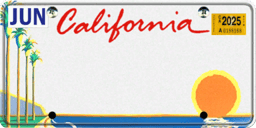
California Plates
jut drag and replace in Grand Theft Auto V\plugins\LSPDFR\CalloutInterface\textures\plates
Requirements
Enjoy 🙂
- 795 Downloads
- 4 Comments
Updated