Skip to content
View in the app

A better way to browse. Learn more.

LCPDFR.com

A full-screen app on your home screen with push notifications, badges and more.

To install this app on iOS and iPadOS
  1. Tap the Share icon in Safari
  2. Scroll the menu and tap Add to Home Screen.
  3. Tap Add in the top-right corner.
To install this app on Android
  1. Tap the 3-dot menu (⋮) in the top-right corner of the browser.
  2. Tap Add to Home screen or Install app.
  3. Confirm by tapping Install.

SelugeGaming

Members
  • Joined

  • Last visited

Files posted by SelugeGaming

  1. Note: I've uptdated the link because the old was the wrong link. So there is the good one. I'm really sorry for this mistake. 
     
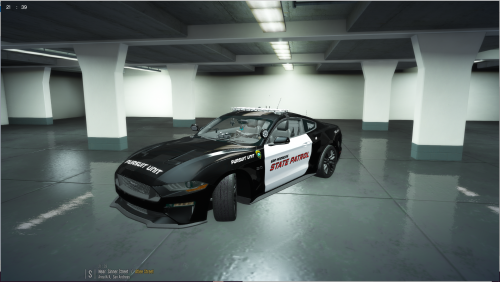
    Here's my second texture !
    This texture is inspired by the livery of Need for Speed Hot Pursuit. 
    It was made for NorthernScot's 2019 Ford Mustang, It was made for Ripple's 2019 Ford Mustang, here (download required) :
     
     
    You can choose between a slicktop version and a version with the Whelen Liberty lightbar.
     
    Inside the file:
    -2 YTD Textures (police4 et fbi)
    -Templates
    -Read Me.txt (How to install and credits)
     
    FOR ANY QUESTION or HELP
    Contact me at albatrossgamingcontact@gmail.com or
    leave a feedback on my LCPDFR.com download page.
    • 163 Downloads
    Submitted

Account

Navigation

Search

Search

Configure browser push notifications

Chrome (Android)
  1. Tap the lock icon next to the address bar.
  2. Tap Permissions → Notifications.
  3. Adjust your preference.
Chrome (Desktop)
  1. Click the padlock icon in the address bar.
  2. Select Site settings.
  3. Find Notifications and adjust your preference.