Skip to content
View in the app

A better way to browse. Learn more.

LCPDFR.com

A full-screen app on your home screen with push notifications, badges and more.

To install this app on iOS and iPadOS
  1. Tap the Share icon in Safari
  2. Scroll the menu and tap Add to Home Screen.
  3. Tap Add in the top-right corner.
To install this app on Android
  1. Tap the 3-dot menu (⋮) in the top-right corner of the browser.
  2. Tap Add to Home screen or Install app.
  3. Confirm by tapping Install.

Nelad

Members
  • Joined

  • Last visited

Files posted by Nelad

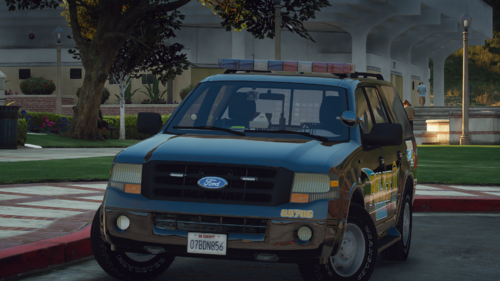
  1. Here is a 2013 Ford Expedition that I created. This vehicle can be both marked and unmarked with majority of the lighting equipment being toggleable. I did not base this vehicle off of any specific department or state, it is fictional. There are screenshots of the vehicle below thanks to Crazy_Creed72.
     
    The livery is NOT included.
     
    Extra 1: Lightbar
    Extra 2: Visor Light
    Extra 3: Dash Light
    Extra 4: Grill Light
    Extra 5: Rear Deck Light
    Extra 6: Plate Lights (Rear)
    Extra 7: Spotlight (Down)
    Extra 8: Spotlight (Up)
    Extra 9: Partition
    Extra 10: Cargo Partition
    Extra 11: Seat Organizer
    • 2,292 Downloads
    • 5 Comments
    Submitted

Account

Navigation

Search

Search

Configure browser push notifications

Chrome (Android)
  1. Tap the lock icon next to the address bar.
  2. Tap Permissions → Notifications.
  3. Adjust your preference.
Chrome (Desktop)
  1. Click the padlock icon in the address bar.
  2. Select Site settings.
  3. Find Notifications and adjust your preference.