Skip to content
View in the app

A better way to browse. Learn more.

LCPDFR.com

A full-screen app on your home screen with push notifications, badges and more.

To install this app on iOS and iPadOS
  1. Tap the Share icon in Safari
  2. Scroll the menu and tap Add to Home Screen.
  3. Tap Add in the top-right corner.
To install this app on Android
  1. Tap the 3-dot menu (⋮) in the top-right corner of the browser.
  2. Tap Add to Home screen or Install app.
  3. Confirm by tapping Install.

KustomKreations

Members
  • Joined

  • Last visited

Files posted by KustomKreations

  1. Hello all, here we have another explorer. This is a replica of a real life explorer. I mainly focused my work on the ELS lights. They are R/B/W and are as accurate as I could make them to mimic a real pattern including park mode. I will most likely update this model and possible add more models. Please let me know what you think. 
    • 1,061 Downloads
    • 3 Comments
    Updated
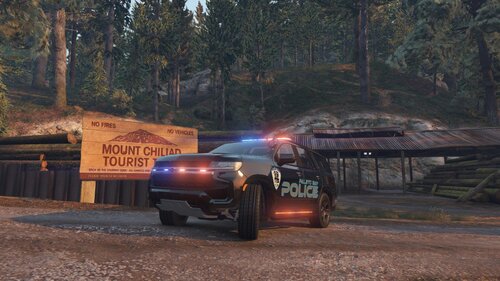
  2. WIP Tahoe Pack. I will periodically update when i have time. Please let me know if something is wrong. Thanks. 
     
    Photo creds go to my friend LukeDeSanta. Make sure you check out some of his work on this site. 
    • 3,233 Downloads
    • 11 Comments
    Updated
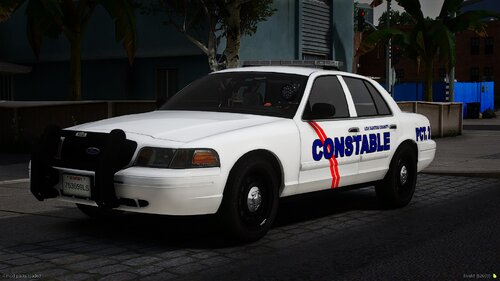
  3. Just your basic Crown Vic. Is a WIP so will update later maybe. Not perfect as i am learning so take this and do what you will.  
     
    Photo Creds go to LukeDaSanta for taking the time to take them. Thank you!
    • 547 Downloads
    • 1 Comments
    Updated
  4. Just a CVPI I put together. Let me know what you think! 


    • 1,251 Downloads
    Updated

Account

Navigation

Search

Search

Configure browser push notifications

Chrome (Android)
  1. Tap the lock icon next to the address bar.
  2. Tap Permissions → Notifications.
  3. Adjust your preference.
Chrome (Desktop)
  1. Click the padlock icon in the address bar.
  2. Select Site settings.
  3. Find Notifications and adjust your preference.