
H1 Development
Members
-
Joined
Files posted by H1 Development
-
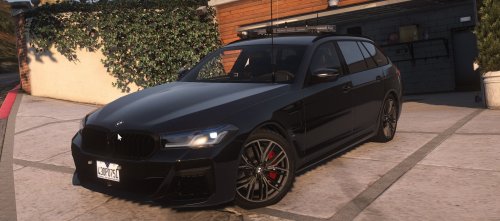
This is a BMW 530I with a light setup based off of the Vicpol 2021 530d wagon!
Yes it doesn't come with a livery but it comes with a template so if you want you can make your own!
I've probably broken something in this model so don't be afraid to add a comment down below with that problem and I'll try to respond as soon as possible!
By Downloading this model you agree to the following terms:
I'm not liable for any damages to your game and/or server.
You agree not to distribute them to other platforms without my permission first.
You have permission to make liveries and upload them, but you must have a link back to my vehicle.
You are not to claim ownership of my models.
- 3,687 Downloads
- 5 Comments
Updated -
Hi all,
This is my first release/finished vehicle. It was extremely fun to put together and I hope you all enjoy.
There is a read me and credits in the download. Massive thanks to everyone who contributed.
As this is my first model all CONSTRUCTIVE feedback is amazing and would be a big help with my future models.
This was a quick video I whipped up to showcase the lights. This was my first time making a video like this so hopefully when my next car come out it'll be a bit better :).
- 1,311 Downloads
- 5 Comments
Updated