RidgedDolphin1
Members
-
Joined
-
Last visited
Files posted by RidgedDolphin1
-
Thanks for downloading.
Be on the lookout for more livery releases!
Livery was made by me, RidgedDolphin1
Use this any way you'd like, edit it, resize it, I don't care, as long as you credit me for original files. The livery is based off of GM's 2015-2020 Tahoe template, so it will work with all models using GM's Tahoe base. Livery is based off of the Burleson Texas Police Department. They use both Tahoes & Chargers, but I only included the Tahoe in this release. If you'd like to see more cars included, feel free to ask in the comments!
As a founding member of Candyland Development, I'd like to invite you to our discord to check out our services! We offer custom liveries, scripts, and cars.
Check us out at discord.gg/6rgThwy .
Installation using OpenIV:
1. Un-Zip the downloaded file into a normal folder (not a zip or .rar file)
2. Open your vehicle's .ytd and/or _hi.ytd
3. Look for the file that is currently your livery. (might be named something like charger_sign_1 or chr_sign_1, but it depends on the car).
4. Right click, replace, find where you un-zipped the files to, and open.
5. Your original file should now be replaced by the new one.
6. Remember, if your vehicle as a .ytd AND a hi_.ytd then you have to replace it in BOTH files in order for it to work.
7. Save and let it load.
8. Replace you .ytd and/or your _hi.ytd files in your game with the ones in OpenIV.
9. Start your game and enjoy!
- 87 Downloads
- 3 Comments
Updated -
Thanks for downloading.
PSA : Pictures only show the Borough of East Greenville specific version, although there is a lore-friendly version included.
Use this as you wish, but don't take credit for it, you didn't make it. The livery is based off of Kane's template, so it will work with all 2016 Explorers using his base and/or template. Livery is based off of the Borough of East Greenville Police Department's 2016-2019 Explorer, with the only difference being the unit number being a different font.
Be on the lookout for my upcoming releases!
Livery was made by me, RidgedDolphin1
Vehicle in Picture Made by Finite Modifications : [Non-ELS] Whelen Legacy Pack [6 Vehicles][FiveM-Ready] - Vehicle Models - LCPDFR.com
Installation using OpenIV:
1. Un-Zip the downloaded file into a normal folder (not a zip or .rar file)
2. Open your vehicle's .ytd and/or _hi.ytd
3. Look for the file that is currently your livery. (might be named something like charger_sign_1 or chr_sign_1, but it depends on the car).
4. Right click, replace, find where you un-zipped the files to, and open.
5. Your original file should now be replaced by the new one.
6. Remember, if your vehicle as a .ytd AND a hi_.ytd then you have to replace it in BOTH files in order for it to work.
7. Save and let it load.
8. Replace your .ytd and/or your _hi.ytd files in your game/server files with the ones in OpenIV.
9. Start your game and enjoy!
- 36 Downloads
Submitted -
Thanks for downloading.
Be on the lookout for my upcoming Tennessee State Trooper Pack!
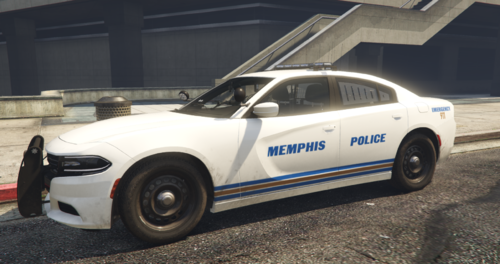
PSA : Livery is in fact 4K, but the model in the screenshots is only a 2K car so it looks 2K on that car.
Livery was made by me, RidgedDolphin1
Use this as you wish, but don't take credit for it, you didn't make it. The livery is based off of Matt's template, so it will work with a fair amount of 2015+ chargers. Livery is based off of the Memphis Police Department's 2015 charger, with the only difference being the unit number on the rear bumper, and not on the rear spoiler above the tail light. This was done simply due to looking better in my opinion.
Installation using OpenIV:
1. Un-Zip the downloaded file into a normal folder (not a zip or .rar file)
2. Open your vehicle's .ytd and/or _hi.ytd
3. Look for the file that is currently your livery. (might be named something like charger_sign_1 or chr_sign_1, but it depends on the car).
4. Right click, replace, find where you un-zipped the files to, and open.
5. Your original file should now be replaced by the new one.
6. Remember, if your vehicle as a .ytd AND a hi_.ytd then you have to replace it in BOTH files in order for it to work.
7. Save and let it load.
8. Replace you .ytd and/or your _hi.ytd files in your game with the ones in OpenIV.
9. Start your game and enjoy!
- 213 Downloads
Updated

.thumb.png.d07897d9ab72d80b263ebf73a77f3bf6.png)