
Mr.Gamer
Members
-
Joined
-
Last visited
Files posted by Mr.Gamer
-
Overview
MoveThatPed is an immersive LSPDFR plugin for Grand Theft Auto V that transforms your real-life microphone into a functional police megaphone within the game. This plugin enhances role-playing experiences by allowing officers to interact with civilians and suspects using voice commands processed through realistic megaphone audio effects.
tuj06SyZAy6Nq5NDgYgADw.mp4 Credits to SrVenuh36 for the above clip
Key Features
🎙️ Real-time Voice Processing
Captures audio from your microphone with minimal latency Processes your voice through a custom audio pipeline that simulates police megaphone characteristics Applies professional-grade audio effects including: Bandpass filtering centered around 1800Hz for that authentic "tinny" megaphone sound Subtle distortion to simulate speaker compression Gain adjustment for proper volume levels Echo effect to simulate sound reflection in urban environments Background noise simulation for realism 🚨 Voice Command Recognition
Recognizes your voice commands while using the megaphone Built-in speech recognition responds to commands like "move," "clear the road," and "pull over" AI-driven traffic response system that intelligently clears vehicles from your path Configurable command phrases for customized experience Works seamlessly with the megaphone system for complete immersion 🚗 Advanced Traffic Control
Realistic traffic clearing with physically-based vehicle movements Vehicles respond differently based on their position relative to your patrol car High-speed emergency clearing for urgent situations Multi-stage clearing with pulse waves that progressively clear traffic ahead Vehicles visibly move, change lanes, and create a path for emergency vehicles Traffic responds with honking, braking, and authentic evasive maneuvers ⚙️ Customizable Settings
Fully configurable via XML settings file Adjustable audio parameters: Filter frequency Filter resonance (Q) Gain amount Noise level Echo parameters Customizable keybinding Configurable voice commands Option to enable/disable notification messages
Troubleshooting
Common Issues
No sound output: Check that your microphone is working properly in Windows settings Plugin doesn't load: Verify all dependencies are correctly installed Crackling audio: Try adjusting the GainAmount setting to a lower value Game crashes: Make sure you have the latest versions of RAGE Plugin Hook and LSPDFR Known Limitations
Audio quality depends on your microphone hardware May not work with all third-party audio devices Performance impact on lower-end systems
NOTE: I AM NOT RESPONSIBLE FOR BREAKING YOUR GAME.
- 8,287 Downloads
- 54 Comments
Updated -
Overview
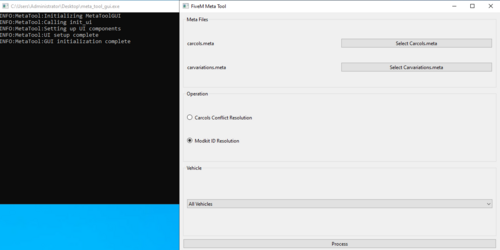
The FiveM Meta Tool is a GUI-based application designed to assist developers in managing and resolving conflicts in carcols.meta and carvariations.meta files for GTA V's FiveM servers. The tool simplifies handling vehicle modkits, IDs, and related metadata.
Features
Carcols Conflict Resolution: Automatically resolve ID conflicts in carcols.meta and carvariations.meta. Modkit ID Management: Streamline modkit ID conflicts and ensure consistency across files. Vehicle-Specific Processing: Resolve conflicts for all vehicles or a specific one. (Currently bugged to be all vehicles) User-Friendly GUI: Intuitive interface built with PyQt6 for ease of use. Requirements
Windows 10/11 (64-bit) No additional installations required; the application is standalone. Installation
Download the latest release Extract the contents of the zip file to a folder of your choice. Run meta_tool_gui.exe. Usage
Launch the application by double-clicking meta_tool_gui.exe. Use the File Selection section to load carcols.meta and carvariations.meta files. Select the operation: Carcols Conflict Resolution Modkit ID Resolution Optionally, choose a specific vehicle to process or leave it on "All Vehicles." (Currently bugged to be all vehicles) Click Process to apply changes. Included Files
meta_tool_gui.exe: Main executable for the application. Source Code. This is an open-source project for the community. Known Issues
Some antivirus software may flag the executable as a false positive. If this occurs: Add the application to your antivirus allowlist. Ensure no critical files are blocked or quarantined. Contribution
Feel free to contribute to this project by submitting pull requests or reporting issues in the repository.
License
This project is licensed under the MIT License. See the LICENSE file for details.
Developer Terms Of Services
By using the FiveM Meta Tool, you acknowledge and agree that it is provided "as-is" with no warranty, that you assume all risks, refrain from illegal or prohibited uses (including malicious redistribution or reverse engineering), may only modify it for personal use with no unauthorized distribution, and accept that it is licensed under the MIT License with only limited support available.
- 417 Downloads
- 2 Comments
Updated -
Hello! I made this out of boredom and cringe. I may update this in the future with a template, but I do not know right now.
Feel free to join my discord!
Disclaimer:
DO NOT distribute this content without my permission!
Please do not upload this file or a part of it to any other website without permission from me.
I accept no responsibility for any damage caused to your PC, game, or anything else.
If you have any problems installing or you want me to make a pack all blue you can contact me on Discord.
Mr.Gamer#2222
- 1,858 Downloads
- 14 Comments
Submitted