Luthous
Members
-
Joined
-
Last visited
Files posted by Luthous
-
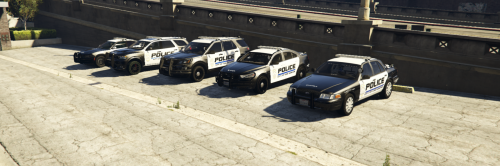
-------- LSPD Mini Pack - Luthous#9744 --------
Disclaimer; You may use this in your five m server providing you give credit where credits due.
UNDER NO CIRCUMSTANCES SHOULD YOU EDIT/REDISTRITUBTE/ TAKE ANYTHING OFF OF MY LIVERYS. IF YOU ARE WANTING TO USE ANYTHING PLEASE CONTACT ME ON DISCORD (luthous#9744)
Installation: -> Open open.IV
-> Go to the vehicle you want to add the texture to
-> Click into the YTD
-> Replace the current texture with my texture
-> Hit save, BOOM!
- 211 Downloads
- 1 Comments
Updated -
Release:
Community Policing Vehicle and livery (Vehicle NOT mine)
Details:
It is a fully custom police livery designed for a 2011 crownvic. It is based on a IRL design and was completely custom and made in photoshop. The crown vic i included in the dowload was Silent.S’s found here
The spawn code by default is pcop
Installation:
Download the folder Drag and Drop into your resources folder Add (start “pcop”) to your server.cfg Start the server, spawn in (pcop) and your good to go!
Contact Me:
You can get in contact me via discord by adding `Luthous#9744`
Or join my texture discord
- 359 Downloads
- 10 Comments
Updated