Skip to content
View in the app

A better way to browse. Learn more.

LCPDFR.com

A full-screen app on your home screen with push notifications, badges and more.

To install this app on iOS and iPadOS
  1. Tap the Share icon in Safari
  2. Scroll the menu and tap Add to Home Screen.
  3. Tap Add in the top-right corner.
To install this app on Android
  1. Tap the 3-dot menu (⋮) in the top-right corner of the browser.
  2. Tap Add to Home screen or Install app.
  3. Confirm by tapping Install.

303TheDev

Members
  • Joined

  • Last visited

Files posted by 303TheDev

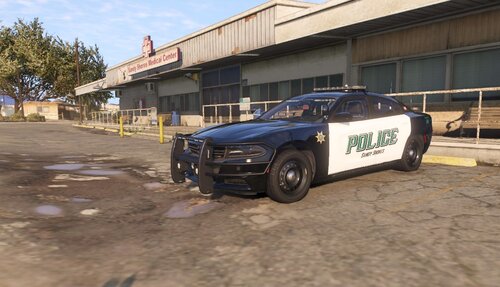
  1. This is a 2018 Dodge Charger All-Wheel-Drive Police-Package created by Recon Development's 303TheDev#1567, It is my first release and I hope you all can enjoy it.
     
     
    Version 2.0.0
    - Removed Old Air Freshener
    + Added Brand New Custom Air Freshener from Hyena
    + Blue/Blue Lighting Variant
    + Blue/White Lighting Variant
     
     
    **Recon Development**
    Some of us are told 'Live Your Life To The Fullest', Recon Development serves as a vessel for all members to project their masterpieces and to earn new friends. Here at Recon you can receive about all the help you need with Non ELS vehicles and coding bots.
     
    *Join Now At:*
    https://discord.gg/Yuep7Pa
    • 964 Downloads
    • 1 Comments
    Updated

Account

Navigation

Search

Search

Configure browser push notifications

Chrome (Android)
  1. Tap the lock icon next to the address bar.
  2. Tap Permissions → Notifications.
  3. Adjust your preference.
Chrome (Desktop)
  1. Click the padlock icon in the address bar.
  2. Select Site settings.
  3. Find Notifications and adjust your preference.