




001Hex
Members
-
Joined
-
Last visited
Files posted by 001Hex
-
Overview:
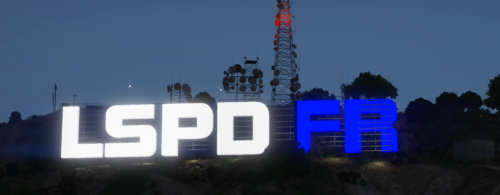
This addon will replace the origional vinewood sign in vinewood hills with a more interesting, animated and luminated LSPDFR logo that can be seen from pretty much any distance
Installation: Please follow the instructions provided in the download.
(This will likely be incompatible with mods such as LArevo/5real)
Please report any bugs!
- 462 Downloads
- 3 Comments
Updated -
Alternative Handgun Animations Modification
Showcase (Click me)
This is a modification that will alter the weapon animation whilst walking and sprinting, it ensures the officer always has their weapon facing towards the suspect whilst running and creates a more secure looking grip on the weapon whilst walking.
Installation: To install, simply drag and drop the .oiv file into your OpenIV
This should be compatible with the majority of modded handgun models.
Reccomended:
If you would like the full, realistic weapon experience: This mod includes Alternative Handgun Animations and Much more.
I have only have it implemented for core LEO weapons at the moment, will update in future with more options.
Current Weapons:
Pistol
Combat Pistol
Stun Gun/Taser
Please report any bugs below, Thanks!
- 4,295 Downloads
- 20 Comments
Updated -
This jamming script is a great way to add an extra layer of immersion into your FiveM server, it features extensive customization and is lightweight.
It is FiveM Only and does not have any dependencies.
Hope you enjoy!
It may still have minor bugs, please report anything you experience below.
Default Unjam Key: U

.thumb.gif.4757e3be0fe02512b97a9dc6dff05ff7.gif)
