Siouxfan28
Members
-
Joined
-
Last visited
Files posted by Siouxfan28
-
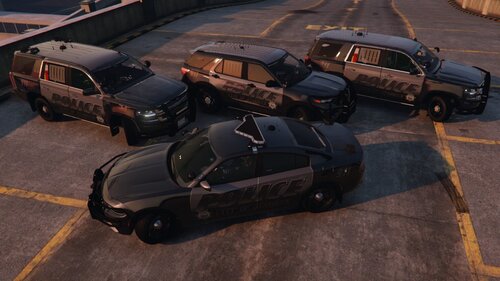
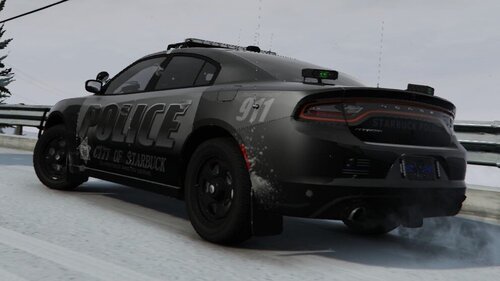
Starbuck, Minnesota Police Department texture pack
--'16-'18 Dodge Charger
--'20 Ford Police Interceptor Utility
--'18-'19 Cheverolet Tahoe
-*K-9 Version also included*
Vehicle Model I use in game:
Installation Intructions:
In Open IV, navigate to GTA V/mods/update/x64/dlcpacks/(Whatever DLC pack you wish to put it in)/dlc.rpf/x64/levels/gta5/vehicles/vehicles.rpf. (Either use an add on modding pack or Uses the latest Patchday pack to put your vehicle models in)
Find the texture file used that corresponds to the 18 Charger you have downloaded, e.g.) police3, and open the .ytd in "edit mode."
Rename the skin to match the one in the .ytd file, e.g.) charger_sign_1 to charger_sign_2,3,4,etc...
Save file and open your game
To install the License plate, open the .ytd file and find the texture "plate01" and "plate01_n". Drag and drop the included textures or click "replace".
I plan on making a Lore Friendly Version of each of these if enough interest is shown. Not entirely sure how important that is to others out there but to each their own.
- 54 Downloads
- 1 Comments
Updated -
Starbuck, Minnesota Police Department texture pack
Vehicle Model I use in game:
Federal Signal LSSD Pack [ELS] --
*Highly recommend this model*
Installation Intructions:
In Open IV, navigate to GTA V/mods/update/x64/dlcpacks/MODDING/dlc.rpf/x64/levels/gta5/vehicles/vehicles.rpf.
Find the texture file used that corresponds to the 18 Charger you have downloaded, e.g.) police3, and open the .ytd in "edit mode."
Rename the skin to match the one in the .ytd file, e.g.) charger_sign_1 to charger_sign_2,3,4,etc...
Save file and open your game
To install the License plate, open the .ytd file and find the texture "plate01" and "plate01_n". Drag and drop the included textures or click "replace".
- 60 Downloads
- 3 Comments
Updated -
Alexandria Minnesota Police Department 2016 FPIU texture
Vehicle Model I use in game :
OR
Installation Instructions:
In Open IV, navigate to GTA V/mods/update/x64/dlcpacks/MODDING/dlc.rpf/x64/levels/gta5/vehicles/vehicles.rpf.
Find the texture file used that corresponds to the 2016 FPIU, e.g.) police3, and open the .ytd in "edit mode."
Rename the skin to match the one in the .ytd file, e.g.) exp_sign_1 to exp_sign_2,3,4,etc...
Save file and open your game
May or may not be more added to this file at a later date for other models and maybe a different MN Dept.
**I claim no rights to the models used or the templates provided in this file only the work done for this skin itself**
- 66 Downloads
- 1 Comments
Updated