Skip to content
View in the app

A better way to browse. Learn more.

LCPDFR.com

A full-screen app on your home screen with push notifications, badges and more.

To install this app on iOS and iPadOS
  1. Tap the Share icon in Safari
  2. Scroll the menu and tap Add to Home Screen.
  3. Tap Add in the top-right corner.
To install this app on Android
  1. Tap the 3-dot menu (⋮) in the top-right corner of the browser.
  2. Tap Add to Home screen or Install app.
  3. Confirm by tapping Install.

ApexDevil

Members
  • Joined

  • Last visited

Files posted by ApexDevil

  1. A Nice K9 Unit it is still in his Development State
    so everything you see can be changed in the full release
     
    Note:
    Feedback is more then welkom 
    to make it a nice as possible 
    all feedback will be looks ad
     
    I Got Really inspired after seeing this picture and made me whant to make somthing like it but not the same
    link to the offical car picture :
    https://danasafetysupply.com/chevy-tahoe-police-k-9-vehicle-ghost-graphic-decals-any-color/
                                                                                                                                                                                                                             Scroll Down to see the new updates


    • 80 Downloads
    Updated
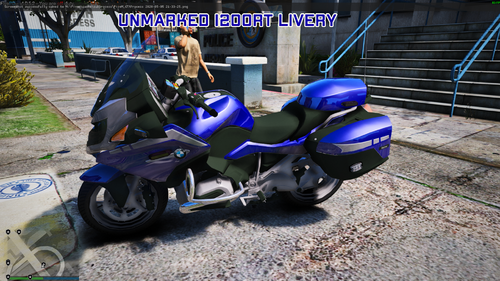
  2. Nice The Unmarked cars but what about a Bike Well here you go have fun!!!!
     
    NOTE!!
    You can also use this on the 2014 CHP BMW R 1200RT


    • 216 Downloads
    Updated
  3. This Skin is made in memory for the old Vermont Crown Vics
    that the took of the road in 2018 after 20 years of service wit the first that hit the road in 1997
     
     
    • 202 Downloads
    • 6 Comments
    Updated

Account

Navigation

Search

Search

Configure browser push notifications

Chrome (Android)
  1. Tap the lock icon next to the address bar.
  2. Tap Permissions → Notifications.
  3. Adjust your preference.
Chrome (Desktop)
  1. Click the padlock icon in the address bar.
  2. Select Site settings.
  3. Find Notifications and adjust your preference.