


Kristovision
Members
-
Joined
-
Last visited
Everything posted by Kristovision
-
@Johnny132 Like I said previously. It's an ongoing issue that a lot of people are having. You may just have to wait for a fix to be provided.
-
Is GTA V working on it's own with no mods?
-
Ok, I am a little bit confused by that... Have you attempted to disable your windows defender.
-
Hi, I don't believe so. Although don't quote me on that. Right now your focus is to get the game working again. It could be that you have some corrupted files in your game. Losing mods are the least of your worries right now as the vanilla version of your game is not working.
-
Hi, I would remove ScriptHook as it is not the correct version. What other plugins do you have installed? Have you tried using LSPDFR without an additional plugins.
-
Hi, If the vanilla version is still stuck then please verify your game files through steam.
-
Hi, The logs folder is for RPH. Have you attempted to disable your windows defender. Look through your directory for anything that might be a RagePluginHook log.
-
Hi, If you are referring to windows defender then try disabling it and launching the game. You can find your RPH logs in Grand Theft Auto V >> Logs
-
@UrbanEMT I won't even quote you to get your attention because it will quote that large amount of text. If you need to provide your RPH log please simply attach the file to your post. If you are having an issue please create a thread and somebody can help you out. Hi, Your 'Plugin Timeout Threshold' is very low. Try setting it to 60000. This can be done in the settings for RPH.
-
Hi, Can you please provide your RPH logs. What anti virus are you using?
-
Hi, I believe that this is an on going issue with LSPDFR. You will need to wait for G17 to provide a fix.
-
Hi, I believe that this is an ongoing issue with LSPDFR. You will need to wait for G17 to fix it.
-
Hi, Can you please provide your RPH log.
-
Hi, This is an ongoing issue with LSPDFR. You will need to wait for G17 to fix it.
-
Hi, I believe there is an ongoing issue relating to this. You may just have to wait until a fix is released.
-
You are saying that the game is not crashing per say but just closing directly after launching? Try launching GTA V vanilla and see if that works.
-
Have you removed ScripthookV.dll and dinput8.dll like @A Stranger suggested.
-
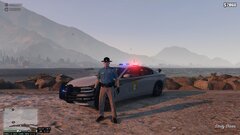 Very nice! I really like the vehicle skin!
 -
I'm not so sure about this, however the new update for RPH and LSPDFR is now available. Go here https://www.lcpdfr.com/forums/ as there is links provided in a banner near the top of the forums.
-
Sorry to jump in. I am not a police officer in the UK but certainly have been interested and considered joining in the past. @IRONBLASTER Police in the United Kingdom do not carry firearms. The responsibility to carry firearms is upheld by specially trained firearms officers. Typical items that police officers use for self defence are just like Survivalmaster has listed. @Survivalmaster Please feel free to correct me if I'm wrong. Like I said, I have only ever shown and interest in joining so I'm am not completely clued up on this stuff, however I do like to do a bit of research now and again.
-
Hi, You can still use LSPDFR. Any plugins like ELS or any trainers that you have won't work until ScriptHook V is updated. Have you installed all of the new LSPDFR files and RPH files? Make sure these replace the old files. Also before you launch the game do the following. Go into OpenIV -> Mods folder -> Edit mode -> Check the Green Banner.
-
Hiya, Just to confirm the following.. Are you getting in game or is the game crashing before hand during the loading process? If so can you make sure that GTA V launches fine without any mods. Essentially try launching GTA V vanilla. If your game is not launching correctly I can advise the following. - Check your antivirus as this can sometimes create issues. I would first advise that you disable your antivirus and try launching the game. If it works doing this then you will need to setup an exception. - Check you have no other plugins. Try running RPH with LSPDFR and nothing else. This can help to determine if a specific plugin is causing the crash.
-
Hi, I would like to see some more of this. Might be nice to use in game.
-
That looks really nice! I'd so use that as an undercover vehicle! Really well done!
-
Hello, Firstly welcome to the community. If you want to introduce yourself you can post an introduction here https://www.lcpdfr.com/forums/forum/922-introductions/ If you are looking for help regarding an issue you have. Please post a new thread here https://www.lcpdfr.com/forums/forum/920-lspdfr-04-support/


