KITT089
Members
-
Joined
-
Last visited
Files posted by KITT089
-
Hello Everyone.
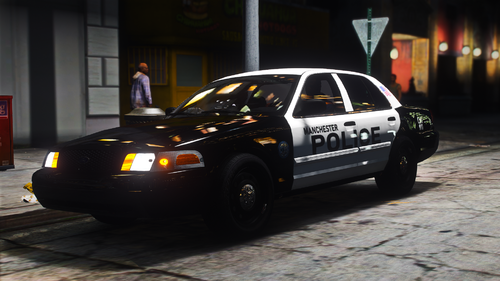
This vehicle texture I've been working on is ready for release.
First you will need to download this Vehicle pack:
Some of the best Vehicle packs out!
All the files are included to convert this car to all blue to closely resemble the NHSP Patrol Cars.
If your unsure how to replace vehicle textures I Highly Recommend the Geoffrey_gamer video below. Make sure to give a Like and Subscribe.
I only created the vehicle texture.
All I ask in return is to share photos and give an Honest review.
Bugs: Not sure why but when the vehicle in the police4 slot is spawned in it has a metallic paint on. Just go into your trainer change the color to classic black and it will look normal. I'm not sure why this happens or how to fix this.
Thank you.
- 80 Downloads
- 1 Comments
Updated -
Couldn't find any textures from my Home town police so I made my own. After a few tries I'm happy with these results. Try them out and tell me what you think.
Textures are add ons to Blueghost's unmarked vehicles. Manchester PD and New Hampshire State Police. Two Textures included in the pack along with a Directions for install text file.
The First of many more to come.
- 63 Downloads
- 4 Comments
Updated