
Radly33
Members
-
Joined
-
Last visited
Files posted by Radly33
-
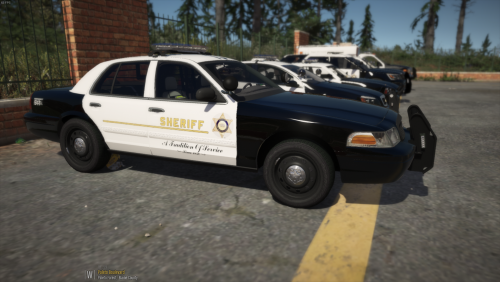
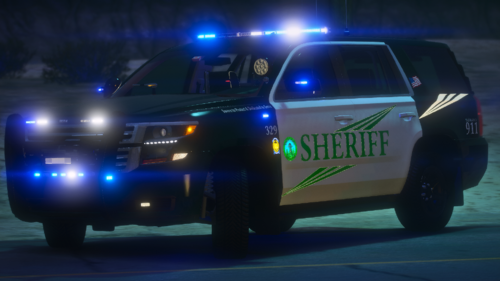
Hey, this is my DCSO's Skin Pack, more screens are available on my discord : https://discord.gg/t2awf4m
Support me on Paypal
This pack include :
10 CHARGER : COMPLETE
11 CVPI : COMPLETE
13 FPIU : COMPLETE
14 TAHOE : WIP
16 FPIU : COMPLETE (just change env light in the carcol.meta)
18 TAHOE : COMPLETE
- 63 Downloads
Submitted -
All 3D models of the vehicles were produced by @Ondulation. Only the skins are made by me. Thank you for asking me in MP on discord to be able to use them on a FiveM server with this name: ƤĂŘĂṂĔČĂŦÕŁツ#4182 or @PARAMÉCATOL.
FPIU 2020 come soon.
Support me;
You can make a donation via Paypal : https://www.paypal.me/prctml
Installation:
1- Open OpenIV
2- Go to the "Vehicles.rpf" folder Mods / update / x64 / dlcpack / legacypack / dlc.rpf / x64 / levels / gta5 / vehicles / vehicles.rpf or Mods / update / x64 / dlcpack / patchdayng20 / dlc.rpf / x64 / levels / gta5 / vehicles / vehicles.rpf
3- Then open the .ytd file and type "sign" with "edit mode"
4- Replace the file with the new one
5- Click on "Save", remove the "edit mode"
6- Have fun
Vehicle pack :
- 300 Downloads
- 1 Comments
Submitted -
Installation:
1- Open OpenIV
2- Go to the "Vehicles.rpf" folder Mods / update / x64 / dlcpack / legacypack / dlc.rpf / x64 / levels / gta5 / vehicles / vehicles.rpf or Mods / update / x64 / dlcpack / patchdayng20 / dlc.rpf / x64 / levels / gta5 / vehicles / vehicles.rpf
3- Then open the .ytd file and type "sign" with "edit mode"
4- Replace the file with the new one
5- Click on "Save", remove the "edit mode"
6- Have fun
Vehicle pack :
CAPRICE :
HARLEY :
- 56 Downloads
- 2 Comments
Updated -
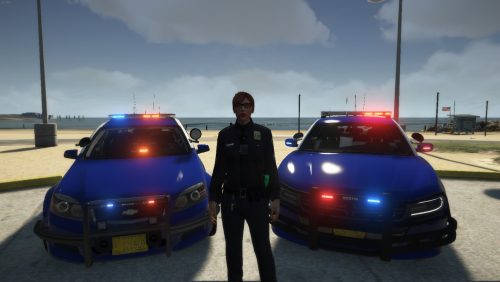
Hey, this is my new texture pack of WCSO in Oregon, I hope you like it. All vehicles are made by TickleMyElmo, I made the skins only.
VEHICLES PACK
Installation:
FOR TEXTURE
1- Open OpenIV
2- Go to the "Vehicles.rpf" folder Mods / update / x64 / dlcpack / your add-on pack / dlc.rpf / x64 / levels / gta5 / vehicles / vehicles.rpf or Mods / update / x64 / dlcpack / patchdayng20 / dlc.rpf / x64 / levels / gta5 / vehicles / vehicles.rpf
3- Then open the .ytd file and type "sign" with "edit mode"
4- Replace the file with the new one
5- Click on "Save", remove the "edit mode"
6- Have fun
FOR LICENSE PLATE
1- Open OpenIV
2- Go to the "veshare.ytd" files into : Mods / x64e.rpf / levels / gta5 / vehicles / vehshare.ytd
3- Replace "plate_05" if you want the new plate on all police car or "yankton" if you want the new plate on some police car & save
THIS PART IS ONLY FOR THE SLOT "YANKTON"
REPLACE
4- Go to the "carvariation.ymt" files into : Mods / update / update.rpf / x64 / data / carvariations.ymt
5- Replace the line <Name>Police guv plate</Name> by <Name>yankton plate</Name>
6- Save & ENJOY
ADD-ON
4- Go to the "carvariations.meta" files into : Mods / update / x64 / your add-on pack / dlc.rpf / common / carvariations.meta or Mods / update / x64 / your add-on pack / dlc.rpf / common / data / carvariations.meta
5- Replace the line <Name>Police guv plate</Name> by <Name>yankton plate</Name>
6- Save & ENJOY
- 77 Downloads
- 4 Comments
Updated -
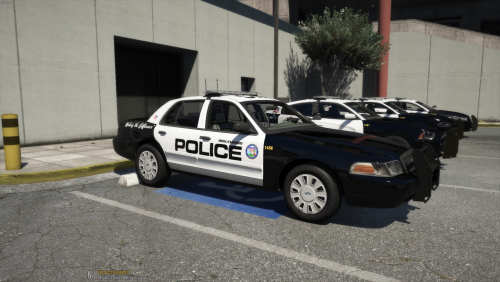
Hey !!! This is my new texture pack of Los Angeles Sheriff Department. I hope you enjoy !
Vehicles
Chevy Caprice : https://www.modding-forum.com/downloads/file/46-2013-chevrolet-caprice-ppv-los-santos-sheriff-s-department/
CVPI & FPIU : https://www.lcpdfr.com/downloads/gta5mods/vehiclemodels/24305-els-lasdlssd-mini-pack/
Chevy Tahoe : https://www.lcpdfr.com/downloads/gta5mods/vehiclemodels/28427-els-13-chevrolet-tahoe-lapd/
Search & Rescue : http://www.lcpdfr.com/files/file/15367-1999-ford-f-450-super-duty-sheriff-rescue/
Charger : https://www.lcpdfr.com/downloads/gta5mods/vehiclemodels/23128-2010-lapd-dodge-charger-patrol-car/
CVPI Volunteer : https://www.lcpdfr.com/downloads/gta5mods/vehiclemodels/17413-els-added-fpis-lspd-sedan-pack/
Installation
1- Open OpenIV
2- Go to the "Vehicles.rpf" folder Mods / update / x64 / dlcpack / place of vehicle / dlc.rpf / x64 / levels / gta5 / vehicles / vehicles.rpf or Mods / update / x64 / dlcpack / patchdayng20 / dlc.rpf / x64 / levels / gta5 / vehicles / vehicles.rpf
3- Then open the .ytd file and type "sign" with "edit mode"
4- Replace the file with the new one
5- Click on "Save", remove the "edit mode"
6- Have fun
- 1,501 Downloads
- 4 Comments
Updated -
All 3D models of the vehicles were produced by Ripple. Only the skins are made by me. Thank you for asking me in MP on discord to be able to use them on a FiveM server with this name: ƤĂŘĂČĔŦĂṂÕŁ_ŦṼ ツ#4762
/!\Requires/!\
Vehicles pack :
Installation:
1- Open OpenIV
2- Go to the "Vehicles.rpf" folder Mods / update / x64 / dlcpack / medic4523 / dlc.rpf / x64 / levels / gta5 / vehicles / vehicles.rpf
3- Then open the .ytd file and type "sign" with "edit mode"
4- Replace the file with the new one
5- Click on "Save", remove the "edit mode"
6- Have fun
Vehicles:
11 Ford Crown Victoria Police Interceptor (CVPI) - Slicktop & unmarked
14 Dodge Charger - Slicktop & unmarked
14 Chevy Tahoe - Slicktop & unmarked
16 Ford Explorer (FPIU) - Slicktop & unmarked
16 Ford Taurus (FPIS) - Slicktop & unmarked
18 Dodge Charger - Slicktop & unmarked
19 Chevy Silverado - Slicktop & unmarked
19 Chevy Tahoe - Slicktop & unmarked
20 Ford Explorer (FPIU) - Slicktop & unmarked
- 329 Downloads
- 9 Comments
Updated -
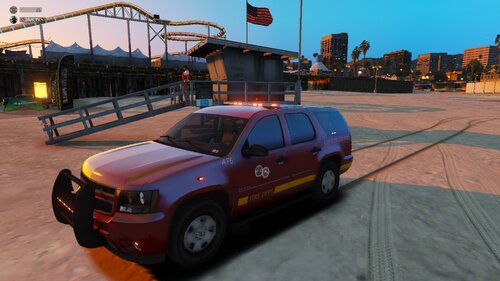
All 3D models of the vehicles were produced by Medic4523. Only the skins are made by me. Thank you for asking me in MP on discord to be able to use them on a FiveM server with this name: ⚡ŽĒŲŞ_ŦV⚡ # 4762
/!\Requires/!\
Ambulance : https://modification-universe.com/forums/index.php?/files/file/202-els-ram-ambulance-pack/
BATTALION CHIEF : https://gtapolicemods.com/index.php?/files/file/700-lssd-whelen-cenator-tahoe/
ENGINE: https://modification-universe.com/forums/index.php?/files/file/36-els-vg-pierce-arrow-xt-pack/
Dodge Ram : https://www.modding-forum.com/forums/thread/302-2016-ram-2500-los-santos-fire-department-pickup-truck/?postID=1215#post1215
Fast Response : https://nextgenerationroleplay.com/index.php?/files/file/94-2020-dodge-ram-2500-rapid-paramedic-squad-fivem-ready-non-els/
Installation:
1- Open OpenIV
2- Go to the "Vehicles.rpf" folder Mods / update / x64 / dlcpack / medic4523 / dlc.rpf / x64 / levels / gta5 / vehicles / vehicles.rpf
3- Then open the .ytd file and type "sign" with "edit mode"
4- Replace the file with the new one
5- Click on "Save", remove the "edit mode"
6- Have fun
- 2,652 Downloads
- 14 Comments
Updated -
FRANCAIS
Tous les modèles 3D des véhicules ont été réalisés par Medic4523. Seul les skins sont fait par moi. Merci de vouloir me demander en MP sur discord pour pouvoir les utiliser sur un serveur FiveM à ce nom: ⚡ŽĒŲŞ_ŦV⚡#4762
/!\Requiert/!\
Packs de véhicules de Medic4523: https://modification-universe.com/forums/index.php?/files/file/36-els-vg-pierce-arrow-xt-pack/
Batallion Chief vehicle: https://www.lcpdfr.com/downloads/gta5mods/vehiclemodels/14626-els-lsfd-battalion-chief-tahoe/
Installation:
1- Ouvrez OpenIV
2- Allez dans le dossier "Vehicles.rpf" Mods/update/x64/dlcpack/medic4523/dlc.rpf/x64/levels/gta5/vehicles/vehicles.rpf
3- Ensuite, ouvrez le fichier .ytd et tapez "sign" avec l'"edit mode"
4- Remplacez le fichier par le nouveau
5- Cliquez sur "Save", enlevez l'"edit mode"
6- Amusez-vous
ENGLISH
All 3D models of the vehicles were produced by Medic4523. Only the skins are made by me. Thank you for asking me in MP on discord to be able to use them on a FiveM server with this name: ⚡ŽĒŲŞ_ŦV⚡ # 4762
/!\Requires/!\
Medic4523 vehicle packs: https://modification-universe.com/forums/index.php?/files/file/36-els-vg-pierce-arrow-xt-pack/
Batallion Chief vehicle: https://www.lcpdfr.com/downloads/gta5mods/vehiclemodels/14626-els-lsfd-battalion-chief-tahoe/
Installation:
1- Open OpenIV
2- Go to the "Vehicles.rpf" folder Mods / update / x64 / dlcpack / medic4523 / dlc.rpf / x64 / levels / gta5 / vehicles / vehicles.rpf
3- Then open the .ytd file and type "sign" with "edit mode"
4- Replace the file with the new one
5- Click on "Save", remove the "edit mode"
6- Have fun
- 450 Downloads
- 3 Comments
Updated -
FRANCAIS
Tous les modèles 3D des véhicules ont été réalisés par Medic4523. Seul les skins sont fait par moi. Merci de vouloir me demander en MP sur discord pour pouvoir les utiliser sur un serveur FiveM à ce nom: ⚡ŽĒŲŞ_ŦV⚡#4762
/!\Requiert/!\
Packs de véhicules de Medic4523: https://modification-universe.com/forums/index.php?/files/file/36-els-vg-pierce-arrow-xt-pack/
Batallion Chief vehicle: https://www.lcpdfr.com/downloads/gta5mods/vehiclemodels/14626-els-lsfd-battalion-chief-tahoe/
Installation:
1- Ouvrez OpenIV
2- Allez dans le dossier "Vehicles.rpf" Mods/update/x64/dlcpack/medic4523/dlc.rpf/x64/levels/gta5/vehicles/vehicles.rpf
3- Ensuite, ouvrez le fichier .ytd et tapez "sign" avec l'"edit mode"
4- Remplacez le fichier par le nouveau
5- Cliquez sur "Save", enlevez l'"edit mode"
6- Amusez-vous
ENGLISH
All 3D models of the vehicles were produced by Medic4523. Only the skins are made by me. Thank you for asking me in MP on discord to be able to use them on a FiveM server with this name: ⚡ŽĒŲŞ_ŦV⚡ # 4762
/!\Requires/!\
Medic4523 vehicle packs: https://modification-universe.com/forums/index.php?/files/file/36-els-vg-pierce-arrow-xt-pack/
Batallion Chief vehicle: https://www.lcpdfr.com/downloads/gta5mods/vehiclemodels/14626-els-lsfd-battalion-chief-tahoe/
Installation:
1- Open OpenIV
2- Go to the "Vehicles.rpf" folder Mods / update / x64 / dlcpack / medic4523 / dlc.rpf / x64 / levels / gta5 / vehicles / vehicles.rpf
3- Then open the .ytd file and type "sign" with "edit mode"
4- Replace the file with the new one
5- Click on "Save", remove the "edit mode"
6- Have fun
- 230 Downloads
- 3 Comments
Updated


.thumb.png.ed5748acb43581e467949c92ad6843b9.png)