Connor B.
Members
-
Joined
-
Last visited
Files posted by Connor B.
-
Hello all,
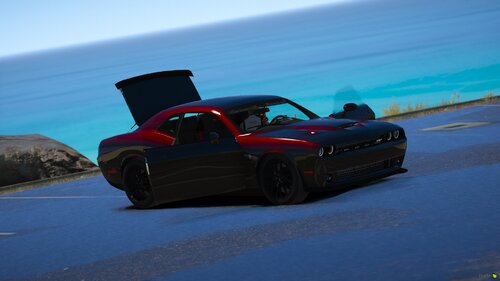
This is my first ever release of a vehicle. It is nowhere near perfect but I hope some people can enjoy this vehicle for what it is. This car is non-els and ready to be put into your FiveM server. You have permission to put this in your FiveM server or whatever you would like, just be sure to credit me as well as the other devs who made the parts. This challenger can also be a turned into a civilian version by removing the extras, listed below. Please leave some constructive criticism in the comments so I can improve this model with future updates (coming soon). This model includes a texture as well.
And I just made a discord so feel free to join: https://discord.gg/B6RfZVT .
Extra 1: Visor Bar
Extra 2: Grill Lights
Extra 3: Dash Light
Extra 4: Rear Deck Light
Extra 5: Rear Ion's
Extra 6: Rear Window/Side Lighting
Extra 7: Front Vertex's
Extra 8: All Interior Police Equipment (So you can make it a civilian vehicle)
Extra 9: Rear Avengers
- 7,905 Downloads
- 8 Comments
Updated