MitchellP
Members
-
Joined
-
Last visited
Files posted by MitchellP
-
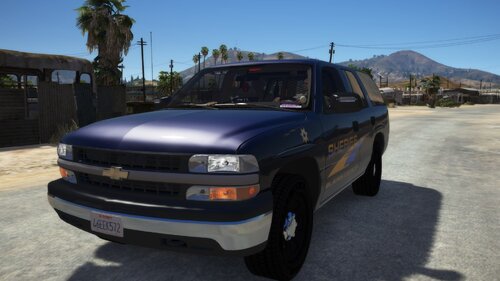
I wanted to be slightly retro so whilst not making too many sacrifices in the process one of my vehicle choices was the 2006 Tahoe. This Tahoe was created by Bxbugs123 and I couldn't find the skins that I wanted for it. Many people will know that these skins are used in DOJ and due to me having a very early mid-life crisis I've recently installed my cars to look like their due to that originally getting me into the roleplay type stuff leading me here. Anyway the credits are down below and I would highly suggest using this car with the original texture pack by Skin Works.
Blaine County Sheriffs Office 2006 Tahoe based off of the Alemeda County's sheriff office.
This also includes a .xml file in case - although this isn't an ELS vehicle - people want to use ELS to control the lights.
Credits:
Vehicle - Bxbugs123
Original Skins (Parts of the 2013 Tahoe skin used) - Skin Works
- 319 Downloads
- 2 Comments
Updated