1r1sh
Members
-
Joined
-
Last visited
Files posted by 1r1sh
-
Howdy!
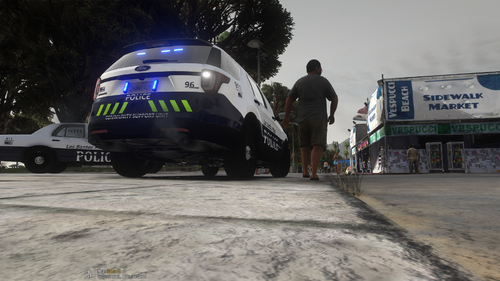
I don't usually make skin packs or release items, I decided to make a quick skin pack to fit Othrin's (Blaine County Sheriffs Office Pack 2.0) and also his previous version of his pack the (BCSO RX2700 Pack).
I liked these cars a lot and he has done an amazing job on them! Unfortunately it was only a sheriff pack and i wanted a police skin pack to fit these cars. I made the skin pack to my own taste, and selected some cars from both the old and the newer updated pack. I will not be making any changes or alterations to these, and i will not be skinning any others!
These skins were made on the fly, i did not put a huge amount of time or effort into these. I decided to release them incase anyone would like to use them with Othrin's sheriff pack, and be able to have a police experience rather than a sheriff one!
CARS ARE NOT MINE, I ONLY CREATED THESE SKINS TO BE USED WITH THESE CARS!
You will need to download the below pack in order to use these skins, upon downloading you will be asked to either download the newer pack (Blaine County Sheriffs Office Pack 2.0) or the older pack (BCSO RX2700 Pack), i suggest both as i have skins for both packs, again your choice!
I hope you enjoy the pack, again to reiterate, not a lot of time was spent on this pack, it was suited to my own taste, it wont suit everyone, and no further changes will be made, however if you want to make any alterations yourself, please feel free to change what you want!
Car Pack Link -
Lighting / Quick Demo -
- 204 Downloads
- 3 Comments
Updated