



Dark Light
Members
-
Joined
-
Last visited
Everything posted by Dark Light
-
It depends on what edits you want to make for the model. If you want just texture edits, those are simple, as OpenIV can open up .yft's (texture files for models) and export/import them (and you can preview their respective ytd's -model files- to see what it looks like) and you can open the .dds file in whatever image editing program you like. If you want to do full-out model replacements, you need a 3D modeling program that has support for GTA V formats, such as 3DS Max 2016 with GIMS installed. Keep in mind, I haven't done a vehicle mod for GTA V, I've done only ped mods so I don't know how similar the two processes are.
-
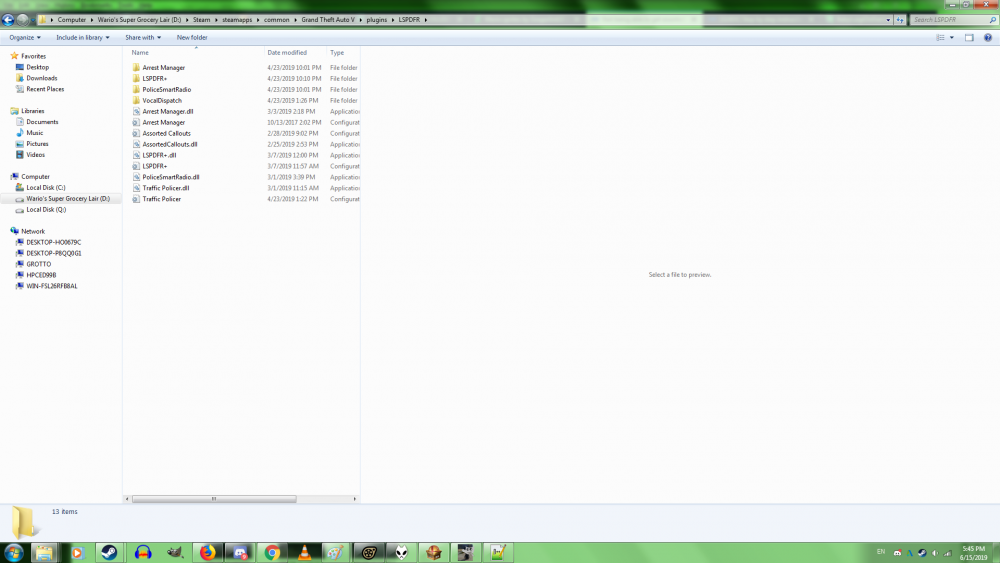
fyi, this is what the installation should look like Also, I suggest that you take a look and edit the Assorted Callouts.ini file, when dispatch calls you, you can customize your division, unit type, and beat 🙂
-
I'm wondering what exact problems you are facing that makes you rage quit. I know that I have lots of bugs on my end such as the LSPDFR plugin not loading much of the time I boot up the game, though in that case, I really only have issues loading and I can make it past the black screen, everything else plays as it should such as accessing the police station and going on duty. The only consistent crashes I have encountered so far are in the middle Hot Pursuit dispatches from Albo's Assorted Callout plugin. Sometimes, I get crashes in the middle of the game but those aren't consistent so I can't reproduce those. I have lots of scripts installed too, so maybe that could contribute to the instability at points.


