Cray2890
Members
-
Joined
-
Last visited
Files posted by Cray2890
-
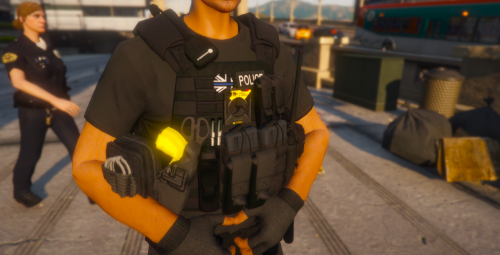
These vests aren't mine. I just textured them.
INSTALLATION GUIDES:
Download OpenIV
Install:
Also:
Navigate:\mods\update\x64\dlcpacks\eup\dlc.rpf\x64\eup_componentpeds.rpf\mp_m_freemode_01_mp_m_vinewood
Replace the task_diff_002_a_uni.ytd and you should be done.
- 475 Downloads
- 4 Comments
Updated -
These sirens are going to be updated before or after 2022! So please bare with me when i find some free time, I will make sure to start working on them! Thanks.
-Sincerely Cray/CTIX
These sirens are used in some parts of London and i tried to find accurate ones. For my future plans i want to make more sirens in different parts of England and possibly different countries. If there are any issues with something or i've done something wrong, feel free to post it in the comments. Please do not re upload this file or claim it as yours. If done so at least credit me with a valid reason why you choose to re upload it.
Known Issues
None
Installation Guides
1. Once downloaded extract the folder to your dekstop.
2. You will need OpenIV for this one, open OpenIV
3. Navigate to (mods>x64>audio>sfx>RESIDENT.rpf)
4. Click > New > import open Formats > goto the siren folder > click on vehicles.oac > click open > ok.
Once you've done that is all set and you're ready to go.
- 27,926 Downloads
- 28 Comments
Updated -
Credits to [Othrin] for allowing me to use his models to reskin it.
1.0.1 Update - Added in the model with texture inside and the texture file.dds itself just in case.
1.2.2 Update - Added a new 2016 Dodge charger and updated readme.txt
1.3.2 Update - Added 2014 Chevrolet Tahoe, (Known Issues: No Writing on the back) Will be fixed in 1.4.3 Update.
1.3.3 Update - Updated Readme.txt once again (Yes this is very important to me haha)
-------------------------------------------------------------------------------------------------------------------------------------------------------------------
Everyone go sub to this guy for this video ❤️
If there are any BUGS please report them to me via messages or comment
them in the comment section.
If you went to replace the dds skin on the model.ytd and you see 3 different signs always replace it with sign 1 and
if wanted to you can remove thoose 2 other signs that are left. But there's a model with the skin already replaced
so you don't have to waste your time trying to find the sign and instead just replace the model with ELS.
Othrin's South Carolina's Mega Pack
I will be making a Pack of Santa Rosa's liveries on Othrin's models.
The vehicles i'm focusing on
-2009 CVPI (Completed)
-2016 Charger (Completed)
-2014 Tahoe (Completed)
-2016 FPI (Work in progress)
-2017 Tahoe (Work in Progress)
-2010 F350 (Discontinued)
---------------------------------------------------------------------------------------------------
- 163 Downloads
- 10 Comments
Updated