(1).png.cc67f7fd206e669b377ab6624b25b59c.png)

Kalwde
Members
-
Joined
-
Last visited
Files posted by Kalwde
-
Channel Seven News Network Studio - Australian Broadcast Channel
By Masuta
FIVEM INSTALLATION!
- Place 7news_masuta and props_7newsmasuta in resources
- In server config type
* start props_7newsmasuta
* start 7news_masuta
For Single Player
Readme inside folder
Regards,
Masuta
Disclaimer:
All logos or images used, all rights are subject to owners.
- 614 Downloads
- 3 Comments
Submitted -
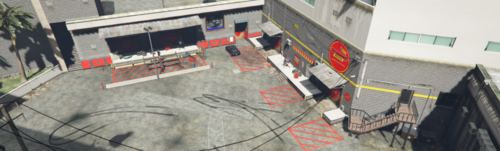
SuperCheapAuto By Masuta.
For any help with installation Join my discord: https://discord.gg/wzw7Mqz 🙂
Read Me! inside file for installation process.
Did this because i was bored if anyone wants improvements to it let me know! 🙂
-----------------------------------------------------------------------------------------------------
- You do not redistribute the product without permission from the designer (Masuta.)
- The product is not to be used for personal financial or commercial gain.
- Any form of noncompliance with the terms and conditions stated in the file will result in legal action.
-----------------------------------------------------------------------------------------------------
Regards,
Masuta
Discord Link - https://discord.gg/Xr47FuS
- 297 Downloads
Updated -
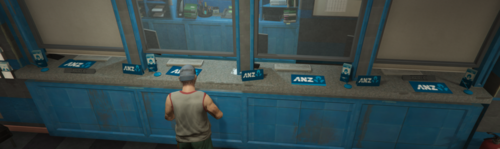
- ANZ BANKS RETEXTURE - BY MASUTA V1.2
(REMOVED) v1.1 - Minor changes to only 3 banks
- New ANZ atm machines
- Overall minor changes to a uncompleted project.
(CURRENT) V1.2 - Updated textures and interiors for all banks.
- New added features to fulfill the ANZ bank theme.
- Rearranged and improved interiors for all banks.
- Added ymaps and ytyp for edited interiors.
(FUTURE) V1.3 - Version v1.2 is in complete stage but, a new version might
be introduced with something unique and new!.
FIVEM INSTALLATION!
- Place ANZBANKSBYMASUTA in resources
- In server config type start ANZBANKSBYMASUTA
----------------------------------------------------------------------------------
For Single Player:
- Make sure you have scripthook
- So in every folder there contains files every files has a code name example:
"v_ser"
"dt_23"
all that start with the same code name go into there rpf folders
e.g dt1_23_build2+hidr.ytd file would have to go into
D:\Grand Theft Auto V\x64i.rpf\levels\gta5\_citye\downtown_01\dt1_23.rpf
see have in the end theres a specific file named dt1_23.rpf thats the folder for
all files starting with "dt1_23" and same concept goes for all files that have
code names like v_10_bckbnkdirt.ydr thats means this should go into
D:\Grand Theft Auto V\x64h.rpf\levels\gta5\interiors\v_int_10.rpf
see how that rpf folder starts with v_int_10 so all files starting with that phrase
go into that folder and as shown with that example up top this is very simple if
you having difficulties join my discord.
Discord Link - https://discord.gg/Xr47FuS
Regards,
Masuta
- 506 Downloads
- 3 Comments
Updated -
Hello! This is a AD on three main buildings retexture I did.
----------------------------------------------------------------------------------
HOW TO ACTIVATE: JOIN MY DISCORD https://discord.gg/nDD9jgd)
For FiveM
1. Place FILES_MASUTA in resources
2. in server config put start FILES_MASUTA thats all very easy
-------------------------------------------------------------------------------------
For Single Player:
Place in specified path make sure you have this path in mods folder so just in case you corrupt any files.
INSTALLATIONGUIDE!
Launch OpenIV
Press EDIT MODE in OpenIV
Go to GTA V/x64i.rpf/levels/gta5/_citye/downtown_01/dt1_22.rpf
Drag & drop files from dt1_22 folder into dt1_22.rpf
Press EDIT MODE again in OpenIV & exit out
---------------------------------------------------------------------------------------------------
Please join my discord and support me as i work on more projects like this...
JOIN MY DISCORD HERE:
https://discord.gg/nDD9jgd
Have Fun...
I am not responsible for any data loss, computer crashes or nuclear disasters etc that happen in relation to using this mod.
-----------------------------------------------------------------------------------------------------
Regards,
Masuta #6864
-----------------------------------------------------------------------------------------------------
- You do not redistribute the product without permission from the designer (Masuta.)
- The product is not to be used for personal financial or commercial gain.
- Any form of noncompliance with the terms and conditions stated in the file will result in legal action.
-----------------------------------------------------------------------------------------------------
Hello, after recent communication with mod developers i want to clarify that my mods or future mods are only being deployed on the following websites - https://www.gta5-mods.com/users/Masuta - https://www.lcpdfr.com/profile/402535-masuta/
!!CAUTION!!
We've recently noticed that our mods and other follow members mods are being stolen and and being uploaded on other websites that demand money,so please stay vigilant
thanks for your support
!!CAUTION!!
Regards,
Masuta #6864
-----------------------------------------------------------------------------------------------------
- You do not redistribute the product without permission from the designer (Masuta.)
- The product is not to be used for personal financial or commercial gain.
- Any form of noncompliance with the terms and conditions stated in the file will result in legal action.
-----------------------------------------------------------------------------------------------------
Hello, after recent communication with mod developers i want to clarify that my mods or future mods are only being deployed on the following websites - https://www.gta5-mods.com/users/Masuta - https://www.lcpdfr.com/profile/402535-masuta/
!!CAUTION!!
We've recently noticed that our mods and other follow members mods are being stolen and and being uploaded on other websites that demand money,so please stay vigilant
thanks for your support ❤️
- 52 Downloads
Updated -
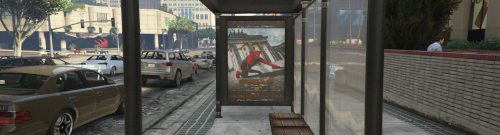
BUS-STOP ADS REAL LIFE!!
ALWAYS BACK UP YOUR ORIGINAL FILES! I AM NOT RESPONSIBLE FOR LOST TEXTURES.
[ FILES TO REPLACE: prop_busstop_02.yft - prop_busstop_02+hifr.ytd - prop_busstop_04.yft - prop_busstop_04+hifr.ytd
prop_busstop_05.yft - prop_busstop_05+hifr.ytd]
HOW TO INSTALL USING OPEN IV
1. Start Open IV and navigate to: Grand Theft Auto V\mods\x64h.rpf\levels\gta5\props\roadside\v_utility.rpf
2. Enable Edit Mode
3. Drag prop_busstop_02.yft - prop_busstop_02+hifr.ytd - prop_busstop_04.yft - prop_busstop_04+hifr.ytd
prop_busstop_05.yft - prop_busstop_05+hifr.ytd and drop.
4. Disable edit mode, close and enjoy!
For FiveM put prop_busstop_02.yft - prop_busstop_02+hifr.ytd - prop_busstop_04.yft - prop_busstop_04+hifr.ytd
prop_busstop_05.yft - prop_busstop_05+hifr.ytd
in your stream folder
if you dont know how to here's a tutorial
https://www.youtube.com/watch?v=DPwXaoUFGhQ
Please join my discord and support me as i work on more projects like this...
JOIN MY DISCORD HERE:
https://discord.gg/nDD9jgd- 77 Downloads
Updated -
1950s new textures for the mule:
- Coca-Cola
- Oreo
- Luckies Smoke
- Pepsi Cola
- Mc-Donalds
- DisneyLand
ALWAYS BACK UP YOUR ORIGINAL FILES! I AM NOT RESPONSIBLE FOR LOST TEXTURES.
[ FILES TO REPLACE: mule.ytd , mule+hi.ytd ]
➡️➡️HOW TO INSTALL USING OPEN IV ⬅️⬅️
1. Start Open IV and navigate to: Grand Theft Auto V\update\x64\dlcpacks\patchday3ng\dlc.rpf\x64\levels\gta5\vehicles.rpf\
2. Enable Edit Mode
3. Drag mule.ytd , mule+hi.ytd into vehicles.rpf replacing the original files.
4. Disable edit mode, close and enjoy!
➡️➡️For FiveM put both mule.ytd , mule+hi.ytd⬅️⬅️
in your stream folder
if you dont know how to here's a tutorial
https://www.youtube.com/watch?v=DPwXaoUFGhQ
Please join my discord and support me as i work on more projects like this...
JOIN MY DISCORD HERE:
https://discord.gg/nDD9jgd
- 29 Downloads
Updated -
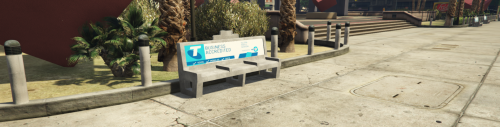
Hello! This is a quick bench I did.
Telstra is a Australian Network Company.
HOW TO ACTIVATE: JOIN MY DISCORD https://discord.gg/nDD9jgd)
1. Place MasutaBench in resources
2. in server config put start MasutaBench thats all very easy
For Single Player:
Place in specified path make sure you have this path in mods folder so just in case you corrupt any files.
D:\Grand Theft Auto V\x64f.rpf\levels\gta5\props\roadside\v_seating_tables.rpf\prop_bench_add+hi.ytd
Please join my discord and support me as i work on more projects like this...
JOIN MY DISCORD HERE:
https://discord.gg/nDD9jgd
Have Fun...
I am not responsible for any data loss, computer crashes or nuclear disasters etc that happen in relation to using this mod.
Regards,
Masuta #6864
- 93 Downloads
Updated