


Brexin212
Members
-
Joined
-
Last visited
Everything posted by Brexin212
-
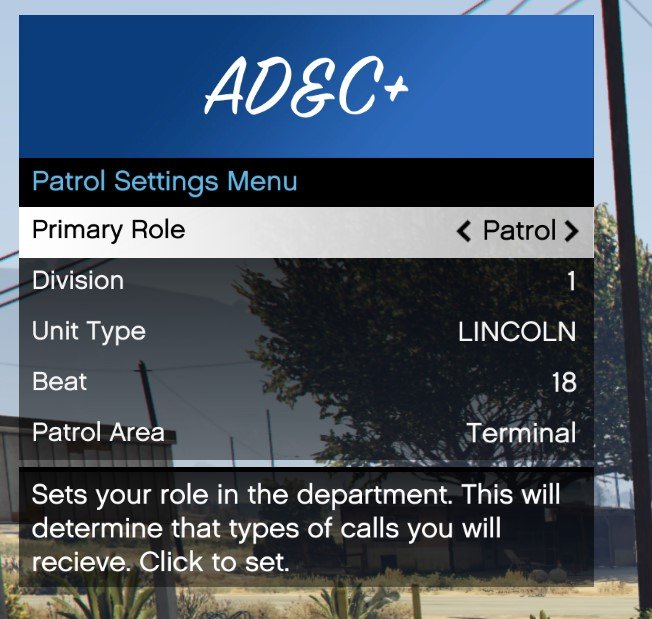
This is a good question. The "Primary Role" option in the menu is used to tell Dispatch which type of callouts to prioritize sending the player to over the AI simulated officer units. For example, If you set your role to "Patrol", and a GangActivity scenario pops up from the call center, Dispatch will send the closest officer units to handle the situation. If the player is not one of the closest units available to send to the call, then the AI units who are will be sent to "handle" the situation. On the other hand, if you set your Primary Role to "Gang", and the same callout pops up from the call center, Dispatch will most likely send the player to that call instead of the AI, as long as certain criteria are met (such as the player being "Available" for calls, or currently handling a low priority call).
-
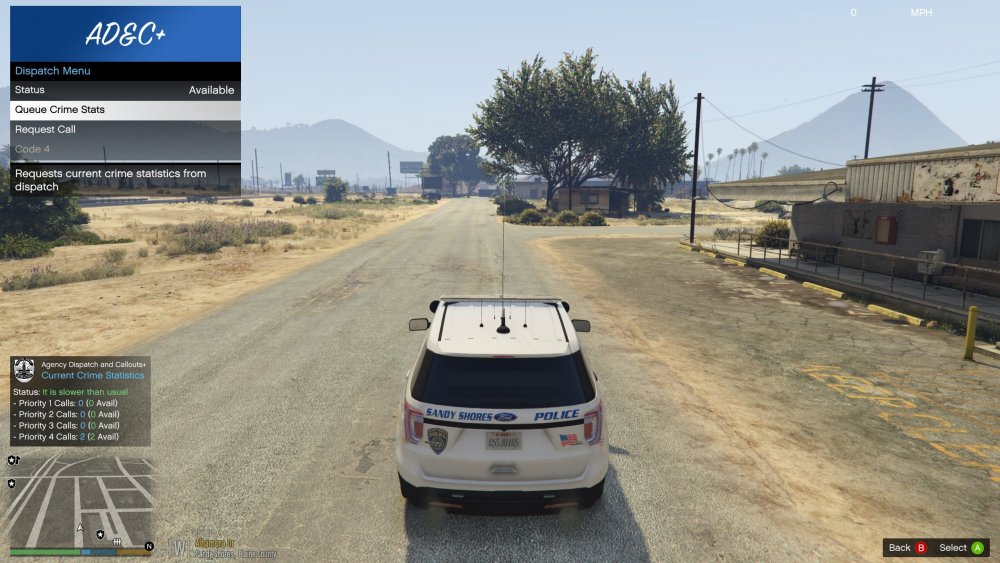
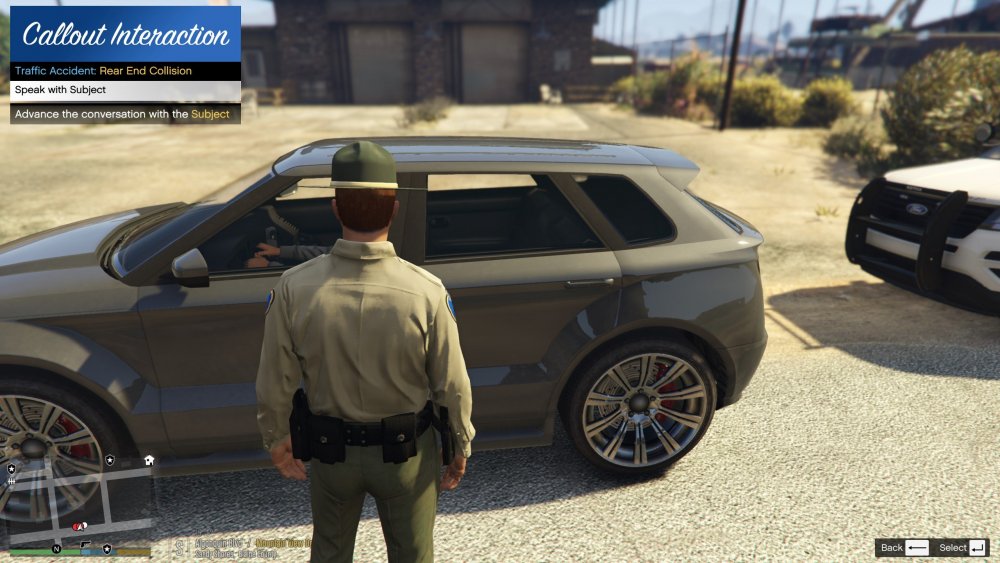
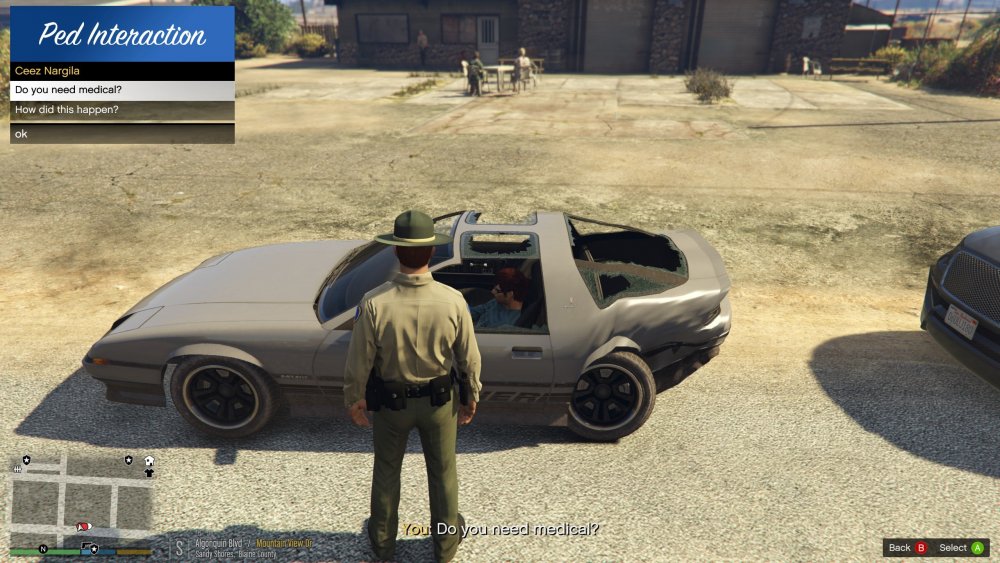
Hey everyone, Stopping by to talk about some updates that I have worked on for the mod. Getting closer to completion everyday! So here is what I have been working on: 1) While bare bones at the moment, the conversation handler has been created and is in working order. Every callout scenario in the mod will have fully dynamic conversations. There will be a list of questions (customizable via XML files PER callout) that the player can ask a Ped (related to the callout), and the Ped will randomly choose a relevant answer to give to the player. These questions can range from "Why did you do that?" to "Explain what you seen happen". Conversations can be edited and extended by just a few simple XML edits! 2) Added some quality of life options to the main mod menu, such as the ability to change your unit identifier, your role within the department (dictates which callout's you will be primarily assigned to), ask dispatch for current call statistics, and if playing Highway Patrol/State Trooper, the ability to change your patrol area on the fly. 3) Implemented a dynamic Call Center with a fluctuating amount of crimes being committed based on the Time of Day in the game world, as well as a few RNG elements to make some patrols more exciting than others. There will be slow periods with very few calls coming in (night time for example), and very busy periods where the department can barely handle the number of calls coming in (day and evening for example). 4) Integration with Grammer Police! With a big part of this mod being all about Dispatching and making dispatch as realistic as possible in game, Grammer police takes this mod to a whole new level by being able to communicate with dispatch via voice commands. Attached below are some screenshots to help display the updates I've made.
-
Just dropping in to say HI! Hope everyone is doing well during these Covid-19 times. Progress is going very well, the mod is almost complete! Finished the conversation system, and now working on completing callouts.
-
Sorry guys, real life came and took me away for a bit. I see my time freeing up here soon, and will get back to work on this!
-
Sorry for the late reply! There has been progress for sure, Currently working a Speech / conversation handler for my Callouts in the mod, so that every conversation (reasoning for crime, responses to officer questions) are all different each time you play the same callout. Also started adding locations for callouts to use (this is going to be a very lengthy process). Mostly internal changes and updates that cant be captured in a screenshot lol. I've also been working on adding UI elements above the mini-map (think DOJRP style HUD) that will display your current status, current crime level (changes depending on weather and time of day) and dispatch information such as number of available calls and available officers etc.
-
I have made some updates to Computer+ on my computer. I asked the author @PieRGud a few weeks ago if I could be apart of the dev team and push official updates, but have not gotten a reply. As of right now, my mod does not require Computer+, but rather uses the Computer+ API to add the CAD interfaces for self dispatch etc etc. If you chose to not use Computer+, then this mod will work just fine, but you will not have the self dispatching options (You can however request a call). I will do some research into possible getting a custom GUI in game like they use on FiveM servers (example DOJ).
-
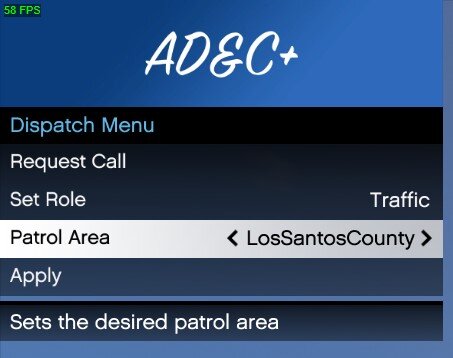
Hey thanks for your feedback! I can do you one better on your first request 😉. What I am planning to do for Highway Patrol is having a Rage Menu selector in game where you can choose your patrol area. This way it can be changed in game, on the fly whenever you would like (see screenshot below). As for your second request, I have thought about some options for a PDA like screen that can be displayed and moved on screen, however you can already do something similar with Computer+. All you need to do currently is toggle the background and toggle the pause. It would be awesome to get this integrated into CompuLite, I agree with you there 😄
-
I had this problem right after 0.46 came out. Mine was due to missing OnFoot.xml and InVehicle.xml button files. Ill attach a copy of mine, in case you dont have a backup of yous. PoliceSmartRadio_Fix.zip
-
Yep, not too bad. However, this is only using the API to get information that can be used. In order to add your callout into Dispatch, its alittle more complicated and changes the Callout sequence slightly. If you would like, you can see my example here: https://github.com/wilson212/AgencyCalloutsPlus/blob/master/AgencyCalloutsPlus/Callouts/TrafficAccident.cs#L42 . When the player accepts your callout off of the call list (self dispatch), The callout must request information from Dispatch so that the location and descriptions all line up together. You can see that on line 45 there. The PriorityCall class contains all the information that is shown on the Computer+ Call Details screen such as location, scanner text, description etc etc
-
Exactly, yep. The AI will run calls (callouts) in the background (requires the callout class to have special method). The actual scene is not rendered unless the player comes into viewing site of the callout location however, to save CPU for other things that matter more. Of course, this feature is only enabled if "EnableFullSimulation" is also true in the .ini file. If false however, then callouts are only simulated in memory using random timers, so showing up on scene will not yield a scene, thus minimizing CPU impact of the mod. There is an API, yep! I don't want to get into the technical details yet, because things can change... But other callout packs will easily be able to add their callouts into Dispatch. Their is also methods where other mods can get Agency information (zones in jurisdiction, crime levels etc etc), Zone information, as well as able to pull locations easily by type (SideOfRoad, Home, Store etc etc). An example of how an external Callout pack would use the API: using AgencyCalloutsPlus.API; Agency agency = Agency.GetCurrentPlayerAgency(); // Also can use Dispatch.PlayerAgency property SpawnPoint location = agency.GetRandomSideOfRoadLocation(); Vector3 inJurisdictionSpawnPoint = location.Position;
-
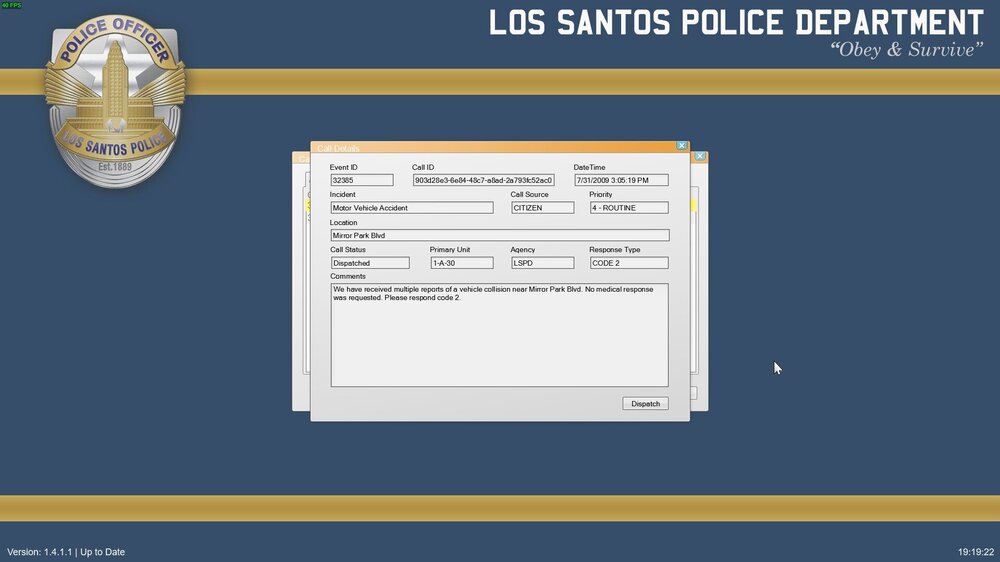
Thanks man! Another update: Worked on self dispatching today. If a call is dispatched to an AI unit, the player can intercept and take over the call out as long as the AI officer has not made it on scene yet. If the AI officer is on scene, the player can still dispatch to the call, but will only be able to provide back up and not actually run the call out.
-
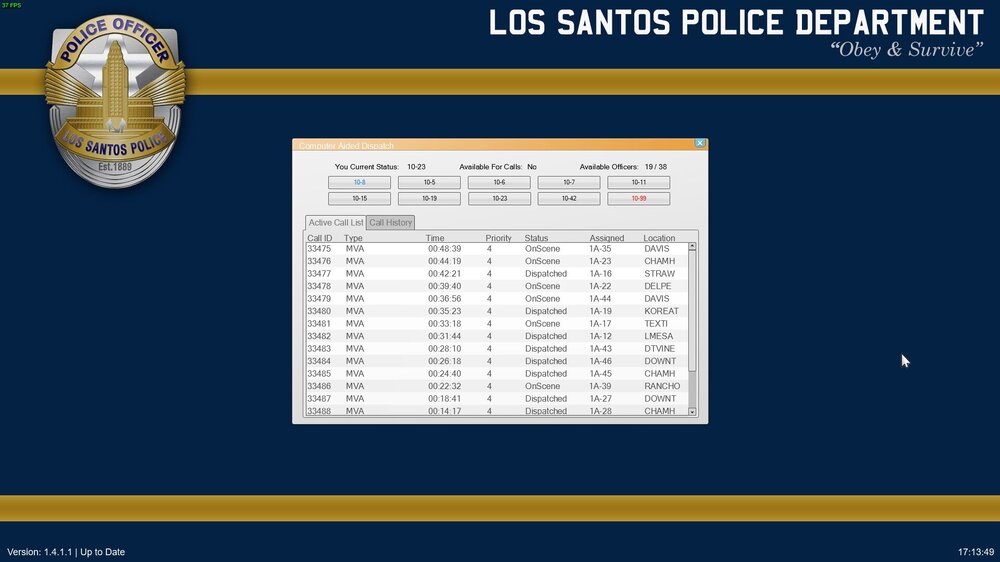
Small Update. Here is a screenshot of the call list in the Computer Aided Dispatch system. From this list, the player can double click a call view more information about it, and dispatch themselves if they want to take the call (still a work in progress). This only applies to lower priority calls, as the Dispatch feature will automatically dispatch the closest officers to higher priority calls (this may or may not be the player). Screenshot:
-
Description: Today, We at Blue Light Software are showcasing a mod that we have been working on over a year now. We wanted to enhance the realism and immersion in our games by creating a mod that takes LSPDFR to the next level. Real police officers these days are able to dispatch themselves to routine calls and have a lot of liberty on how productive they chose to be each day, with the exception of emergencies of course! With the Agency Dispatch Framework mod installed, you will also have the liberty to choose how productive you want to be while on your shift. With new the built in virtual AI simulation system, each agency will have its own roster of AI units that will handle calls just like you. No longer are you a “One man show” in your department. As a player, you will have an array of AI units to assist you in handling your calls, as well as running calls of their own in the background to lighten the workload. If you call for back up, an AI officer unit will come to assist you if they are not too busy doing something more important. If your department is bogged down on calls and does not have the resources to provide backup where needed, then a county sheriff or state patrolman will come to the rescue and assist with your department's calls. Another important feature of Agency Dispatch Framework is enforcing jurisdiction limits of each agency. Something that bugs us about the vanilla callout system, is that callout locations do not consider jurisdiction limits of the department you are "working for" in game. We understand that when outside of your jurisdiction, officers are still considered “peace officers” and can enforce the law, but these are edge cases at best. In this mod, every callout spawned from the new dispatch system will be within your departments jurisdiction (as defined in the "LSPDFR/data/regions.xml" and "LSPDFR/data/backup.xml"). Same applies for callout types (Highway patrol is more likely to be dispatched to a traffic accident than a domestic violence or homicide case for example). Local agencies will have primary jurisdictions within their zones, which a backing county agency only jumping in to assist if necessary. I will continuously update this post as progress continues. Please let me know if you have any feedback, suggestions or requests! Features: New Dispatch script that runs along side of LSPDFR's callout manager: Complete/On Going Simulates a real call center with multiple calls coming in every hour (depending on crime levels): Complete Calls will be dispatched to locations within the departments jurisdiction always, just like in real life: Complete Support for EMS and Fire dispatching: WIP Virtual AI Simulation Mode: WIP Virtual AI police units will be spawned when going on duty to fill the departments roster, and help fight crime with the player: Complete The number of virtual AI police units created scales based on number of zones in the agencies jurisdiction, the staff level defined in the Agency.xml file, and the overall crime level in those zones: Complete AI officer units will have persistent models and variations once they are created. Being assisted by the same officer unit multiple times in a shift will result in the same Ped variation and vehicle variation every single time to improve immersion: Complete Customizable staffing levels for departments: Lower staffed departments will be busier running calls versus higher staffed departments, and will have less AI units to provide the player assistance: Complete AI officer's status can be seen in the CAD. When an AI officer is on a call, or a traffic stop you will be able to observe the changes in status: WIP Simulated AI calls and traffic stops have a chance to go south and turn violent, requiring emergency back up: WIP Shift Rotations: Complete When going on duty, you will be asked to choose one of three 10 hour shits: Complete Day shift hours are 6am - 4pm Swing shift hours are 3pm - 1am Night shift hours are 9pm - 7am Shift hours are based on common hours shared by many departments, offering increased coverage from 9pm -1am, as these are the highest crime times: Complete AI units will also participate in shift rotations: Complete When choosing a shift rotation, the player will also have the option to set the desired weather for the beginning of their shift, the in game timescale, and whether to fast forward the in game clock to the beginning of their shift, and begin the shift immediately: WIP Computer Aided Dispatch System (CAD): WIP A built in CAD using RageNativeUI (think similar to Compulite) allowing the player to view the Call queue and dispatch themselves to calls, just like in real life: WIP Integration with Computer+ for those who prefer a CAD that is more computer like: WIP 20 high quality callouts with multiple scenarios for each one: WIP Over 1000+ hand picked locations across the map for callouts to use, each with multiple spawn points for different entity types (peds, vehicles): WIP With so many locations and multiple scenarios for each callout, no call will ever be like the last: WIP Agency type specific callouts (Highway patrol will be less likely to be dispatched to a domestic violence call): Complete Callout probability changes between morning, afternoon and night time game hours, as well as the weather: Complete Support for custom vehicles: Complete/On Going Customizable crime levels for each zone: Complete Crime levels will also be affected by the current weather: Complete Support for custom police departments and jurisdictions: Complete Support for custom police vehicles (addon) : Complete Public API that other Callout Mods can use to add their callouts to Dispatch: Complete/On Going Customizable conversations for all Callouts with support for text replacements, and condition statements (text only show is [some condition == true]: Complete/WIP Randomness: This mod thrives on providing a unique experience each time it is used. Every callout, location, vehicle and dialog sequence will be randomized to keep things as fresh as possible for the player, so you never get bored: Complete Overall Progress: As of 08/30/21, the mod is currently about 66% complete. Beta should be out around 12/21/2021 or so. Required Mods: TrafficPolicer audio files by Albo (.dll file is not needed) StopThePed Mods recommended for optimal use: Jurisdictions+ UltimateBackup Computer+ Source Code: https://github.com/Blue-Light-Software/AgencyDispatchFramework
-
Hello fellow officers! I am back hoping to get some help with a new problem that I need help solving. When invoking a Ped to park a vehicle, I noticed that the Ped will get almost right on top of the point, then drive around in circles for a few minutes before straitening out and parking the vehicle correctly. No matter how far away from the Vector3 that I call the "ParkVehicle" method, the Ped always drives like an idiot in circles before parking. Is anyone willing to share with me a work around? My relevant code: // Run checks while officer is enroute to the callout while (drivingTask.IsActive) { // Check for assignment changes if (NextTask != TaskSignal.None) return; // Return // Distance check if (parkingNicely && !isParking) { // Getting close to location if (Officer.Position.TravelDistanceTo(CurrentCall.Location.Position) < 100) { Officer.Tasks.Clear(); // Clears the DriveToPosition task isParking = true; drivingTask = Officer.Tasks.ParkVehicle(CurrentCall.Location.Position, CurrentCall.Location.Heading); } } // Allow other threads to do something GameFiber.Yield(); }
-
Answered my own question. The answer is Native functions: /// <summary> /// Checks via CVehicleModelInfo /// </summary> /// <param name="vehicle"></param> /// <param name="extraId"></param> /// <returns></returns> public static bool DoesExtraExist(this Vehicle vehicle, int extraId) { return NativeFunction.Natives.DOES_EXTRA_EXIST<bool>(vehicle, extraId); } /// <summary> /// /// </summary> /// <param name="vehicle"></param> /// <param name="extraId"></param> /// <param name="enabled"></param> public static void SetExtraEnabled(this Vehicle vehicle, int extraId, bool enabled) { NativeFunction.Natives.SET_VEHICLE_EXTRA(vehicle, extraId, !enabled); } /// <summary> /// Sets the livery index for this vehicle /// </summary> /// <param name="vehicle"></param> /// <param name="liveryIndex"></param> public static void SetLivery(this Vehicle vehicle, int liveryIndex) { NativeFunction.Natives.SET_VEHICLE_LIVERY(vehicle, liveryIndex); }
-
Hello guys! As the title states, I am trying to figure out how to spawn a police vehicle with a specified livery, as well as toggle extras (in code). Does anyone know how to do this?
-
Well I figured it out! I am going to post my code here just in case anyone in the future would also like to know: public static void DeformFront(this Vehicle vehicle, float radius, float amount) { // Get dimensions we want to deform var dimensions = vehicle.Model.Dimensions; var halfWidth = (dimensions.X / 2) * 0.6f; var halfLength = dimensions.Y / 2; var halfHeight = (dimensions.Z / 2) * 0.7f; // Apply random deformities within the ranges of the model var num = new Random().Next(15, 45); for (var index = 0; index < num; ++index) { // We use half values here, since this is an OFFSET from center var randomInt1 = MathHelper.GetRandomSingle(-halfWidth, halfWidth); // Full width var randomInt2 = MathHelper.GetRandomSingle(halfLength * 0.85f, halfLength); // Front end var randomInt3 = MathHelper.GetRandomSingle(-halfHeight, 0); // Lower half height vehicle.Deform(new Vector3(randomInt1, randomInt2, randomInt3), radius, amount); } } public static void DeformRear(this Vehicle vehicle, float radius, float amount) { // Get dimensions we want to deform var dimensions = vehicle.Model.Dimensions; var halfWidth = (dimensions.X / 2) * 0.6f; // Ignore far left and right of dimensions var halfLength = dimensions.Y / 2; var halfHeight = (dimensions.Z / 2) * 0.7f; // Ignore roof and gound of dimensions // Apply random deformities within the ranges of the model var num = new Random().Next(15, 45); for (var index = 0; index < num; ++index) { // We use negative values here, since this is an OFFSET from center var randomInt1 = MathHelper.GetRandomSingle(-halfWidth, halfWidth); // Full width var randomInt2 = MathHelper.GetRandomSingle(-halfLength, -halfLength + (halfLength * 0.07f)); // Rear end var randomInt3 = MathHelper.GetRandomSingle(-halfHeight, 0); // Lower half height vehicle.Deform(new Vector3(randomInt1, randomInt2, randomInt3), radius, amount); } }
-
I created those methods, but they dont work lol
-
Hello, me again This time I have a question on how to deform a specific part of a vehicle. I am aware of and currently using @NoNameSets method of damage vehicle, as seen here. While this method does damage the vehicle, it is in completely random positions all around the vehicle. I am currently working on a Callout where a vehicle rear ends another, and would like to damage the front and rear of the two vehicles. Does anyone know how I can achieve this?
-
@LMS So something like this? The documentation on this i very limited if (NativeFunction.Natives.IS_PED_FACING_PED<bool>(player, p)) { // Logic }
-
Thanks man, I appreciate all your help!
-
Hello all, I tried googling this before coming here, and did not find anything. Is there a way to determine if the player is facing a Ped? I am trying to create a RageUIMenu that becomes visible when the player is standing within 5m of a ped, and is facing them. I have the menu pretty much coded, just working on the Visible logic. Any and all help is appreciated!
-
@LMS Does this refer to the name of the class, or the CalloutInfo.Name property?
-
@PNWParksFan if that is the case, then what if 2 callout packs add the same name to the CalloutManager?
-
@LMS, @PNWParksFan This is what I ended up doing, thoughts? With a CalloutProbability set to VeryHigh, this should ensure my callout manager spawning very often, even if there is 20 or so other callouts loaded? https://github.com/wilson212/AgencyCalloutsPlus/blob/master/AgencyCalloutsPlus/API/AgencyCalloutManager.cs




